

Today we’re going to take another look at the challenge we encountered in part 1 of this series. The challenge is: given a simple database consisting of Products, Invoices and Invoice Line Items, how can we show total sales per product filtered by date range?

One thing is certain: assuming a normalized data model (with the date in the Invoices table), some sort of trick will be required. In part 1, we leveraged the FileMaker relational model to solve this problem, by adding additional table occurrences to the Relationships Graph, as well as some calculated fields in the products table.
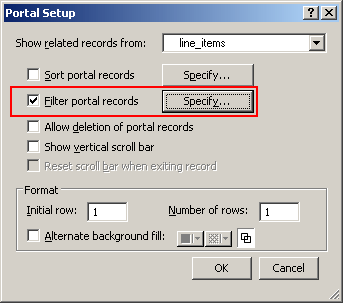
If you aren’t familiar with this feature, it allows filtering criteria to be defined via the calculation engine. Prior to FileMaker11, the only way to filter a portal was to tweak the Relationships Graph by adding some new table occurrences and defining some new fields to be used as predicates.
Fortunately, things have changed, and not a moment too soon. Incidentally, now would be a good time to open this article’s accompanying demo file, if you’d like to follow along.
Here’s what our Relationships Graph looks like, and we don’t need to change a thing here.

Before we actually do any portal filtering, however, we need to define a summary field in the line_items table, as per the highlighted entry below.
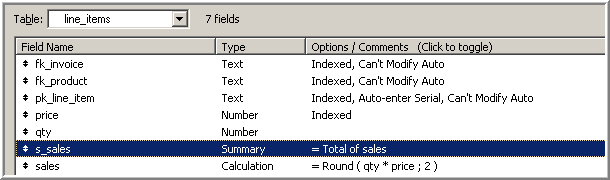
If you’re wondering what a summary field in the line_items table has to do with filtered totals in the products table, the answer is, “Quite a lot, actually.” It turns out that if we place the summary field from line_items onto a layout attached to products, we will see the sum of all sales for that product. That’s right, placing a related summary field onto a layout, causes it to behave as if it were a calculated aggregate.
Let’s give it a try. Here it is in layout mode:
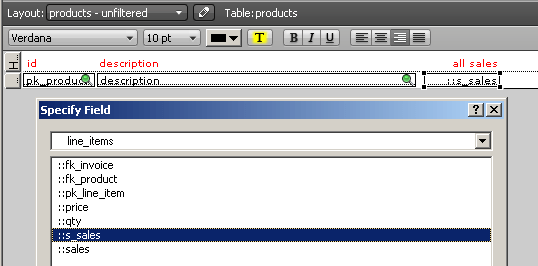
…and here’s how it looks in browse mode:

But our challenge is to see totals for a specific date range, as opposed to all the sales we’ve ever had for a given product. And that’s where filtered portals can help. So let’s place a single-row portal behind line_items::s_sales, configured as follows:
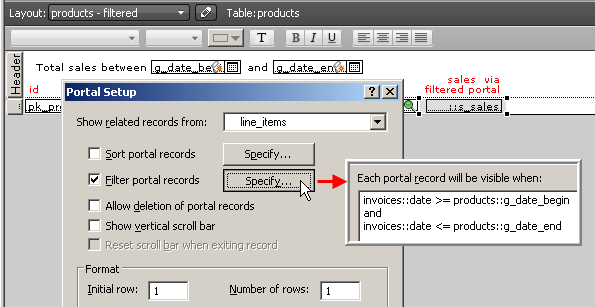
We’re almost done, but as I wrote in part 1, we need to send a little wake up call to FileMaker when we change our date range, so let’s attach OnObjectSave (or since this is 11, OnObjectValidate) triggers to both the global date fields in the layout header, and instruct the trigger to perform a “Refresh Window [Flush cached join results]” step.
And here’s how it looks in browse mode:
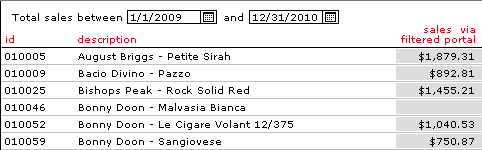
For anyone who may be wondering why I used table view in part 1, but switched to a list view for the current article, it’s because FileMaker refuses to render portals inside table rows. You can place them there in layout mode, but they will be ignored in browse mode.
Believe it or not, we’re done for today, but stay tuned for further adventures in the wild realms of Filtered Relations.
Demo file: filtered-relations-02