

Note: Interface file #1 requires FM 14 or later; interface file #2 works with FM 12 or later.
What do you get when you combine the Separation Model + FM 14 placeholder text + ExecuteSQL + a million-record table + a variable array + Get(CalculationRepetitionNumber) + the Mod and Ceiling functions + a couple custom functions, with blazingly fast (local, LAN and WAN) performance thrown in for good measure?
This article w/ accompanying demo (fm-14-separated-data-mining.zip), that’s what.

The Challenge
Provide a data-mining interface to query a million-record table (cc_transactions) containing 20 years’ worth of credit card transactions. The client wants to be able to pick a date via a calendar widget, and see transaction info for that date, summarized by card type, transaction type and region.


This is a separated solution, with cc_transactions living in a file called z_data.fmp12, and a specific requirement for this project is to not make any schema changes to the data file. The data-mining will take place in a separate interface file… or in this case, two interface files, since we’re going to look at two methods.
The Basic Approach (common to both interface files)
Picking a date triggers this script…


…which uses ExecuteSQL to assemble a two dimensional bullet-delimited array with…
- rows representing Payments, Refunds, Other and Net, first for all regions, and then broken out by region (North, South, East, West), so 20 rows in all
- columns 1-4 representing card type (Visa, MasterCard, Amex, Discover) and column 5 summing the preceding four columns for each row
The syntax to populate one array item looks like this:


And here’s a completed array for 5 July 2015:


Next, use a custom function to parse individual items from the array and display them in the appropriate “cell” of the data mining interface. Here’s the CF…


…and here’s how the first four rows of the array appear once they’ve been parsed:


Interface Demo #1: Placeholder Text
My initial thought was to use FM 14 placeholder text, along the lines of the method showcased in last month’s FM 14: Separation Aggregation Aggravation Revisited article. For full details see that article, but the basic idea is that you define a single “null” field — a field that is guaranteed to always be empty — place as many instantiations of this field as necessary onto your layout, and then populate the fields via calculated placeholder text. I refer to these as “pseudo-calcs” .
In this demo, the null field is defined in the Interface file like so…


…and it appears 100 times on this layout…

…with a placeholder text calculation determining for each instantiation of “null” which array item to display. E.g., here we’re displaying the item at the intersection of the first row and the first column…


…and here we’re grabbing the item from the fourth row and third column…


…and you can see those two items here in the array, highlighted in red:


So one drawback of this technique is that each of the 100 instantiations of the null field must have its placeholder text calc individually configured.
Also, as I mentioned last month, placeholder text does not know or care about your underlying field type, and will disregard data formatting applied via the Inspector. So, to get the values in the array to display in U.S. dollar format (with two decimals, and a comma as the thousands separator), I used a custom function by Jeremiah Small called AddDollarFormat.

And it works just fine…


…in browse mode, at any rate. But what happens if we view it in preview mode, or attempt to print it or save it as a PDF?


Hmmm… not quite what we had in mind. Let’s move on to plan B.
Interface Demo #2: Calculated Repeater


This time we’re going to use a calculated repeating field with 100 repetitions.


Unstored calculated repeating fields are a natural fit for arrays, because the Get(CalculationRepetitionNumber) function allows each rep to be self-aware, i.e., know its own repetition number.
Given this relationship between columns and rep numbers…
- Column 1: reps 1-20
- Column 2: reps 21-40
- Column 3: reps 41-60
- Column 4: reps 61-80
- Column 5: reps 81-100
We can correlate the rep number to the correct array column like so: Divide the rep number by 20 and then round the result up to the next whole integer.
And we can correlate the rep number to the correct array row like so: Divide the rep number by 20, and the remainder = the row number (except if the remainder = 0, then the row number = 20)
So whereas in the previous example we had to configure the placeholder text calculation individually for each of the 100 occurrences of the null field, now a single calculation can do the trick for all 100 reps.
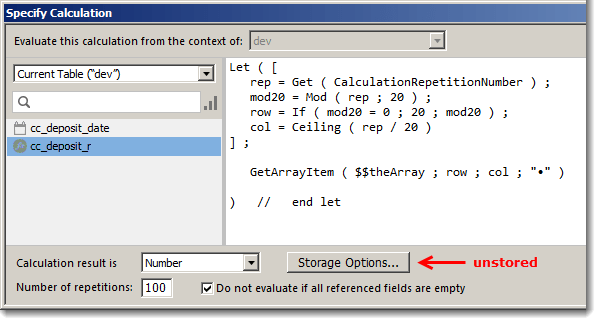

Also, since cc_deposit_r is defined to have a number result, we can apply dollar formatting (#,###.##) via the Inspector at the layout level, and dispense with the AddDollarFormat custom function. In other words, this…


…as opposed to this:
And yes, it previews, prints and outputs to PDF just fine.
