

Long time readers of this blog will be familiar with the following scenario —
An ExecuteSQL expression is given, e.g.,
ExecuteSQL ( "
   SELECT SUM ( net_amount )
   FROM cc_transactions
   WHERE batch_date = ?
      AND batch_region = ?
      AND card_type = ?
" ; "" ; "" ; $theDate ; $theRegion ; $theCard )
…followed by a disclaimer along the lines of
For readability, static code has been used… in the real world I would employ robust coding practices to prevent accidental breakage due to field and/or TO renaming.
…with the link pointing to custom functions utilizing a combination of GetFieldName and Quote to ensure that using reserved words or potentially-problematical characters (such as a space or #) in table occurrence or field names, or renaming either of the preceding, will not break your SQL code.
Here’s the same expression “robustly” coded…
ExecuteSQL ( "
   SELECT SUM ( " & GFN ( cc_transactions::net_amount ) & "
   FROM " & GTN ( cc_transactions::ID ) & "
   WHERE " & GFN ( cc_transactions::batch_date ) & " = ?
      AND " & GFN ( cc_transactions::batch_region ) & " = ?
      AND " & GFN ( cc_transactions::card_type ) & " = ?
" ; "" ; "" ; $theDate ; $theRegion ; $theCard )
…which, at the risk of stating the obvious, sacrifices a certain amount of readability (and write-ability) in favor of reliability.
Recently, however, I encountered a situation where, to paraphrase Sir Francis Bacon, the “remedy was worse than the disease”, so to speak. I needed to reach across a complex graph to grab some data from a far-away-but-connected TO, and decided to do so via ExecuteSQL.
At this point, a couple observations…
- The target TO was far from my current location, as measured by graph hops.
- The target was on the other side of an extremely promiscuous intervening TO (in terms of connected join type and quantity).
…neither of which would typically have been a concern, since ExecuteSQL doesn’t care about joins on the graph.
My “naked” (non-robust) query looked like this…


…and it executed instantaneously.
Next, not wanting to leave the code in a brittle state, I began to robustify my code…
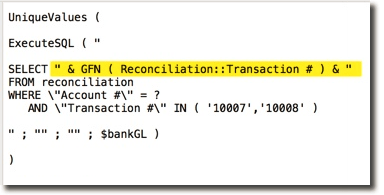

…and to confirm there were no problems, ran the revised query. To my surprise, on first run it now took 25 seconds to execute.
What the heck was going on?
Clearly the introduction of my normally-benign custom function into the proceedings was responsible… but further investigation confirmed that the actual culprit was GetFieldName, which as mentioned, is an internal component of that CF.
Well it turns out that one of the interesting things about GetFieldName is that it actually behaves differently depending on context.
- If the source TO is disconnected from (i.e., not in the same table occurrence group as) the target TO, all is well.
- If the source and target TOs are closely and cleanly related, all is well.
- However, if you are starting at one end of a sprawling graph, and reaching across to a faraway target TO with many intervening joins, FileMaker will cache all those joins on the first GetFieldName invocation, which can take a VERY long time.
Since number 3 is unacceptable, under those circumstances the developer may wish to employ some other strategy, for example…
- access the target data without using GetFieldName
- break a large graph into discrete segments
I mention this second option because it is true. However this is not something a developer should ever do casually (except for experimentation purposes in an offline test copy), unless they are experienced enough to know what will break as a consequence and how to go about fixing it.
Update 7 Mar 2020 — as per comments below, a third strategy that a) supports using GetFieldName, and b) avoids segmenting the Relationships Graph, would be to include a set of isolated utility TOs on your graph for protected SQL queries, e.g.,


…and as Paul Jansen points out, you might find other uses for these TOs as well.