

7 June 2015: This technique has been substantially revised to work with FileMaker 14; see FM 14: Separation Aggregation Aggravation revisited.
FileMaker developers take it for granted that calculated sub-total and total fields will update automatically when portal rows are created, edited or deleted. This becomes problematic when one a) uses the separation model, and b) either intentionally or unintentionally holds the parent and related child records open (uncommitted) while editing, but still expects to see these aggregates update in real time.

It’s worth pointing out that the aggregate fields update as soon as the user tabs or clicks out of a portal field where changes have been made, i.e., on field exit rather than on record commit. As I mentioned, the parent record is newly created, as are the child records in the portal. If we were to throw Get(RecordOpenState) into the Data Viewer, we would see a 1, which is what you see when the current record is newly created and has never been committed. Once a record has been committed, it is no longer new, and if you reopen it to edit it, then Get(RecordOpenState) will return 2. And of course if you are not editing the current record, then Get(RecordOpenState) returns a zero.
The operative word in the preceding sentence is “you”; Get(RecordOpenState) doesn’t tell you whether a record is open by another user — only whether you have it open. To test whether a record is open (a.k.a. locked or in-use) by another user, 1) set error capture on, 2) perform an Open Record step, and 3) see if Get(LastError) returns 301 (“record in use by another user”).
But getting back to the above screen shot, what you see is pretty incredible if you stop to think about it, because new, uncommitted records don’t really exist, in the normal sense of the word… yet the aggregate calcs are updating as if those records really do exist, which is of course a highly desirable behavior as far as the user experience is concerned.
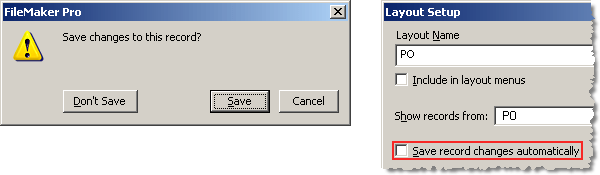
Incidentally, no other user will see uncommitted changes that you make, until you choose to commit them. When Get(OpenRecordState) is >0, you can cause all changes made (since you opened the parent record) to evaporate by performing a “Revert Record” script step — or, if your layout is set to not save changes automatically, by clicking “Don’t Save” when the following dialog appears.
So what happens when we create a new parent record and begin adding portal rows in the Interface file of a separated solution (i.e., one where the layouts are in a different file than the underlying data tables)?
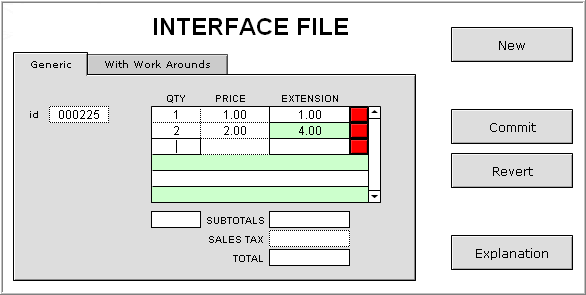
To see the problem: in the Interface file, a) create a new portal row and enter some data in it, or b) delete an existing portal row… in either case, the aggregates will not update. However, if you edit an existing portal row, aggregates will update just fine.
In the Interface file, aggregate calcs don’t update until the parent record is committed, and while inconvenient, there is a certain logic to this behavior, because in a separated solution there are two Relationships Graphs (one per file): the portal is based on a relationship in the Interface file, but the aggregate calcs are based on a relationship in the Data file. In a manner of speaking, the left hand doesn’t know what the right hand is doing.
Conversely, in a non-separated solution, aggregate calcs in the uncommitted parent respond immediately (on field exit) to any changes made within a portal, because the same relationship is used for both the portal and the aggregate calcs.
So, is there anything we can do to remedy this sorry state of separated affairs? Certainly script triggers represent one approach, but they can get convoluted in a hurry. For the purpose of this article, I am intentionally ruling out scripted solutions, in favor of something more dynamic.
The problem is, calculated fields must live where the tables live, i.e., in the Data file. Wouldn’t it be nice if there were a way to define calculations in the UI file? Well, if we’re talking about calculated fields, we’re out of luck. But who says fields are the only way to define or display a calculation? It turns out that web viewers can act as pseudo-fields.
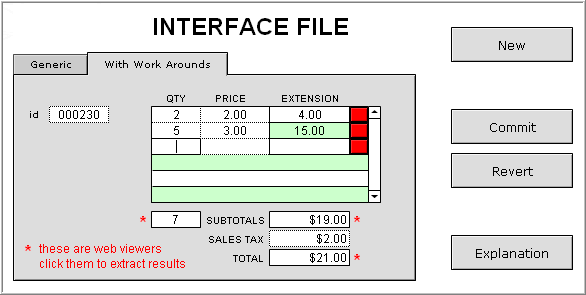
With the release of FileMaker Pro 9, the web viewer gained the capability to display locally generated data, via the “data:text/html” specifier. The ability to have the equivalent of a calculated field in the UI file of a separated solution takes some getting used to, but the results speak for themselves.
Dr. Ray Cologon of Nightwing Enterprises has generously provided a demo called Layout Calculations, which makes it all very easy, thanks to a brilliant custom function which I have used with minor adjustments. You can see Dr. Ray’s demo here:
http://www.nightwing.com.au/FileMaker/demosX/demoX10.html
To give you an idea of how much effort this custom function can save you, here is the syntax for two pseudo-fields. Which would you rather type?
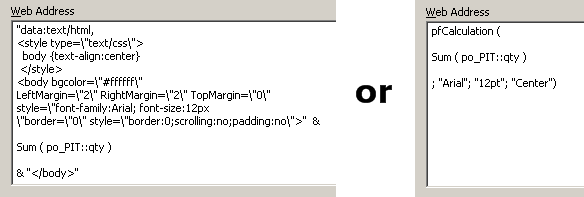
The custom function is called LayoutCalculation in Dr. Ray’s demo. I renamed it to pfCalculation, because I have written a companion CF, pfContent, and I wanted to “namespace” them together in my custom function library (the “pf” stands for pseudo-field).
Since pseudo-fields aren’t really fields at all, accessing their results programmatically takes a bit more work than doing the same for regular fields.
- Since they’re objects, not fields, we need to use GetLayoutObjectAttribute
- …which requires that the web viewer (or any object) be named
- …and which returns too much information, so the results must be parsed


Obviously pseudo-fields have utility far beyond the narrow use-case I’ve outlined here. Any time you want to add a calculation to a layout, without having to actually define a field, they can get the job done with a minimum of fuss.