

In part 1, I listed six scenarios that could potentially cause ExecuteSQL code to break:

…and managed to get through the first five before running out of steam. This time, we’re going to examine #6 on the list, and then look at a few miscellaneous odds ’n’ ends, and today’s demo file is ExecuteSQL Sandbox, v2, if you’d like to follow along.
Changing a Field Type
Why would changing a field’s type cause a problem? Well, first off, as I mentioned last month, if you are using that particular field as a predicate in a JOIN, the query will break, and your reward will be the the dreaded “?”.

I don’t have a fix for this, just some advice: Don’t change a field’s type if you’ve used it as a JOIN predicate in a working SQL statement. (The only reason I’ve needed to change a field type recently was to fix a broken JOIN where the field types were mismatched.)
But let’s suppose you haven’t used a particular field as a JOIN predicate, is it then safe to change its type? Yes, if you take some precautions. The first precaution you can take is to construct your queries using dynamic parameters whenever possible, because then you don’t have to worry about the underlying field type.
(If that isn’t 100% clear, it was discussed in detail in the “Numbers” section of FM 12 ExecuteSQL: Dynamic Parameters, pt 1.)
But, as we saw in FM 12 ExecuteSQL: Dynamic Parameters, pt 2, if you are constructing an IN argument “on the fly” (creating it at runtime), then you will most likely want to go the standard route. Here’s an example of a query using an IN operator:
ExecuteSQL(

" SELECT MAX ( sales )

FROM customers

WHERE state IN ('WA','OR','ID')  "

; "" ; ""

)
Since “state” is a text field, each IN element has been wrapped in single quotes. That’s straight-forward, and no one’s likely to change that field type from text to number.
But what about the pk_order field in today’s demo file?

It looks like a number, but it could be a text field… which means if we decide to reference that field as part of an IN clause, it’s not immediately clear whether we should do this:
WHERE pk_order IN ( '110','230','1479' )
or this:
WHERE pk_order IN ( 110,230,1479 )
…is it? Now it happens that pk_order is a text field, so therefore the first version is correct, and let’s suppose that you’ve used that version in some mission-critical routine. Well, you know what’s going to happen if you change pk_order to a number field, don’t you? Your mission-critical routine goes up in smoke, along with your reputation as a careful developer.
What we need is a custom function to correctly format the IN arguments based on the type of the referenced field, like this:
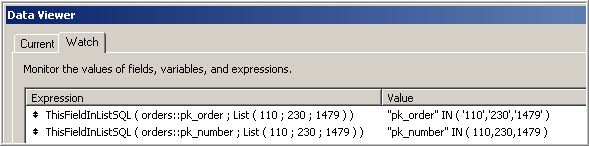
In case it isn’t clear, the only difference between the two entries is that the first references a text field and the second references a number field. And if you’re wondering about the double quotes around the field name, that was explained in part 1.
Here’s the CF definition:

And here’s how the custom function might be used in a query.

Or, since the original point of this was to facilitate “on-the-fly” IN arguments:

On a related note, I can see that it’s time to upgrade the FoundSetToSQL custom function that I introduced last year (Custom Functions for Internal SQL). Here’s what I had to say about it at the time:
FoundSetToSQL – the concept of a found set does not exist in SQL, but sometimes we need a SQL command to operate only on the records in our current found set. What to do? Well, it turns out that we can say, “Hey, SQL, only process records if the value in a certain field matches one of the values in this list: a,b,c,d,e,…”, and we can build that list from values in the current FileMaker found set. Take for example this found set of 14 records:

FoundSetToSQL ( customers::id ) will return the following…
'000940','000540','001443','001545','000458','000639',

'000794','001629','000048','000973','000735','001139',

'001224','001449'
…as one unbroken string of text. And this can be used by the SQL “IN” operator as part of a WHERE clause, as per this statement, which generates a list of unique cities in the found set.

Warning: FoundSetToSQL is a) not fast with large found sets, and b) subject to the standard 10,000 iteration recursion limit… you don’t want to point it at a found set with more than 10,000 records.
At the time, I either was unaware of, or conveniently chose to ignore, the “underlying field type” issue. This has been remedied in today’s demo… the CF now correctly detects the field type and formats the IN arguments accordingly. I by no means consider this CF to be the last word on the subject, and welcome any suggestions for improvement.
Other Observations
Today’s demo includes a basic set of tables logically related like so:
ORDERS ---< LINEITEMS >--- PRODUCTS
…but of course, since this is SQL we’re talking about, I was quite proud of the fact that they weren’t actually linked on my Relationships Graph:

When I decided to define orders::sales like so, there were two problems. First the error message…
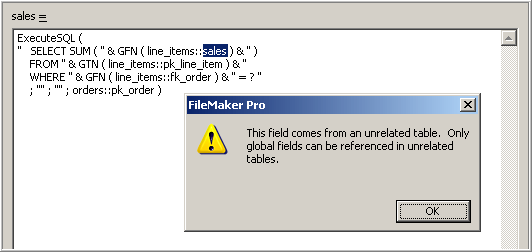
Unfortunately, FileMaker doesn’t want you to indirectly use GetFieldName from inside a custom function, in this case GFN and GTN, in a calculated field definition to point to an unrelated field. But where there’s a will there’s a way, so I temporarily linked orders to line_items, like so…

…which allowed me to finish defining orders::sales. Then I went back into the Relationships Graph, broke the link between orders and line_items, and guess what? The calculation for orders::sales continued to work, and I was pretty pleased with myself. Unfortunately, I soon discovered a second problem: performance. For example, running standard FileMaker searches on orders::sales just felt unacceptably slow. So I a) re-linked orders and line_items on the Relationships Graph, and then b) redefined orders::sales as…

…and no more sluggishness. Lesson: use SQL where it makes sense to use it, but don’t necessarily expect it to outperform native FileMaker functionality.
The demo also contains some examples using the LIKE operator, with its two wildcards, _ for a single character and % for multiple characters.
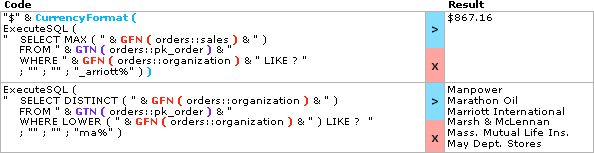
Note in the second example that by invoking LOWER on the source field, the LIKE criteria effectively becomes case-insensitive.
Also, I knew there was a product that had “Telegraphe” in its name…

…and I wanted to generate a list of customers who had purchased it, so this gave me an opportunity to not only use LIKE, but the JOIN operator as well. To make the JOIN example as readable as possible I ignored robust coding practices.

Here’s a robustly coded version:

Finally, the demo contains some examples of concatenation…
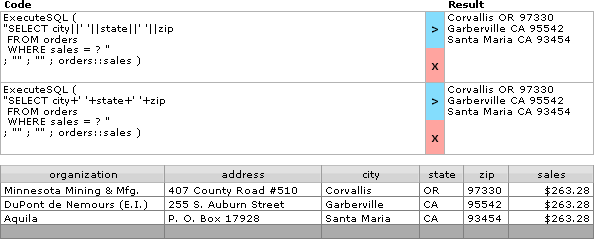
…and a few other entries for the reader to explore if he or she is so inclined.