

Editor’s note: Today it’s my pleasure to present a guest article written by Beverly Voth. Like many other developers, I have enjoyed and benefitted from her ongoing contributions to the FileMaker community.
I do a lot of text manipulation for EDI (Electronic data interchange – http://en.wikipedia.org/wiki/Electronic_data_interchange) and plain text exports with fixed-width field data. Some varieties of EDI use XML, but this article is about plain text. EDI may or may not use the fixed-width format. Fixed-width reports may or may not use delimiters and various “padding” characters.
I created two FileMaker custom functions to help me calculate fixed-width and EDI text for export, and if you wish, you can follow along in today’s demo file, Fixed Width EDI.

The first custom function is for text with optional width (string length), optional padding character(s) and optional delimiter character(s). Text padding is placed to the right of the original string and the string truncates if it is longer than the optional width. The other custom function is for numbers with optional width (string length), optional padding character(s) and optional delimiter character(s). Number padding is to the left of the original number and returns the padding character only if number length is more than the width. These custom functions may be used “as is” or revised to include other options you may need. Or perhaps you can use them and include other calculations to achieve that you need.
fn_fixed_width_text (str; width; pad_char; delimiter )

Example text calculations:
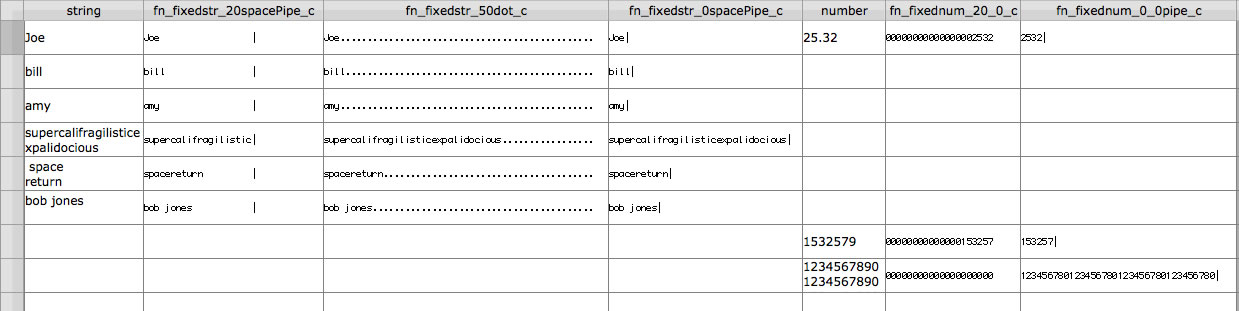
- fn_fixed_width_text ( field ; 20 ; ” ” ; “|” ) – this specifies: a WIDTH of 20 characters, a space for the PADDING and a pipe character (“|”) for the DELIMITER
- fn_fixed_width_text ( field ; 50 ; “.” ; “” ) – this specifies: a WIDTH of 50 characters, a dot (“.”) for the PADDING and no DELIMITER
- fn_fixed_width_text ( field ; “” ; ” ” ; “|” ) – this specifies: no WIDTH (leave length as is), a space for PADDING (with no width, there will be no padding) and a pipe DELIMITER
fn_fixed_width_number ( num; width; pad_char; delimiter )

Example number calculations:
- fn_fixed_width_number ( number ; 20 ; 0 ; “” ) – this specifies: a WIDTH of 20 characters, a zero for PADDING and no DELIMITER
- fn_fixed_width_number ( number ; 0 ; 0 ; “|” ) – this specifies; no WIDTH (leave as is), a zero for PADDING (with no width, there will be no padding) and a pipe DELIMITER
Examples
Note that I often find it necessary to clean up text before passing it to these functions. This only removes leading and trailing spaces and removes return characters. Since those two “data-entry errors” tend to break the most for fixed-width or EDI reports, I’ve concentrated on them. If you need to add other cleaning, do so before passing to the custom function.
I have also chosen to filter all numbers to just the digits “0”, “1”, “2”, “3”, “4”, “5”, “6”, “7”, “8” or “9” and no other characters. If you need to retain other characters ($, comma “,”, decimal “.”, dash “-“, for example) within a number (which really is text!), you may revise the custom function. Keep in mind that fixed-width is quite different if you retain these characters! $000300.00 is not the same as 00030000, although they are both “fixed-width”, so adjust as needed in the custom function or use additional text functions to revise after passing through the custom function.
I’ve used a fixed-width font ( Monaco, in these examples) on the calculated fields in the layout to show the relative width (if any). Upon export, these will be fixed-width, if opened in a text editor or other processing application that displays a fixed-width font.
calculation field definitions

results (click image to enlarge)
More Examples
given these fields and values:
first_name “Bob”
last_name “Johnson”
middle_name “”
“EDI” calculation:
= fn_fixed_width_text(“NME”;””;””;”|”)
& fn_fixed_width_text(first_name;””;””;”|”)
& fn_fixed_width_text(middle_name;””;””;”|”)
& fn_fixed_width_text(last_name;””;””;”~”)
// note the last character of the “line” is the tilde and may or may not be followed by a CR (carriage return)
“EDI” result:
NME|Bob||Johnson~
“fixed-width” calculation:
= fn_fixed_width_text(first_name;30;” “;””)
& fn_fixed_width_text(middle_name;1;” “;””)
& fn_fixed_width_text(last_name;30;” “;”¶”)
// note all text will be in a single string followed by a CR
“fixed-width” result:
Bob                            Johnson
Bob............................Johnson.......................
          (note: space changed to dot to show the "width" is maintained)
Bob                           | |Johnson                       |
          (note Pipe added to show the "width" is correct, even with empty fields)
Follow-up
These calculated values can be exported (as tab-delimited) if one field is the calculation per line or all “lines” are in one field (one record) using a script to populate all lines (loop the found set). Name the file appropriately and you have a fixed-width and/or EDI export! You may also push these values to Virtual List reports.