

If you produce reports or other FileMaker output in PDF format, here’s a little trick that can be a real time saver in terms of development.
Imagine this: a client receives a nightly report via email in PDF format, and asks you to make sure it will fit on a single page in landscape orientation. The report always contains three groups of 12 records, with each group preceded by a leading subsummary, a latticework of horizontal and vertical gridlines, etc.
It is a busy, crowded report, but with patience and fine tuning, you manage to get everything to fit on a single page. Just. Barely.
Now the client wants you to add a trailing sub-summary to each group, but of course still expects everything to fit on a single page. The report is already at 8pt type, with tight vertical margins, and you are not looking forward to a bunch of time-consuming heroic measures to accommodate this request, so instead you employ the following trick.
Define a custom paper size of 9.5″ x 11″, which provides enough room for the trailing sub-summaries. If the client views the PDF on screen, it will look fine, and if he or she chooses to print it out, it will be gracefully squeezed onto an 8.5″ x 11″ sheet of paper.
Specifics may vary from printer to printer, and from platform to platform, but as a general rule you can set up a custom paper size via advanced options within Print Setup (or via advanced settings for the printer driver).


Here are a couple simple demos that are basically identical except for layout size and custom paper size:
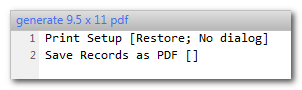
Instructions: open a demo and run the script…

…and the resulting PDF looks like this.


Note: Once the custom paper size has been referenced in a Print Setup script step, you can distribute (or host) the FMP file and any user can produce the PDF without the custom paper size needing to be defined on their computer.