

Disclaimer: This article features an undocumented technique. As with all material on this site, use at your own risk and test thoroughly.
8 Feb 2015: Demo updated to include a “refresh window / flush cached join results” step before GTRRing across a summary list relationship
Last week we looked at a technique to allow a summary field to be used as a relational predicate, directly, i.e., without the need to use a “helper field” as a predicate. If you’re not comfortable employing an undocumented hack in your solutions, I encourage you to read on anyway, because what you’re about to see may still be worth doing, whether you use last week’s method, or the safer (but a bit slower) “helper field” approach as delineated here on FileMaker Hacks last year in Summary List Fields in FM 13, part 1.
We’ve established that a summary list field can be used as a relational predicate (either directly or indirectly); the aim of today’s article and demo file, FM-13-Summary-List-As-Predicate, is to offer a compelling reason to do so.


In this demo, you can compare two ways to jump from a given found set of Web Visit records to the corresponding found set of related State records:
1) via “Go To Related Record” for found set (a.k.a. “GTRRFS) using a standard relationship
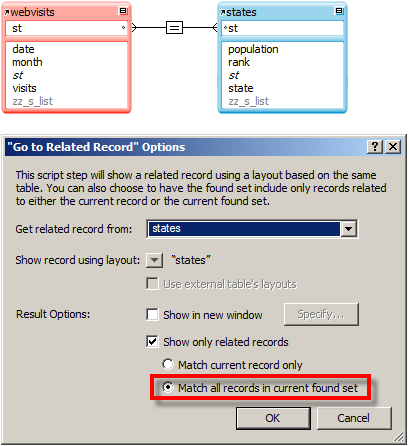

2) via “Go To Related Record” for the current record using a summary list field (see last week’s article for how to define this relationship)


You’ll also note that the demo contains three buttons to control found set size, as follows:
- If you’re testing on a WAN, use “visits >= 25K”
- If you’re testing on a LAN, use “visits >= 10K”
- If you’re testing locally, use “All”


Once you’ve generated the proper found set, compare what happens when you click the “Standard GTRRFS” vs. the “Summary List GTRR” buttons. The difference is not subtle is it? Here are the timings I’m seeing:
- WAN: 10 seconds vs. <1 second
- LAN: 13 seconds vs. <1 second
- Local: 5 seconds vs. <1 second
Note: to avoid possibly seeing skewed results due to caching, you should exit and restart the demo between each test.