

Demo file: virtual-portal-v1b.zip
This is a follow-up to last month’s article on virtual list, and this time we’re going to explore a way to use virtual list in a portal.
Imagine you have built a system where a Company can be a parent of a Mill, Refinery, Estate, or another Company.


Each of these entities exists as a separate table in your database…


…and from the perspective of a Company record, you’d like to be able to see all immediate children.
Of course you could go the traditional route with four portals like so…


…but what if you instead want to view all child entities in a single portal, regardless of entity type, like this?


It’s true that FileMaker portals don’t normally work this way, but fortunately virtual list can help. Let’s see how. Here’s the portal in layout mode…


…and you’ll notice that rather than referencing a regular data table, it’s pointing at a stripped down virtual list table, which I have chosen to call “virtual_portal”, and which consists of just two fields: ID and cell_text_r.
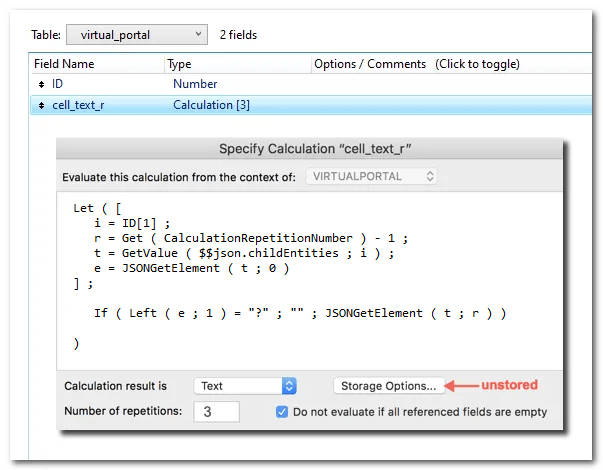

(For more info on these two fields or the array structure shown below, see last month’s article.)
The job of the repeating field cell_text_r is to render data from this array…


…which is auto-generated via a Hide Object calculation attached to this field:


Note 1: the Hide Object calculation is not actually hiding anything; its purpose is to populate and update the $$json.childEntities variable as necessary.
Note 2: see last month’s article for two other techniques to build arrays.
As we navigate from company record to company record, we want the portal to update in real time, and to facilitate this, in addition to the preceding, we utilize a little helper script which will be invoked like so:


Next, a few words about the relationship from COMPANY to VIRTUALPORTAL since it’s a bit unusual.


As we navigate company records, the number of rows in $$json.childEntities changes, so what we want to see via this relationship is the number of corresponding rows in virtual_portal. The predicate on the left is defined like so:


And since, as you may recall, the ID field in the virtual list (or in this case, virtual_portal) table is a sequential serial number beginning with 1, we can use the ≥ operator to limit the number of portal rows that will display data.
Incidentally, if you’re wondering about the four TOs at the right…


…they facilitate navigation when you click one of the blue triangles inside the portal.


Here are some limitations of this technique to be aware of:
1. Since the JSON array is generated without using JSONSetElement, potentially problematical characters will not be auto-encoded. For example, since a hard return serves as the row delimiter of the array, it will wreak havoc if it appears as data within the array. In today’s demo this risk has been substantially mitigated via an auto-enter calc attached to the name field in all four data tables:
cfZap ( Self )
For suggested code improvements to resolve other potential problems, see Alex Zueiv’s comment at the end of this article.
2. You cannot search within the virtual portal. However, you can search these fields beneath the portal because they are based on relationships to standard data tables.


Also note that the labels on the first four fields above are hyperlinks. If you click them you will go to the corresponding records in the target table.


The technique we’ve looked at today is an example of how virtual list provides a framework to accommodate “impossible” requests. I will confess that I’ve only had this particular request come up once in the 25 years that portals have been a component of FileMaker.
On the other hand, this narrow use case is merely a proof of concept of the liberating idea that a portal can display whatever you want it to display, as opposed to literally rendering rows from one related data table.
At any rate, it will be interesting to hear whether anyone else finds this useful, or has solved this challenge via other means.
Note: The other obvious approach for combining entities I can think of would be to use the party data model, but that would involve a reworking of the system, whereas virtual list can be bolted on to whatever system you currently have.