

Disclaimer: the techniques shown in this article are provided on an as-is basis. Use with appropriate caution and at your own risk.
Introduction
This is a quick follow-up to last month’s article on 2-Column Magic Value Lists, and, to avoid repetition, will assume the reader is familiar with that material. A colleague pointed out that it might be helpful to offer some real-world applications of this somewhat esoteric technique, and today we have two demos based on last month’s demo #2, but this time actually doing something useful.

Demo Files
- 2-column value lists, v4.zip — performing finds
- 2-column value lists, v5.zip — filtering a portal
Demo 4
Here we begin with a simple table view showing products and related info.

Clicking the Search button brings up the filter interface we saw in demo #2 last time, but now repurposed as a card window.

The Find button will be greyed out until you make one or more choices from the pop-up menus. When you click Find this script will run.


So, for example, enter these criteria and click Find…


…and you will see these results

Demo 5
In this demo, choices made via the pop-up menus are reflected in the portal.

I hesitate to call this a “filtered portal”, though that clearly describes what’s happening, because we are not using FileMaker’s built-in portal filtering.
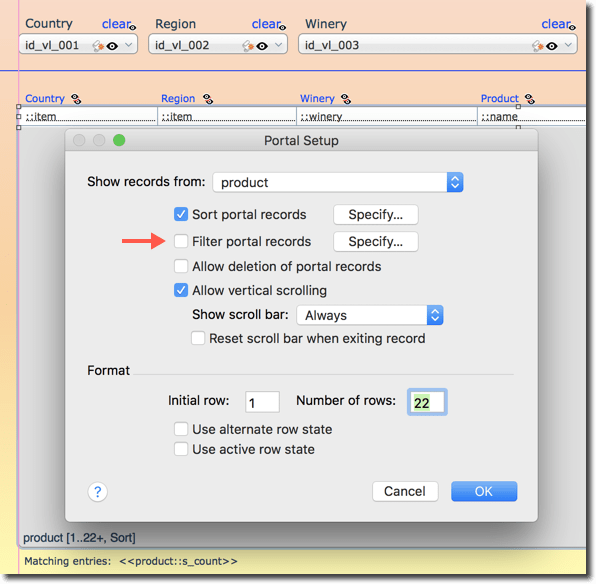

Instead the filtering is handled relationally…

….with a global text field (“mlk”, i.e., multiline key) on the left, and the product primary key on the right.
When the user makes or clears a selection from one of the pop-up menus, this script is invoked…

…the mlk field is populated with a return-delimited list of product ids, and the portal is refreshed.
One other item of interest is the clickable-sortable column headings.

The sorting technique is basically the same as the one explored in detail in Portal Sorting, part 2 (way back in 2011), except one of the variables has been renamed, and Hide Object is now used to selectively display the proper sort indicator.