
This is a follow up to last week’s Fast Summaries to JSON and will assume the reader is familiar with that material.

Demo Files
- Fast Summaries to JSON, v5 (requires FM 16 or later)
- Fast Summaries to JSON, v6 (requires FM 16 or later)
After last week’s article appeared, a reader contacted me wondering whether the technique could be adapted to provide a more literal JSON representation of what was visible on-screen. The answer turns out to be yes, with a bit of additional work…

…as we will see in demo #6. But before we do so, let’s take a look at…
Demo #5
With regard to the approach used in demos 1 and 2, Josh Halpern posted a game-changing (or, methodology-changing, at any rate) suggestion in the comments section of the previous article…
The script [“fast summary output report to json”] should only “touch” one JSON object until it’s completely done writing it in a loop…. So instead of first writing $object/$array, and then inserting that into $$summary.report.json, it can just write to $$summary.report.json directly.
…and I built this demo to confirm that his observation is indeed correct. Within a loop, instead of populating an array or object, and then pushing that array/object into a two-dimensional array, it will be more performant to do it in a single step.
So, using demo #1 from last week as a reference, to create an array of objects, get rid of the first step…

…and move the logic into the next step like so.

And, similarly, for an array of arrays, rather than these two steps…

…go with this single step instead.

Why bother? The script will run about twice as fast, that’s why.
Josh added: “If you’re interested, I wrote a couple more points about how the JSON cache behaves here: https://the.fmsoup.org/t/performance-core-principles-10-scripting/1867/25?u=jwilling. But the gist is… only touch one json at a time.”
(Or sidestep the issue by instead using Insert Calculated Result, as we did in demos 3 & 4 last time, and as we do in the following.)
Demo #6
This is based on demo #4 from last week. I’ve modified the report to make it clear there are three levels of summarization:
- product
- year
- month
As before, the goal is to populate a variable, $$summary.report.json, and I should mention that I didn’t bother to do an “array of arrays” version. An array of objects is sufficient for this proof of concept.
Let’s see it in action. First click the sales report button…

…wait a few seconds for the report to generate, then click the fast summarize button…

…and a quick glance at $$summary.report.json in the data viewer will confirm that the contents of the variable mirror the on-screen report.

What’s going on behind the scenes to make this happen? Let’s start by looking at the report in layout mode.

Level 1 is discussed below; levels 2 and 3 are based on fields that have been defined in the line_items table like so:

Both year and month are now calculated numbers in line_items (which was not the case with last week’s demos). The translation of month number to month name is done via a bit of smoke and mirrors like so.

(Yes I could have used a layout calculation, but I wanted this demo to be backward compatible to FM 16.)
Here is the script that generates the report.

To reiterate, as per the comments in lines 8-11, we’re sorting on three “local” fields (i.e., that are defined in line_items). As per the comment at line 9, any field used as a GetSummary “break” field must live in the local table, and GetSummary will be summarizing at all three levels when we generate the JSON.
Also we get a performance upgrade by sorting on the local id_product field, but, since we want the products to appear alphabetically, we order the records as per this value list:

To see the performance boost in action, let’s go to “Line Items” and do a quick comparison.

When we click “Related Sort”, our sort criteria will be…

…when we click “Local Sort” it will be…

And, drum roll please, here are the results (testing locally on my Windows 10 laptop):

Note: make sure to close and re-open the file between each test, to avoid skewed results due to caching.
Okay, returning to the original question, how do we generate JSON that will mirror the on-screen report? Bearing in mind that our report is currently sorted by these three fields in the line_items table…
…let’s look at the script to find out.
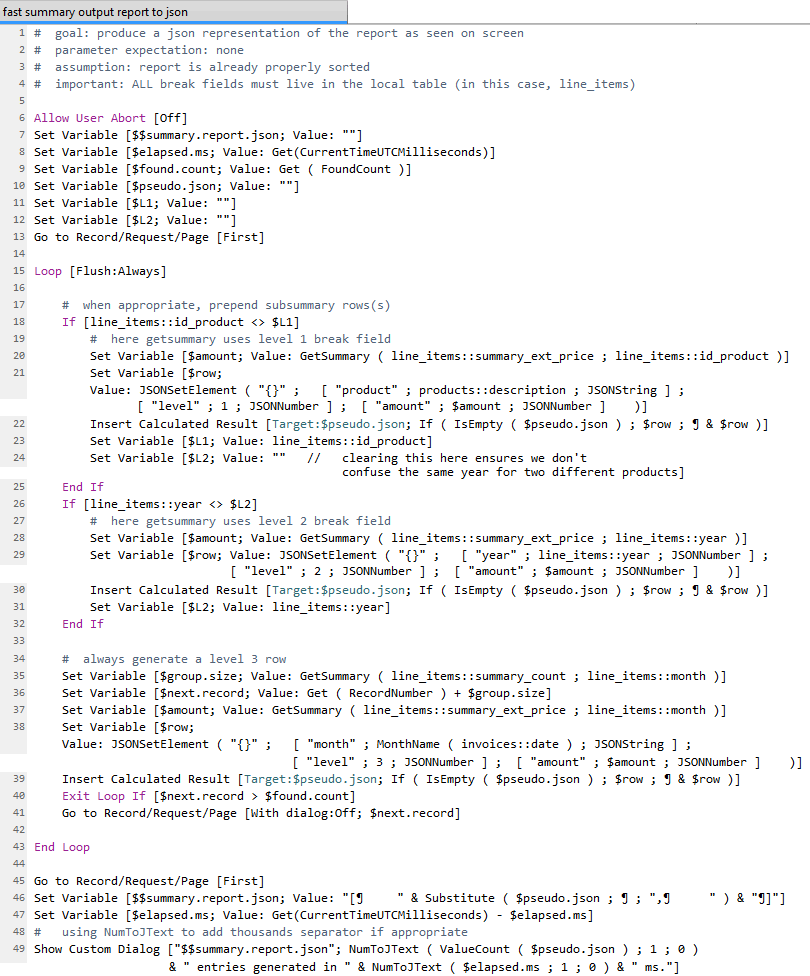
The basic idea is that we will always have a level 3 (month) entry, but sometimes we will need to generate a leading year entry at level 2 or a leading product entry at level 1. And this optional prepending of entries takes place in steps 17-32.
This works because when we are sorted multiple levels deep, as long as the sort fields live in the local table, GetSummary can use any of the sort fields as break fields and summarize at that level.
Thanks as always for all the effort that goes into FileMaker Hacks articles.
For those of us short of time, which was ultimately the fastest method?
Hi Paul,
Check out the v6 demo.
Kevin