
Note 1: This conversation primarily focuses on new features and improvements in JQ v2. For a more general introduction to JSONQuery see the “Resources” section at the beginning of part 1.
Note 2: JSONQuery v2 is available here — https://github.com/steve-ssh/FMP_JSONQuery.
Continuation of JQ v2 conversation with Steve Senft-Herrera
Kevin Frank: There are a couple little improvements in v2 we haven’t mentioned yet. Is this a good time?
Steve Senft-Herrera: Sure.
KF: Okay, thanks. One that I really like is that you can now use “=” in place of “EQUALS” — you don’t have to, but you can. In v2 either of these will work…
JSONQuery ( $input ; "region" ; "EQUALS" ; "Asia" ; "" ; "name" )
or
JSONQuery ( $input ; "region" ; "=" ; "Asia" ; "" ; "name" )
KF: …whereas in v1 you had to write out “EQUALS”.
SSH: Yeah, I like that one too.
KF: Another improvement is that when “MATCH_ALL” is your Operator, you can now simply leave that argument blank. As per ex. 197 in the example file, these two statements are equivalent.

and

SSH: It’s a small change, but I like it because there is less to distract the eye from what really matters in the calculation: your input JSON, and the desired key or path to harvest — in this case, “address”.
KF: Completely agree.
The MAP Component
KF: You know there is an absolute favorite item on my list that hasn’t been mentioned yet, and it has to do with the simplification of MAP syntax.
SSH: That is definitely right there at the top of my list of favorite features also.
KF: And the improvements go beyond syntax simplification. Some of the new capabilities are nicely illustrated in example 156.

But maybe first you could say a bit about what a map is?
SSH: Sure. A map is a collection of instructions that tells you how to perform a transformation. It’s somewhat analogous to making multiple calls to JSONSetElement and/or JSONDeleteElement. There’s an ability to give multiple entries in the input, as well as multiple commands for what we want to set and/or delete.
KF: And when we use a map it becomes our sixth argument in place of the ResultPath that normally goes into that slot.
There are a couple interesting transformations going on in the above example, and it has the new simplified syntax, which I’ve heard you refer to sometimes as “pseudo-JSON”. Before if we wanted to include the map component directly within our query it required a lot of quotation mark escaping, e.g.,

…and to dodge that bullet developers would sometimes define the map somewhere else, e.g., in a field (as in your JSONQuery v1 example file), or maybe they’d use Insert Text and declare a variable that way…
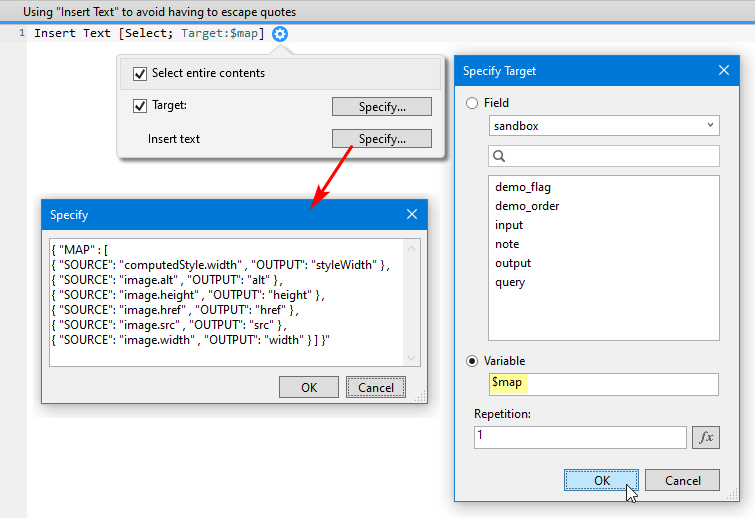
…or build it up in a variable using JSONSetElement.
At any rate, now you’ve given us this…

… which is easier on the fingers and on the eyes, and I think could make the difference between whether or not people bother to learn to use the feature.
SSH: Oh yes.
KF: Returning to the example we saw a moment ago, what can you tell us about it?
SSH: Okay, actually I’ll step back and I won’t just focus on the map. First thing that I see about the query is, we’re using the MATCH_ALL operator. When I see that in conjunction with the map, it means we’re not looking for anything in particular, per se. We’re looking to transform everything.
This particular example shows some of the bells and whistles, whereas a more simple example would just basically say something like, “Take this key and move it to this key, take this key and move it to this other key,” and that would allow you to rename keys and so forth.
KF: The big thing going on here is that you start out with an object that is really crying out to be an array, and you transform it into a proper array of objects, whereas before it was one object containing sub-objects as key/value pairs.
SSH: Yep, that’s totally right, and that’s accomplished by the second and fourth entries in that map array. Both reference a special value, which is .KEY. and that’s something that you just have to sort of get your hands dirty with to get familiar with how it works.
Basically, the second entry is saying, “Hey, get rid of this key,” and that’s the sort of secret sauce that will cause it to shift from an object structure to an array structure.
{ SOURCE: '.KEY.', DELETE: true }
And the fourth entry takes what used to be the key and moves it to a property inside of the object that has the name “id”.
{ SOURCE: '.KEY.', OUTPUT: 'id' }
And when I’m talking about the key, since we’re looking at this example…

…you can see in the upper left ID_1, which is one of the keys that’s holding one of these objects. That’s an example of a key.
KF: A moment ago you mentioned “what used to be the key,” but that key is still there in the input. So the SOURCE portion of line 4 of the map array — or any SOURCE entry for that matter — will be referencing the input, right? It’s not referencing the transformed output.
SSH: You are correct. It’s not like what you deleted at line 2 is no longer available. You’re protected against that kind of gotcha. And one of the consequences of that is that you can reorder those lines as long as you start with
{ SOURCE: '.', OUTPUT: '.' }
as line 1.
KF: Which if I understand correctly can be interpreted as “start with everything as both the input and as the output”. And I should immediately qualify that by defining “everything” as whatever would be returned by the main query — in this case, since we used MATCH_ALL, it would indeed be everything.
SSH: Broadly speaking, yes. There is a nuance which we’ll touch on if we have time to discuss base paths, but in the absence of BASE_PATH, yes.
KF: Another thing that’s really nice here is, to produce this output in JQ v1 we would have had to individually specify every item we wanted to include… we would have had to build it up. But now we can start with
{ SOURCE: '.', OUTPUT: '.' }
and then use DELETE to subtract the things we don’t want, for example, eliminate the “auto” node, which is what we do on line 3 of the map array:
{ SOURCE: 'auto', DELETE: true }
KF: To recap example 156: not only have we transformed the input from an object with sub-objects to an array of objects, we’ve also simplified it. We’ve gotten rid of the “auto” node, and also, in case we might need it later, we’ve added the “id” to each object so the id number is still preserved. But now it’s just a key/value pair within the object.
SSH: To clarify one point, before you could grab something that would include a whole object worth of properties. You could always do that, as per ex. 137, it’s just that you couldn’t remove things.

SSH: The only other thing that I would say about a map that may be helpful is to, in a very fuzzy way, think of it as using JSONSetElement. It’s got a different syntax, but it’s the same sort of concept: you’re specifying multiple keys or multiple nodes. You’re basically kind of thinking to yourself about how you’re building up some JSON additively, by adding each new entry that you do, and that’s where I think the similarity with this is.
In a way, it’s kind of like a hybrid. You’re using a little bit of JSONSetElement, and with the DELETE you’re using a little bit of JSONDeleteElement. And the aim is to build up a result. And that’s how I think of using the maps.
KF: Thank you. That’s definitely a helpful set of analogies, for me at any rate.
BASE_PATH
KF: Before we move on from maps, could we talk about BASE_PATH?
SSH: Yeah, BASE_PATH is a feature that you use with maps, usually when you want to output children of some kind. So let’s look at a couple examples. And this is kind of advanced stuff I would say.
Example 78 has a data structure with people, but it’s also got their children, and the children have pets and so forth.

SSH: Each element contains an “auto” object, but it also contains an array of children that a person apparently has, and each child contains an array of pets that they have. So it’s got some nested array action happening, which sort of sets the stage for talking about how you want to get at child data.
And this is something that’s relevant if you’re using the Data API, and you have a portal which contains child data. Maybe you just want the portal elements, but the Data API is giving you back everything. So how do you get just those child elements? So let’s start with that particular question: what if I just want to get an array of the children? I’ll make a few changes here…

SSH: Alright. So we’re going to match all. And now this is going to return me an array of just the children elements. It will ignore the “auto” part and all of the personal information about the parent of the children. It’s just going to grab me the child elements.
KF: Pun intended.

SSH: If we wanted to go a level deeper, we could get just the pets, and that would look something like this.

SSH: So we’re stepping back a minute just to do sort of like, you know, Child Querying 101. That’s what we’re doing right here.
Okay, so now we can talk about BASE_PATH. These are pet elements that are being output here. We’ve got the name of the pet and the type of the pet, but they’re just being output as “name” and “type”. Maybe we actually want those keys to be “PetName” and “PetType”, just to be a little bit more descriptive. We know we can do transformations of key names with something like a map, so let’s go ahead and see how we would do that.
We know that we need some sort of map that maybe would look like this.

SSH: So this is well-intentioned, but if we run this, it won’t return what we want, because it’s going to look in the entire object for “name” and “type”. It’s not going to dig down into the “pet” level. Let’s find out.

SSH: Yeah, there we go. So it’s not pulling the data that we want, and BASE_PATH is where you handle cases like this: the base path is what the result path would have been if you were not using a map.
KF: That’s a significant observation you just made so I’m going to call it out:
…the base path is what the result path would have been if you were not using a map.

SSH: Yes. You may recall that a moment ago I was doing this query, and I just had this in the result path.
"children[*].pets[*]"
And BASE_PATH corresponds to what the result path was before you started using the map. And then the rest of the map works as it normally does. So let’s try this.

And now we’ve successfully got our our pet elements, and they’ve mapped to the new names.
KF: What if we want to include the pet owner?
SSH: You can go up one level and grab the “name” value. By using double dot slash notation, we’re going up one level to the object that contains that pet, and we’re saying, “Give me the name from that.”

SSH: There we go.

KF: I think that’s really powerful right there. We can transform JSON by grabbing items from different levels and blend them into a single object.
SSH: Once you get fluent with it, you can really pick and pull and rename. And it is very powerful.
KF: I agree… if we’re done with maps, maybe we should move on.
SSH: Sounds good to me.
New _ANY Operators
KF: JQ v1 had a couple “pattern operators” called BEGINS_WITH (a.k.a. LIKE), and ENDS_WITH. We discussed them three years ago; now in v2 you’ve introduced BEGINS_WITH_ANY and ENDS_WITH_ANY.
SSH: Yes, you can now choose multiple patterns that you want to match against for the start, or for the end, instead of just being limited to one. Let’s use email as an example… last time we did this.

SSH: We used “ENDS_WITH” to return all email addresses ending in “.net”. But now we can specify multiple domains like so. And let’s set the ResultPath to “email”.

SSH: In any event, you get the the idea. We’re not limited to just one pattern at this point. And there we go.

KF: I think these will be very useful.
SSH: There’s a CONTAINS_ANY as well. I think these are actually some of the more “developer quality of life” features that will make things easier for people. I think people are mostly reaching for JSONQuery for the basic stuff.
ENDS_WITH is kind of like, “close but no cigar” if you want to do multiple match patterns like this example. You’re like, hey, that’s great that I can get .net, but I actually need to get .org and .it as well. So I tried to remove the “close but no cigar” factor to make it be mostly “cigar”, you know?
KF: You would have to call ENDS_WITH three times, and then do some sort of merge — maybe via a custom function like JSON.MergeArrays, or a While loop, or a scripted loop, to combine the three result sets into one array.
SSH: And if you’re going to do that, you really might as well just write a While loop to to go through it all, from an efficiency of operations standpoint. I don’t want you to have to do something that has to cruise through a many-element array multiple times, and then have some work left to do afterwards.
These new “_ANY” features are there to help people with use cases like these.
KF: And each has an entry in the example file.

SSH: Towards the very end I was doing that process where I figure out what’s going to make it into the function, what’s not, and how much extra space I’m going to have left, I realized it wouldn’t cost much to include them, so those those three got added to the function.
KF: I said last time we spoke that I was running out of superlatives. What I’m feeling right now is a combination of gratitude and amazement. Is there anything else you’d like to talk about?
Tilde Slash
SSH: Yes. You’ve probably heard me say at some point or another, that I think the toughest stuff to wrap one’s head around has to do with searching on child arrays, and returning child arrays, and so on and so forth. I’m not going to dig too deeply into that, but I am going to dig a little, because you asked before we started the interview whether I could cover a little bit about the tilde slash (~/) operator. And this is a good introduction to it.
KF: Tilde slash makes eight appearances in this section of the example file.

SSH: I’m going to hijack example 73 so I can play with this data. The input that we’ve got is an array of objects. Each object corresponds to a fictitious person, and the children array contains the fictitious children that they have, and I’ll start with something real simple.

Here we’re saying find me all elements in this array where the element has a child array that contains a child whose age is 7. There can be other children with different ages, that’s fine, too, but there’s got to be at least one whose age is 7. If the person has at least one 7 year old child, based on this age property of the child then return me that. So let’s go ahead and run the query. And at first I’m thinking, “This is wrong. There’s a child of age 9.” But of course it is right. There’s a child of age 7 down here, and that’s why this person was returned.

SSH: And if we scroll through the results we’ll see that every element returned meets this criteria about the child’s age. So that’s all well and good. But sometimes I’m going to want to see the child objects alone as opposed to all of the other trappings of the parent objects. And I can do that by putting dot slash into the ResultPath. Since I’m not specifying a property, I’m just going to get the child objects themselves… instead of returning the whole parent object, I’m just getting what I would call the qualifying the matching children…

…and you can see here I’ve got an array of just the 7 year old children.

KF: Nice.
SSH: That’s something that’s in version 1. And I think it just makes sense to have it. And once you’ve got this notation, the dot slash, and you’re comfortable with it, you start to realize you can do things like tack on a property, and just get the names of those children if you want.

SSH: So this is all just kind of like a refresher course or an introduction course to the power of the dot slash feature. Dot slash is getting me the qualifying children that made the match, and that’s in contrast to getting all of the matched parents that contain those qualifying children.
That was all version 1 stuff. What’s new in version 2 is an operator that is called tilde slash (~/).
If I run this with "" as the ResultPath, Not only do I get the matching children. I also get the non-matching children. They’re just naturally part of the array, and they haven’t been filtered out.

SSH: So the question comes up, is there a way to get me the parent objects with just the matching children? So in this example. It wouldn’t show the age 9, child, nor would it show the age 2 child, etc., it would just show the age 7 child.
That was not something that was possible in version 1, at least, certainly not without putting in a lot of effort of your own. That’s what the tilde slash operator is about. If I do ~/ and I rerun this, I’m still getting parent output, but you’ll notice the children array now only contains those qualifying matching children.

SSH: Let’s go down to the next one and look at their children. [Scrolling through the results.] Only age 7. Next children, only age 7. So on and so forth. It’s gonna be that way all the way through.
And if you don’t believe me, we can change the query a little bit and instead of an age based thing, let’s take the name and say the name must begin with… what letter are we gonna choose, Kevin?
KF: “B”.
SSH: Okay, sounds good. I’ll update the query…

SSH: Let’s run that, and now we get the matching parents but notice that the child name in each case begins with the letter B.

SSH: So we’re getting the matching parents, but the children have been filtered down so that only children with name beginning with B are being included in there.
KF: Slick. This is a feature that if, or when, you need it, you’re gonna really appreciate.
SSH: Yeah, I agree with you. I have mixed feelings about it because it does feel a little bit niche to me, but if and when you do need it, I think you will be happy to to know that it’s there.
To recap, using the example we just saw…

- Result path
""Return the matching parents with all children. It’ll have the children that did qualify, but it’ll have the other children as well if they are present. - Result path
"~/"It’ll be the matching parents, but the child array will be filtered down to just the qualifying children that made the match. - Result path
"./"We get just the matching children themselves without any parent data.
KF: That’s a great explanation, Steve.
SSH: Thanks. I think it gives you an idea of where that feature came from, and how it’s related to other features, and what it actually does.
Associative Array
KF: On a somewhat related note, do we have time to talk about a real-world JSONQuery challenge?
SSH: Sure, go ahead.
KF: Okay, a colleague was wondering whether JQ could sum the highlighted numbers. This is just sample data of course, and he had a lot more data than what I’ve included here, but the JSON was structured like this (shown here in my “sandbox” file, which will accompany an upcoming article).

KF: Notice there’s only one entry in the first “line” object, but there are two entries in the second “line” object, and it’s the kind of structure where you might normally have an array… I’ve heard the term “associative array” used for this structure. At any rate, what he basically was saying was, “Look, I don’t care which entry it’s in, if it’s there I want to sum it.”
So I decided to take a crack at this, and for starters, as the whole world knows by now, JSONQuery is happiest when you feed it an array of objects (or an array of arrays). So rather than point JQ at the original input, instead, in the first argument I used JSONGetElement to isolate the array hanging off of the “example” key.

KF: That’s an important concept to bear in mind any time you reach for JSONQuery.
SSH: Indeed it is.
KF: Then I hacked around on it for a little while, and came up with something that sort of worked, and then I ran it by you, and you pointed out that PATH_EXISTS is a great way to handle this.

KF: So what we’re saying is, if the “amount” key exists downstream from “line”, then let’s sum that amount… but only if that path exists.
SSH: Sum all three.
KF: Yes, and if we execute that query…

KF: …then we get 688 as our total (132 + 81 + 475).
Here are a couple other queries that might be fun with this source. In both cases I’ve changed the target path to “line[*].itemName”, and in the first one, putting ./ into the result path…

…returns an array of child objects below each UUID.

KF: Appending “itemName” to the ./ in the result path…

…returns the item names in an array.

Dot Slash In Result Path
KF: Also I want to point out something I only realized recently — after you pointed it out, actually — at any rate, something that finally penetrated my thick skull was that the number of asterisks in the TargetPath, in this case
"line[*].itemName"
can correspond to the number of dot slashes in the ResultPath, in this case
"./itemName"
And more specifically, the number of dot slashes cannot exceed the number of asterisks. Would we agree on that?
SSH: We do, and it doesn’t require a thick skull for that not to be apparent. It’s probably the least intuitive thing I can think of about JSONQuery. I’m not trying to put it down or anything like that, just admitting that one of tougher things to wrap your head around is how to use those dot slashes.
But you’re right: each ./ corresponds to an instance of a wildcard in the TargetPath.
ValueType Argument
KF: Thanks. Final question: it seems like most of the time I get away with leaving the ValueType empty. Can you share the rules for when one must specify it?

SSH: The guidelines for when to specify a ValueType parameter vary depending on the operator. When things started out, it was pretty simple, because it was okay to just think that an empty param for ValueType would default to meaning JSONString, and this would work out fine for most cases.
As the variety of operators grew, the situation became more complex, because new scenarios and features were introduced that took the ValueType param beyond just the concept of “it defaults to JSONString”.
The usage of ValueType now falls into one of these types of scenarios:
- The original: Use it to specify which data type to match, and you can leave it empty if you want to match JSONString
- Use it to specify which data type to match, and leave it empty to indicate that you want to match all data types
- Supply a date format string to indicate that you want to treat the value as a date
- Supply a dot or a comma to indicate what the decimal char should be when coercing a string value into a number
I think that the above is the full range of usage. As you can see, there is no longer one single simple guideline. One has to know which of the above scenarios is at play, and then it’s possible to make the correct choice for the ValueType parameter.
KF: Thanks that definitely clarifies things.
I didn’t prepare any closing remarks, so I’ll just say it’s been an absolute pleasure speaking with you again about JSONQuery, and again I congratulate you on the time and energy you invested, and on the spectacular outcome. And also I want to say thank you on my own behalf, but also on the behalf of the entire FileMaker Development community. This is just a huge and very selfless gift.
SSH: Well, thanks, Kevin. I think you definitely should get a lot of credit for this function being realized. It’s nice to know that it’s found a really strong place in your tool kit, and hopefully in tool kits of others as well.
Customization
PostScript: a few days after our discussion, I sent Steve a follow-up message asking about customization options, which we hadn’t touched on during our conversation. Here is his response.
Version 2.0 of JSONQuery defines a few of what I refer to as “Internal Flags”. Internal flags are variables defined near the beginning of the body of the JQ calculation.
There are three such flags:
_MXR=50000;
_FMT=1;
_DMA=1;
In the context of the code, they look like this:

Each of these flags affords the ability to customize a small aspect of the overall JSONQuery behavior. Customization is achieved by editing the calculation to set a different value for any of these variables.
So, as an example, editing the calc so that instead of _MXR=50000, the calc definition instead reads: _MXR=1000, the effect will be to lower the enforced recursion limit from 50000 to 1000.
The purpose of each flag is described below:
_MXR sets the value used as the second parameter in a SetRecursion call that surrounds the body of the main JSONQuery code block. My recommendation is to leave it as-is, i.e., set to a limit 50000.
_FMT controls how the final output is processed before being returned. By default, _FMT is set to 1, which means that, when the output is JSON, the final output will be run through JSONFormatElements before being returned by JSONQuery, and therefore will be formatted. Setting _FMT to 0 changes the behavior so that, instead of running the final output through JSONFormatElements before returning it, the final output is run through JSONGetElement, which means that the returned output will not be formatted. Either way, any JSON final output is run through a JSON function call just prior to returning it, so as to have one last opportunity to trap for any mishap which resulted in mal-formed output. I mention this to put a reality check on the thought that setting _FMT to 0 is going to dodge the overhead of a final parse of the output. It won’t dodge a final parse of the output JSON; what it will dodge is any overhead specifically associated with formatting as part of the final parse. I have not done any rigorous testing to determine the difference in execution time of JQ, but some very cursory testing on an old machine has suggested that any difference in execution time is slight to none. That said, it was pointed out to me that it would be good to leave this decision in the hands of the developer who uses JSONQuery, and I agree. Thus, this feature flag exists to allow configuring JQ to one’s preference. I think the main benefit that I see is not so much about JQ processing time, but rather that there may be downstream implications in the calling code such that it is preferable to have non-formatted output.
The last feature flag, _DMA, can be used to undo a slight behavioral change in JSONQuery that happened between version 1 and version 2.0:
In version 1 of JSONQuery, the Operator parameter (3rd parameter) must be populated — it is always required, and failure to supply an Operator parameter results in an error.
In version 2 of JSONQuery, the Operator parameter can now be left empty, and if empty, it will default to the MATCH_ALL operator. I made this change just to sweeten up the syntax of what the code looks like when one simply wants to harvest something from every element in the input.
Instead of something like this to harvest all email_address values:
JSONQuery( $_json ; "" ; "MATCH_ALL" ; "" ; "" ; "email_address" )
One can now just write:
JSONQuery( $_json ; "" ; "" ; "" ; "" ; "email_address" )
However, not everyone likes small changes like this, so, for anyone who would like to keep the v.1 behavior of requiring an operator parameter, there is the _DMA internal flag.
“_DMA” stands for “default match all”. Setting _DMA=0 restores the v.1 behavior of always requiring an Operator parameter.
In closing, I’ll note that these internal flags are documented on the “Reference Sheet” tab of the example file, as well as on the main GitHub page.
Steve Senft-Herrera has been developing using FileMaker Pro since 1994. He started working at Beezwax Datatools in 2015, and he credits the collaborative and immensely talented team at Beezwax as being an inspiration to learn and grow every day. Outside of the world of FileMaker, he enjoys cycling, music, being around animals, and being silly.