

Demo file: virtual-list-even-more-simplified.zip [expects, but does not require, FM 22 or later]
Note 1: The example in today’s article/demo is intentionally very basic.
Note 2: The demo is self-populating to keep the data current, so the values you see in the screen shots may not exactly match those you encounter in the demo.
As long time readers may recall, between 2011 and 2019 this blog featured numerous articles touching on various aspects of the virtual list technique — or, more properly, series of techniques. The following year, in 2020, I decided to distill the core bits into a basic “beginner’s guide” with accompanying demo file, and I called it Virtual List Simplified. And if you’re still using FM 21 or earlier, and are looking for an introduction to virtual list, I highly recommend that article.
However, with the release a few months ago of FM 22 (a.k.a. FileMaker 2025), the landscape dramatically changed thanks to a re-written JSON engine that is significantly more powerful (i.e., faster) than before. Why should that matter? Because JSON is typically where virtual list gets its data from, and thanks to this awesome performance boost, it’s time to recycle and update the 2020 article and accompanying demo file to take advantage of it. And good news: it’s now less complicated and easier to understand.
At the risk of stating the obvious, there are many, many ways to skin the virtual list cat, and the purpose of today’s article is not to say “this is the best way”, or imply that other approaches are flawed, but simply to propose one particular approach you might take — especially if you are either: a) new to virtual list, or b) already using virtual list, but aren’t completely happy with your current implementation.
At any rate, my aim today is to gather useful insights from earlier articles into a single document (with a couple new ideas thrown in), and some of what follows has been recycled from those earlier articles.
Spoiler alert: two-dimensional JSON arrays are now viable and performant as back-ends for virtual list. Prior to FM 22 this was not the case… things would appear to be fine when the 2D array was relatively small, but would slow down dramatically with larger 2D arrays. For details see Virtual List with a 2D JSON Array in “FileMaker Pro 22: Initial Impressions”.
Some Problems Virtual List Can Help With
Here are some situations where you will run up against limitations of what FileMaker can do natively. Of course virtual list is not the only way to solve these problems, but it is worth considering when, for example, you need to…
- Combine entities from multiple tables into a single report or portal
- Produce a cross-tab report
- Create dashboard interfaces
- Summarize/aggregate the same data more than once on the same page
- Produce a report where, if you rely on traditional FileMaker methods, you will need to define single-purpose utility fields, relationships, and/or tables
Your client can mock up any report (no matter how un-FileMaker-friendly), and virtual list will provide a general purpose tool to accommodate that request and make it a reality… including reporting challenges that would be extremely difficult to handle via standard FileMaker approaches.
A Definition of Virtual List
In reality virtual list is not one technique, but a series of related and overlapping techniques that can be employed according to a) developer preference, and b) the demands of the particular situation. However, I believe that the following paragraph is true for all virtual list implementations and can serve as bare bones definition:
Invented and popularized by Bruce Robertson, virtual list is an approach to data presentation where the data to be viewed is first loaded into one or more variables, and then rendered via unstored calculation fields in a dedicated “virtual list” table.
In my opinion a better name for this technique would be “virtual table” because I believe that more accurately conveys what it is that makes it so incredibly useful. I think of it as a magic “x-ray machine” that can be used to solve countless reporting and data visualization challenges. Nonetheless, virtual list is the name the technique is known by and in the interest of avoiding confusion, I will continue to refer to it as such.
Why Bother with Virtual List?
It’s a fair question, because on the surface virtual list may appear to be a more convoluted way to accomplish things that you already know how to do via standard FileMaker reporting techniques. And for basic reporting tasks, I would agree.
But as requirements become more challenging, virtual list enables you to generate reports (reports that would normally require the creation of multiple helper fields and/or utility relationships and/or special-purpose utility tables) without touching table schema in your main solution or making any modifications to the Relationships Graph.
Actually, I need to amend the preceding. When you use virtual list, you will rarely need to tamper with table or graph schema, but it’s best not be absolutist about such things. From time to time virtual list practitioners will find it expedient to define a helper field or a utility relationship, but that will be the exception, not the rule.
At any rate, once the virtual list table has been created and populated, the heavy lifting will be done primarily at the scripting level… and of course at the layout level, but that would be true of traditional FileMaker reporting as well — in fact virtual list layouts are often simpler than traditional FileMaker reporting layouts.
A Reporting Challenge
Here we have a simple sales table…

…consisting of these fields…

…and we have been asked to produce a report that looks like this:

A Traditional Response to the Challenge
While there are of course various ways to meet this challenge, back in the “dark ages” (i.e., before virtual list) we most likely would have added these highlighted fields…

…more than doubling the field count in this table, and effectively “polluting” our schema, simply to produce one basic report.
And that’s just scratching the surface. Subsequent reporting requirements might include adding more columns as per the next screen shot, which, going the traditional (non-virtual-list) route would entail adding 7 more calculated fields as well as 7 additional summary fields…

…and why stop there? You could be asked to add rolling 36-month averages for each of the above columns (i.e., more schema tampering)… etc., etc., etc…

But back to our current example. Here’s the report in layout mode:
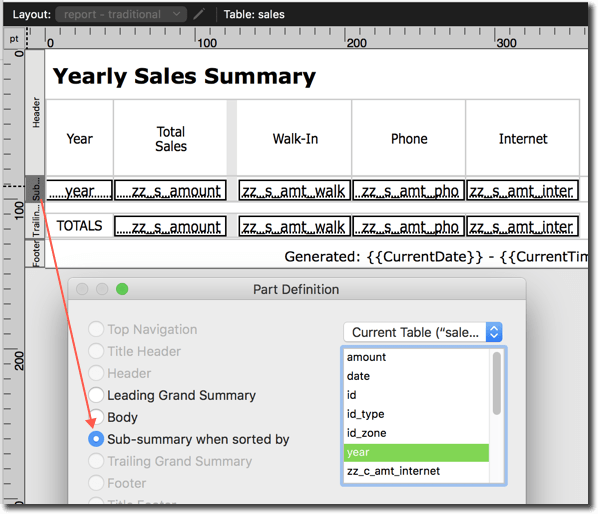
Click “Report: Traditional” to see it in action.

This script runs…

The report displays…
And there you have the traditional approach.
Some Virtual List Considerations
The basic idea behind virtual list is that you create a dedicated utility table in your solution, and pre-populate it with “more records than you’ll ever need” (there are 10,000 in today’s demo). The records in this table will derive their data “virtually”, by reading it from some sort of array… typically, one or more variables.
Here’s the main idea in a nutshell:

There are various decisions to be made — for example…
Q. What method to use to locate and parse the data?
A. Because both can be useful, the demo features two methods to locate and parse the data: Multi-Finds and Fast Summaries (more on these below).
Q. How many dimensions will your array(s) have — zero, one or two?

A. We will generate a 2D pseudo-array initially, and then transform it into a proper JSON array.
Q. How will the pseudo-array be structured?
A. The pseudo-array will be a comma-delimited list of items; each item will be a 1D JSON array.
Q. Could we please see an example?
A. Sure. It looks like this…

Q. But that isn’t valid JSON, is it?
A. Correct. The above will be generated by the subscript, and then transformed by the parent script into a valid 2D JSON array, like so.

Q. Why not just generate a 2D array in the first place?
A. Because this approach will be much faster when you need to crunch a lot of data.
Q. Why do the first row and column contain nulls?

A. Bearing in mind that JSON arrays use zero-based indexing, this ensures a one-to-one correspondence between JSON array addresses and FileMaker schema… specifically we want record #1 in the virtual list table to correspond to array row [1] — not array row [0] — and we want field repetitions in the virtual list table correspond to array column addresses.
Q. Couldn’t we just “offset” by one instead?
A. Yes, in fact, that was the approach I took in 2020, but it’s simpler when things correspond directly.
Q. What type of variable will we use?

A. To keep things simple, in this demo our virtual list table will target a “script” variable, $virtualListArray.
Q. How does using a $var keep things simple?
A. It clears itself when the report script finishes running.
Q. Will we use PSOS (Perform Script on Server)? And if so, how much of the heavy lifting will take place server side vs. client side?

A. The data will be located and parsed via a subscript, which will run server-side via PSOS if the solution is hosted. The subscript will return the above-mentioned pseudo-array as a result.
Q. Will users be able to display multiple reports simultaneously, or interact with them in browse mode?
A. No and no. To keep things simple we will produce one report at a time and not allow browse mode interaction. I’ve found that in most cases these limitations are not a problem.
If you need to generate more than one report at a time and/or interact with reports in browse mode, see Virtual List Reporting, part 4… bearing in mind, however, that in FM 22 and later, you will be fine using 2D JSON arrays rather than the more convoluted multiple 1D array approach shown there.
Comparison of Traditional vs. Virtual List Approaches


The Virtual List Table
Let’s take a look at the virtual list table. As mentioned, it has been pre-populated with 10K records. We can add more if necessary, but 10K records are typically more than sufficient.

There is only one indexed field in this table: ID, which is a serial number. These ID numbers have a one-to-one correspondence with the records in the table, and there can be no gaps… since we have 10K records, the IDs are 1 through 10000, and the next serial value for ID is 10001.
Here are field defs, with the ones we care about for the purposes of this demo highlighted:

Here’s the definition of cell_num_r:

A few things to note… 1. this is an unstored calculation, 2. it has 150 repetitions, and 3. the result type is number.
The basic idea behind having the field name begin with “cell” is that, as in a spreadsheet, a cell represents the intersection of a row and a column. In this case the row corresponds to the ID number of a particular record in the virtual list table… and each array column corresponds to a particular field repetition.
Q. Why are there 150 repetitions?
A. These represent potential columns and, as with rows, the aim is to have more than we’ll ever need.
Q. Why is there a “[1]” after the ID in the Let declaration?
A. Bear in mind that this is a repeating field. One aspect of a repeating field is that when it references another field, it assumes that field is also a repeater, and, unless instructed otherwise, will attempt to address the corresponding repetition in the target field whether it exists or not. Since ID is not a repeating field, we are telling every repetition of cell_num_r to target the first (and only) repetition of the ID field.
Q. Why didn’t you use the Extend function instead? E.g.,
Let ( [ i = Extend ( ID ) ; ...
A. That would be fine also. I prefer so-called array notation, i.e.,
Let ( [ i = ID[1] ; ...
…as it makes it clearer what is actually going on, but either will get the job done.
Q. What about cell_date_r and cell_text_r?
A. They have the same definition as cell_num_r, except the result type is date or text, rather than number. They are not used in today’s demo, but are included because they could likely come in handy at some point in the future.
Q. Why not simply define a bunch of individual (non-repeating) calculated fields, one per column?
A. Some virtual list practitioners do exactly that. The big drawback in my opinion is that if you decide to revise your virtual list calculations, you are going to have to update all those individual fields. And, depending on the type of virtual list reports you create, you might end up having to define a bunch of separate summary fields as well… see next question.
Q. Okay, you’ve convinced me that repeaters are the way to go. What’s the story with the summary field?
A. The summary field, zz_s_cell_num_r, is defined like so:

Since we’ve told FileMaker to summarize repetitions individually, each repetition of cell_num_r will be totaled in a corresponding repetition of zz_s_cell_num_r.
And note that we don’t have to specify the number of repetitions — they are inherited automatically from cell_num_r.
The Virtual List Report Layout
For reference, here is the so-called “traditional” report we already looked at.
And here is the virtual list version.
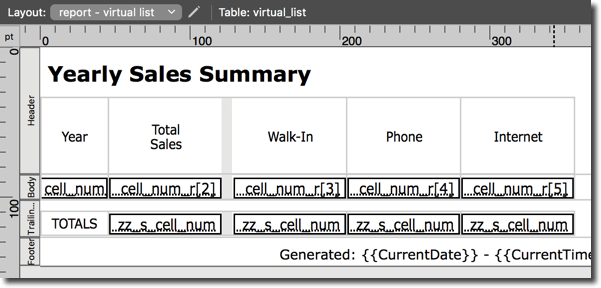
Superficially they bear a close resemblance, but note the following distinctions:
- The layout is based on the virtual_list table.
- Below the header we have a body part rather than a sub-summary.
- There are only two fields on this layout: cell_num_r and zz_s_cell_num_r, but each instantiation is a separate repetition thereof.
Q. Why is there a body part containing calculated fields, rather than a sub-summary containing summary fields?
A. The data has already been aggregated by the reporting script into one array row per year, so it can be rendered here in a simple body part.
Q. If I wanted to, could I instead load raw (un-aggregated) data into the 2D array, and then render it via a sub-summary with summary fields instead of a body with calc fields?
A. Absolutely, though it would negate many of the advantages of using virtual list in the first place, including blazing fast performance. It would take longer to both generate and render the 2D array, and that array would be considerably larger than the one in today’s example, but there’s no reason you couldn’t do it, provided that a) your virtual list table had as many rows, or more rows, than the 2D array, and b) if you were using PSOS, that the total size of the 2D array didn’t exceed 1M characters which is the max size for a PSOS script result or PSOS parameter.
Q. So, it sounds like you can treat virtual list reports an awful lot like standard FileMaker reports, in terms of sub-summaries, etc?
A. Yes, if you wish, including sorting/reordering the report after it’s been generated, in which case you might appreciate this trick: Sorting On A Field Rep > 1
Q. Why are the field repetitions individually placed on the layout? It seems like it would be easier to redesign the report so you could place each field on the layout once and then specify the beginning and end rep and spread them out horizontally.
A. Distinctly placing each individual rep on the report layout…
- Allows them to be rearranged (i.e., be ordered non-sequentially)
- Allows them to have different widths
- Allows different formatting to be applied to individual reps
Generating The Virtual List Report
Okay, it’s time to generate the report, but first let’s display the virtual list table.

Next click “Report: Virtual List”

The parent script asks you which “locate and parse” method you’d like to use…

…runs the appropriate subscript either client-side or (if possible) server side, and retrieves the 2-dimensional array from the script result.

At this point $pseudoArrayJSON will contain something like this…

…the next portion of the script…

…will transform it into a valid 2D JSON array…

…and the remainder of the script will output the report…

Note that the reporting script ends with a Pause step to facilitate $var exploration via the Data Viewer and also to give you a chance to click Save As PDF or Print should you be so inclined. You will need to unpause (or break out of the script if you’re using the debugger)…

…to be able to dismiss the report window. But before you do, note that what you see in the body of the report…

…is also reflected in the virtual list table.

The “Locate and Parse” Subscripts
Fast Summaries and Multi-Finds have been discussed, compared and contrasted at length here (Multi-Finds appear in the latter two articles only):
In today’s demo, both subscripts use JSONSetElement to build up each 1D JSON array, and Russell Watson’s amazing “insert calculated result” trick to construct the 2D array. Also in both subscripts I have attempted to strike a balance between readability and code optimization.
The Fast Summaries method requires that a “year” field be defined in the sales table because it uses it as a GetSummary break field. Multi-Finds, on the other hand, don’t use GetSummary and so do not require break fields. I mention this because if a primary goal is to avoid defining helper fields in your main data tables you may discover Multi-Finds to be less intrusive in that regard than Fast Summaries.
On the other hand, you will often find that the break field you need for Fast Summaries already exists, or that you simply prefer to work with Fast Summaries rather than Multi-Finds, so the break field issue is merely something to be aware of, not a recommendation to avoid Fast Summaries.
Array Q & A
Q. Why did you settle on this particular array implementation?
A. I needed to be able to crunch large amounts of data server side (i.e., via PSOS) and then return potentially large results back to the client-side calling script. Furthermore, my users were interacting with multiple different reports simultaneously, each in its own window, in browse mode. By interacting, I mean sorting, scrolling, and revealing trailing grand summaries at the bottom of each window — and each of these operations needed to be as zippy as possible. See Virtual List Reporting with JSON Arrays for an in-depth exploration of how this particular methodology was arrived at (and thank you Paul Jansen for helping me clarify my thinking around this).
Q. Why JSON?
A. Using JSON functions to build your arrays ensures you won’t have problems with embedded potentially-problematical characters… not only are these characters auto-encoded (for example, embedded tabs or hard returns within your data) and auto-decoded, but it also means you don’t need to design your own array with, e.g., pipe or bullet symbols as delimiters, and take on the responsibility of ensuring those delimiters never appear as embedded characters in your data.
Q. I’m not comfortable with JSON; can you point me to an online resource?
A. Yes. Check out Thinking About JSON, part 1 and part 2.
Miscellaneous Observations
1. If you’ve added virtual list functionality to your dev master file, and now are planning to push it into a client solution via the Data Migration Tool, after performing the migration, you will need to remember to create the records in the target virtual list table. This is an important step that is easy to overlook.
2. This isn’t restricted to virtual list reports, but if you need to generate PDF output and are struggling squeeze a lot of columns (or rows) onto a given page, and wishing you had a bit more space on your layout, check out this custom paper size trick.
3. You can do some of the heavy lifting in the virtual list table (sorting, tweaking the found set, populating additional variables) after the data has been parsed… as opposed to doing all the work prior to parsing the data.
4. It sometimes happens that you want to have your virtual lists calculations accommodate more than one type of array, using different logic depending on which report layout is being displayed.
Should you define separate virtual list tables for each type of array? Well, you could do that, but it’s not necessary. Instead you can expand the definition of cell_num_r (and also cell_text_r and cell_date_r) to be more inclusive.
Here’s an extreme example, where the developer decided that moving forward he would be using JSON, but for legacy reasons he needed to accommodate a number of other array structures, so he used the internal layout id to determine the logic. (If you’d like to pursue this, check out the “LayoutID” custom function in today’s demo.)

Some Other Things You Could Do With Virtual List
Note: the following examples use a variety of different array structures.
1. View multiple entities from different tables in a single portal (Virtual Portal and Virtual Portal, part 2).

2. Generate a T.O.C. (Virtual List Table of Contents).

3. Display images in a “lightbox” popup window…

…or combine data from multiple tables into a single report (Virtual List on Steroids).

4. Display multiple reports in separate windows simultaneously and interact with them in browse mode (Virtual List Reporting, part 4).

5. Generate value lists that mirror the entry order of items in fields (Custom Field-Based Value Lists, 2-Column Magic Value Lists and 2-Column Magic Value Lists, part 2).

6. Use virtual list to help produce charts (Virtual List Charts, part 1 and part 2).

7. Generate a browse mode report, with different levels of sub-summarization depending on category (Conditional Subsummary Report in Browse Mode).

8. And finally, if you want to see a whole bunch of other virtual list reports check out Virtual List Reporting, part 1 and part 2.

Conclusion
If you’ve been on the fence about implementing or exploring virtual list, I hope you’ve seen enough to convince you to give it a try. This is an excessively long article, even by FileMaker Hacks standards. As Blaise Pascal once wrote: “I have made this longer than usual because I have not had time to make it shorter.”
And I think that’s enough for today.
Excellent work again! Thanks.
Excellent! And also well explained.
Thank you.