
Today we’re going to look at an issue that can crop up in FileMaker JSON processing, and explore some approaches one might take to address this issue. Typically the issue arises with preexisting JSON coming from an API, including, but not limited to, the FM Data and OData APIs.

Demo Files
Note: minimum version to open the files is FM 21, but the examples will run significantly faster in FM 22+.
The Issue
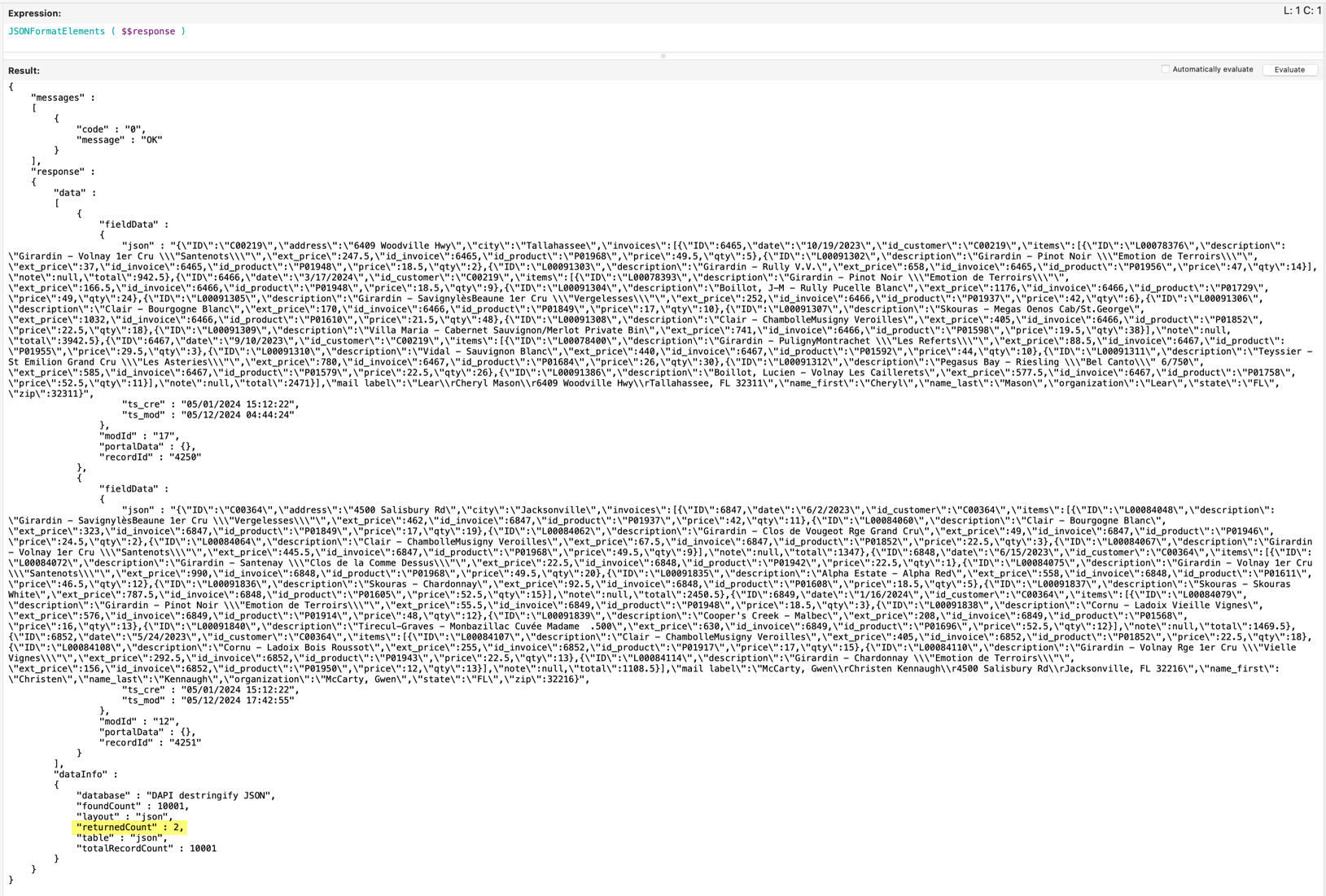
APIs that return data as JSON are sometimes unable to recognize JSON as input, and will pass it as text rather than as an object or array. For example, both of today’s demo files include a text field containing a JSON object (the field name is “json”), and if we retrieve records via the Data API, or via the Execute FileMaker Data API script step, the “json” field data will come back stringified (i.e., as quoted text) as per this close-up detail…

…with the full response for two records looking like this.
The Goals
Return the “json” field from a set of records via the Data API as an array of destringified objects…

…and do so in as performant a manner as possible.
The Demo Files
We have two files today, one containing 500 records and the other containing 10K records. In each file there are several “destringify” scripts, e.g.,

To keep things simple, all the examples use the Execute FileMaker Data API script step to populate a $response variable…

…which in FM 22+ returns parsed JSON (so no need to apply JSONParse).
Each script applies a transformation to the $response variable to produce the desired array of either 500 or 10K destringified objects, which will be loaded into a $$var that can be viewed via the Data Viewer, and an additional $$var will be populated showing time to execute in milliseconds.
With minor variations, all the scripted examples follow this general template.

Results are based on tests conducted locally in FM 22 on a Mac Mini M4 with 24 GB RAM, and timings are calculated before formatting is applied.
Demo 1: 500 records
DAPI – While Destringify
[If you need a refresher on the While function, see SetRecursion and While and/or While, part 2.]
The basic idea: iterate through the the DAPI response, grab each object with JSONGetElement and build up the array object by object via JSONSetElement.

This strikes me as the “obvious” way to solve the problem, and the good news is that JSONGetElement is lightning quick and will automatically transform a stringified object into a proper JSON object.
[Note: “obvious” for FM 22+ that is… for FM 21 and earlier you might want to take a look at JSON Optimization in FM 21.]
The “bad” news is that this is the slowest method we’re going to see today, taking about 2/3 of a second to destringify 500 JSON objects. Even in FM 22, with its much faster JSON engine, using JSONSetElement to construct the array is a performance bottleneck, though the execution time will likely be acceptable when response payloads are relatively small, as they are here.

DAPI – JSONQuery Destringify
The basic idea: use JSONQuery to assemble a list of stringified objects from the DAPI response…

…and then use JSONMakeArray to transform that list into a proper array of objects.

This is significantly faster than the previous approach, but still turns out to be one of the slower methods…

…though on the bright side, it performs almost as well in FM 21 as in FM 22.

DAPI – While Destringify Variation 1
This variation is courtesy of Steve Senft-Herrera, and as per the previous While example, the idea is to iterate through the the DAPI response, and grab each object with JSONGetElement. This time though we manually construct the array as per the highlighted portions shown here.

Assembling the array of objects in this manner is a speedy alternative to using JSONSetElement — yes, even in FM 22 and beyond — and if you work much with JSON, this belongs in your bag of tricks.

Demo 2: 10,000 records

DAPI – While Destringify Variation 1 (revisited)
This is the same script we saw a moment ago, carried over from the 500 record demo, and is included in this file for comparison purposes.

Three seconds might not seem too bad to destringify 10K objects, but let’s see if we can do better.
DAPI – Summary List Destringify
In the JSONQuery example above we touched on the idea of pulling a list of stringified objects from the response…
…and transforming that list into a well-formed array of objects via JSONMakeArray. We’re going to revisit that idea here, but generate the list in a completely different manner.
1. in the source file, we define s_list_json as a summary list field

2. and place that field on a dedicated layout

3. in the script we modify the request we pass to Execute FileMaker Data API

4. so we retrieve just one record

5. but that record is really massive as it contains a list of 10K stringified objects

6. with a combined length of approximately 7 & 3/4 million characters

7. and we transform it like so

This seems like a lot of work — why go to all that trouble? Because it’s so darn fast, that’s why.

And, good news if you are still in 21, this approach is nearly as fast in FM 21 as in FM 22.

DAPI – Destringify Eval Variation 1
But… wouldn’t it be nice if we could achieve, or, better yet, improve on that level of performance w/o having to add a summary list field or a special layout? It turns out we can.
This approach comes courtesy of Steve Senft-Herrera, and the basic idea is to assemble calculation syntax in memory and then Evaluate that syntax.
Overview
1. generate a list of all the target index numbers

2. do some creative substitution to generate something like this pseudocode

3. which will be evaluated to produce this:

One of the more interesting things to come out of studying this approach is learning that, for this narrow use case at any rate — there is an “Evaluate” syntax length limit and it’s considerably larger that the standard 30K character calculation length limit.
As a rough guideline — and I’ve only tested in FM 22 — it appears that the expression length limit for Evaluate is ~150K characters for FM/Win and ~225K for FM/Mac, assuming standard Unicode characters. And even on a Mac that limit is too low to encompass the code necessary to process 10K objects.
So why bother with this approach if we can’t use it? Because it turns out we can use this approach to handle a payload of any size if we “chunk” it as per the next example.
DAPI – Destringify Eval Variation 2
The basic idea: determine an appropriate “chunk” size (number of objects to be processed), and generate the output iteratively via the While function.

With a chunk size of 5K, we iterate twice…

…and the performance is phenomenally fast.

DAPI – Destringify via Custom Function
Given that the heavy lifting in the preceding example takes place in a single script step, this approach is a natural candidate for a custom function.

In addition to doing what we would expect it to do, it also generates an informative little JSON object.

And, interestingly, it seems to consistently run 5 to 15 ms faster than the scripted version, despite the code being almost identical.
Conclusion
I owe a huge debt of gratitude to Josh Halpern and Steve Senft-Herrera. Thank you both for sharing your wisdom and mind-expanding demo files. And thank you to the folks at Angel City Data for educating me about the problem.
Hi Kevin,
I’ve just read this article for the second time, and would like to express how much I appreciate the way that you take an idea and follow it through an entire line of thought without stopping to settle for less — and in the end share it with the rest of us. Thank you so much.
Also interesting to note that the performance times on my machine (also Mac with FM22) are almost identical to what you posted.
Thanks Steve!