Level: Intermediate, Version: FM 16 or later

FM 22: Pseudo Indexing

Demo file: FM-22-Pseudo-Indexing.zip (works w/ FM 16 or later)

When I wrote about Sort Values and Unique Values back in 2017, I made passing reference to an article I’d written a couple years previously on the topic of “pseudo indexing“, i.e., displaying a list of unique values for a specific field for a found set, rather than for all records.

Actually, I wish things were that simple. Full disclosure: there was the original FM 13 demo/article. Then when FM 16 was released, I did a second demo/article, “FM 16 Pseudo Indexing”. Recently I discovered a flaw in the approach I used in the FM 16 article, so I am pulling that demo and article off line in favor of this one.

Today we’re going to dust off the old pseudo indexing demo, and update it to take advantage of various FileMaker functions and innovations that were not available back in 2015. Why bother? Here’s why: the new implementation…

  1. is simpler (has fewer moving parts)
  2. scales better
  3. is less brittle (prone to breakage if schema is renamed)
  4. enables you to bring new fields on board faster
  5. can sort the pseudo index in ascending or descending order

Continue reading “FM 22: Pseudo Indexing”

JSON, Level: Advanced, Version: FM 16 or later

Fast Summaries to JSON, part 2

This is a follow up to last week’s Fast Summaries to JSON and will assume the reader is familiar with that material.

Demo Files

After last week’s article appeared, a reader contacted me wondering whether the technique could be adapted to provide a more literal JSON representation of what was visible on-screen. The answer turns out to be yes, with a bit of additional work…

Continue reading “Fast Summaries to JSON, part 2”

JSON, Level: Advanced, Version: FM 16 or later

Fast Summaries to JSON

The other day some colleagues were discussing a need to produce a JSON representation of the data in a summary report. Long time readers of this blog will know that I am obsessed with fond of the Fast Summary technique, and it seemed like it might be a good fit for this challenge, so I built some demos to find out if that would be the case.

Demos 1 and 4 will work with FM 16 or later. Demos 2 & 3 utilize recently-added JSON features, so require FM 21 or later.

Continue reading “Fast Summaries to JSON”

JSON, Level: Advanced, Level: Intermediate, Version: FM 16 or later

FastRange Custom Function

Recently I needed to produce a large range of consecutive numbers. FileMaker doesn’t provide a built-in function for this but it’s easy enough to accomplish, for example, using the While function or a recursive custom function. In this case, I decided to go a different route based on a tip I’d seen someone post years ago (I’ve forgotten whom so cannot give proper credit) that you can leverage a couple of FileMaker’s JSON functions to facilitate this task, with the advantages being blazingly fast performance and an opportunity to think outside the box.

Demo file:  fastrange-cf-v1.04.zip
Continue reading “FastRange Custom Function”

JSON, Level: Advanced, Version: FM 16 or later

Connecting Portals to JSON Arrays

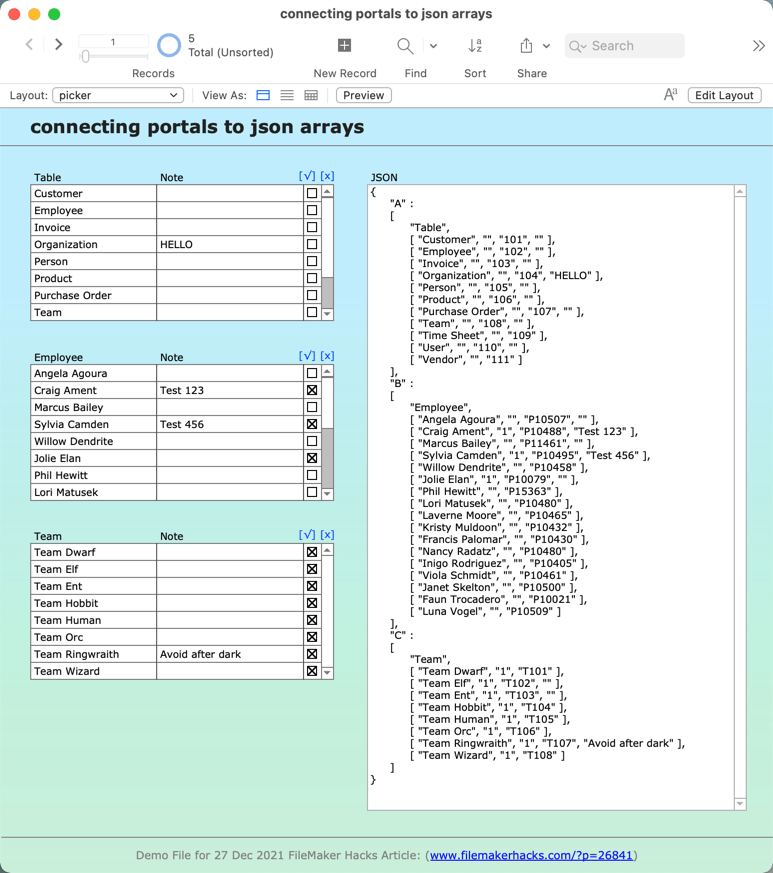
Have you ever wished you could connect a portal to a JSON array? Portals and JSON arrays seem like they should be a natural fit, but FileMaker doesn’t offer us an obvious way to connect one to the other.

(Why would you want to do this? One use case would be to provide dynamic scrollable selection criteria for a report.)

At any rate, today we’re going to take a look at a little proof-of-concept I threw together to enable portals to display and edit data in JSON arrays. In a real-world implementation, the JSON would likely be sitting in a $$variable, which, among other things, would help make the technique multi-user friendly. Here, in the interest of simplicity, I’ve opted to store the JSON in a regular text field. A couple benefits of doing so:

  • You will see changes made in the portal immediately reflected in the JSON, and vice-versa.
  • As you navigate from record to record within the demo, the portals will reconfigure themselves to accommodate the corresponding JSON.

(Yes, it’s possible to accomplish the preceding with variables as well, but the aim here is to keep things simple).

Demo file: connecting-portals-to-json-arrays.zip

Continue reading “Connecting Portals to JSON Arrays”

Level: Advanced, Version: FM 16 or later

Set Variable By Name Re-Revisited

Demo files: set-var-by-name-v4 and set-var-by-name-md5

Background

This is a quick follow up to last December’s Set Variable By Name Revisited, and to avoid repetition will assume the reader is familiar with the material that was presented in that article. But to briefly recap:

1. FileMaker does not provide an obvious way to programatically name a variable.

Continue reading “Set Variable By Name Re-Revisited”

Level: Advanced, Version: FM 16 or later

Set Variable By Name Revisited

Update 19 Aug 2021: demo file has been superseded by the one available in Set Variable By Name Re-Revisited

INTRODUCTION

You’ve probably heard the old joke that goes…

Patient: Doc, it hurts when I do this.

Doctor: Don’t do that.

Perhaps you’re also familiar with the FileMaker equivalent?

Developer: It hurts when I try to assign certain variable names.

FileMaker: Don’t do that.

Continue reading “Set Variable By Name Revisited”

JSON, Level: Intermediate, Version: FM 16 or later

JSON Currency Exchange Rates

Update 27 Feb 2023: this article has been superseded by JSON Currency Exchange Rates revisited.

Update 11 Apr 2021: as per comments below, demo has been updated to use a new service: openrates.io.

Welcome back for another exciting round of JSON exploration. Last time we discussed a JSON-related bug fix in FM 19, as well as a free package tracking service that returns results in JSON format. Today we’re going to look at a free currency exchange rate service.

Demo file: json-exchange-rates-via-openrates.zip

2020-08-24_09-12-59 Continue reading “JSON Currency Exchange Rates”

Level: Any, Version: FM 16 or later

FilterValues, part 2

Sometimes it happens that the real value of a blog posting emerges in the comments section. Such was the case last time, when Paul Jansen posted an elegant little workaround to remedy a performance issue with the FilterValues function. Paul’s workaround is deserving of its own demo, and that’s what we’re going to look at today.

Demo file: filtering-values-v2.zip

2020-06-02_230953

Continue reading “FilterValues, part 2”