Level: Beginner, Version: FM 8 or later

Dialogical Opinions

The other day I wrote: “I never want a dialog to draw attention to itself: a simple title, clear wording, no jokes, no strange button names.” Today I’d like to share a few other opinions on the topic of FileMaker custom dialogs, and as usual, I consider these to be general guidelines, not holy writ.

1. Life is too short to waste time thinking up fancy titles for your dialogs. I use the word “Message” 99.99% of the time.
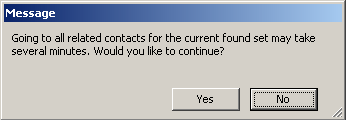
2. As a general rule, the “non-active” choice should be button #1. If your dialog asks, “This may take several minutes. Would you like to continue?” then button #1 should be No, and #2 should be Yes.
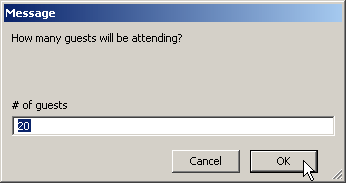
However, if it’s an input dialog, then the active choice will need to be button #1, because currently FileMaker only accepts input via that button. And bear in mind that on the PC (but not on the Mac) hitting the Esc key always chooses button #1. (I know, that doesn’t seem quite right, does it?)

3. Set Get(LastMessageChoice) into a $variable, that way a) you can comment it, b) you can save some wear and tear on the calc engine, and c) very occasionally you will have multi-dialog scenarios and want to know which button was clicked on a dialog prior to the most recent one (in that case, of course, you’d want to use different named $variables for each dialog).

In case it’s not clear, the comment following Get(LastMessageChoice) tells the developer what action is associated with each button. Normally you can’t see that information when working with a script, unless you open up the custom dialog settings.

In the above example, I used an “If/Else If” construction to test the $button variable because I was planning to add more steps to each branch. If I didn’t need to add any further steps, then I could do away with the “If/Else If” steps and replace them with a single Set Variable step:

Set Variable [ $layout id ; Choose ( $button - 1 ; 383 ; 217 ; 288 ) ]

(If you’re not familiar with the Choose function, you can read about it here.)

Level: Beginner, Version: FM 8 or later

Streamlining Scripts, part 1

I’m always mildly astonished when I see a script like the following — and this is the entire script by the way. It’s not that there’s anything horribly wrong with with it, but the architecture annoys me.

The thing I don’t like about the above script is that it is indented more than is actually necessary, negatively impacting readability. Continue reading “Streamlining Scripts, part 1”

Level: Intermediate, Version: FM 10 or later

Avoiding Brittleness

Update 28 April 2014: Make sure to read the illuminating comments following the article, with various suggestions to make your code even less brittle.

The other day I was working with an OnRecordCommit script trigger — let’s call it “Trigger Script” — and, not surprisingly, I wanted this script to run whenever a record in a certain table was committed. Except… well… not exactly always… you see, there was this one other script— let’s call it “Other Script” — which had a Commit Record step right smack in the middle, and in that particular circumstance I definitely did not want Trigger Script to execute.

Luckily, we can include a parameter when a script is triggered, so I added the highlighted script parameter to the OnRecordCommit trigger as follows:

…which evaluates as 0 (zero) when the current script is “Other Script”; otherwise it evaluates as 1. Continue reading “Avoiding Brittleness”

Level: Any, Version: FM 8 or later

Cartesian Join Experiment

Disclaimer: This one falls into the category of just because you can do something doesn’t mean you should. I do not recommend implementing this technique in a real-world solution, in case it should break in some future version of FileMaker.

One thing that bothers me about cartesian join relationships is that they’re implemented at the field level, when from a logical perspective they are actually table-to-table joins (their purpose is to give each table access to all rows in the other table). It seems like we ought to be able to link a table to another table directly, without bothering with fields at all, and it turns out we can… sort of.

7-13-2013 8-09-31 PMTo create a “table-to-table” cartesian join like the one at the left, start by defining a new field in each table… the field type doesn’t matter, because it’s going to have a very short lifespan. Continue reading “Cartesian Join Experiment”

Level: Beginner, Version: FM 8 or later

What’s Right with this Picture?

Note: As of FileMaker 13 this work around is no longer necessary.

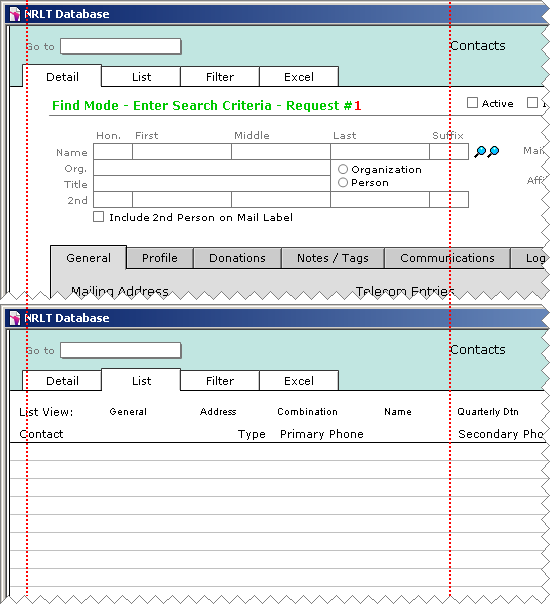
There’s something wrong with this picture. Actually, there’s something right that normally wouldn’t be — can you see what it is? (Hint: follow the dotted lines.)

Notice how everything lines up perfectly? Continue reading “What’s Right with this Picture?”

Level: Beginner, Version: FM 8 or later

Plural, Singular, Who Cares?

This morning I was doing some maintenance on an old solution when I ran into this ungrammatical dialog. “I’d like to give a piece of my mind to the lazy slob who wrote that”, I said to myself smugly, followed a few seconds later by, “Uh, whoops, the slob was me.” Normally, I’m pretty good about making sure my dialog text is correct with regard to plural or singular, but in this case I must’ve been feeling particularly lazy (or overly confident that users would never export only a single record).

Continue reading “Plural, Singular, Who Cares?”

Level: Any, Version: FM 8 or later

Portal Sorting, part 3

Today we’re going to look at a couple more approaches to dynamic sorting, from opposite ends of the complexity spectrum. The simple one, portal sorting, circa 2002, is something I built in the FM 5.5 era. It uses a “smoke and mirrors” approach to achieve its objective, and apart from converting to .fp7 format, and consolidating into a single file, I’ve left it as is.

Behind the scenes this file has eight relationships from the parent table to the child; all based on the same keys, but with different sort orders. Continue reading “Portal Sorting, part 3”

Level: Intermediate, Version: FM 10 or later

Portal Sorting, part 2

The other day we looked at static portal sorting, where the developer decides in advance how the portal will sort, and “hard codes” those settings into the portal. Sometimes, though, we want to provide users with an interface where they can dynamically sort a portal by clicking on column headings…

…and we’re going to look at a technique to accomplish this today. Continue reading “Portal Sorting, part 2”

Level: Beginner, Version: FM 8 or later

Portal Sorting, part 1

Experienced FileMaker developers will likely already be familiar with the following portal sorting trick, but I’ve worked with enough developers recently who aren’t (two, to be precise), that I figure it’s worth sharing here.

Problem: how do you sort a portal on a field that doesn’t live in the table the portal is based on? Take, for example, a simple sales database with this structure:

We want to view sales history for a particular product in a portal, like so: Continue reading “Portal Sorting, part 1”