Beverly Voth, Level: Any, Version: FM 16 or later

An In-Depth Look at “Export Field Contents”

Have you ever wanted to export a single field and maintain all the characters in that field? This article explores the possibility with XML Export and the use of a simple XSLT. But first we’ll explain the good, the bad and the ugly of some different standard ways to export TEXT out of FileMaker.

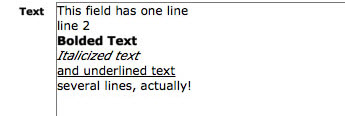
Using this sample text in one field (and one record) we will make different exports and review the results:

Continue reading “An In-Depth Look at “Export Field Contents””

Beverly Voth, ExecuteSQL, Level: Intermediate, Version: FM 12 or later

Aggregates (Summary Fields) in Filtered Portals

The question on one or more of the FileMaker forums was asked and answered. Q: How do you get the Count() of the related records in a filtered portal? A: (paraphrased) duplicate the filtered portal and make it one row in height. Place the related summary field, “Count of…”, in the single row filtered portal. Voila! your count is now filter-specific. (The instructions for creating the filter for a portal and summary field are below.)

This recent topic led me to consider what other aggregate fields could be used with the filtered portal. And what about that Go To Related Record script step? Does it only show the related FILTERED records or all related records? The demo (bvoth_aggregates_in_portals.fmp12) and article have been created to answer these questions.

I started using filtered portals in cross-tab reports shortly after they were introduced. These are generally ways to show something very specific in each portal with sorts and filters and usually one row only. I had not explored the use of aggregates in these cross-tab reports until now.

Kudos to those before me that may have discovered these answers and tricks, too.

Continue reading “Aggregates (Summary Fields) in Filtered Portals”

Level: Beginner, Version: FM 8 or later

Thinking About Value Lists, part 1

In July and August we explored several esoteric value list techniques. This time around, and over the next few postings, we’re going to step back from the cutting edge, identify some common value list challenges, and propose some solutions to those challenges. A few thoughts before we begin:

  1. Some of the material in this series will be beginner-level; some will be either intermediate or advanced, depending on your point of view
  2. Value lists are subtle and multifaceted; to get them to do what we want, we sometimes have to move beyond the obvious
  3. As often happens in FileMaker, there are many ways to skin the cat
  4. I plan to explore only a few of these ways
  5. But will do so in microscopic detail

Now on to our first demo (Thinking About Value Lists, part 1 demo 1), which contains a table of employees with office sizes. Here it is in layout mode…

Continue reading “Thinking About Value Lists, part 1”

Level: Intermediate

FileMaker Blogs

Recently a question came up on one of the lists asking about intermediate-to-advanced FileMaker blogs. Here are some I like to read (no doubt I’ve missed some good ones; I apologize for any inadvertent omissions).

Cimbura – http://cimbura.com/tech/blog

DB Services – http://www.dbservices.com/articles

FileMaker ’n’ the Web: Lessons Learned – http://blog.jsfmp.com

FileMaker Weetbicks – http://www.teamdf.com/weetbicks

FMDiff – http://fmdiff.com/fm

FM Forums Community Blog List – http://fmforums.com/forum/blogs

GeistInteractive – http://www.geistinteractive.com/blog

HomeBase Software – http://hbase.net

MightyData – http://www.mightydata.com/blog

New York FileMaker Pro Developers’ Group – http://nyfmp.org/blog

RobFM – http://www.sumware.net/robfm3

SavvyData – http://www.savvydata.com/blog

SeedCode – http://seedcodenext.wordpress.com

Six Fried Rice – http://sixfriedrice.com/wp/blog

Soliant Consulting – http://www.soliantconsulting.com/blog

Continue reading “FileMaker Blogs”