
This article is part of a series. See also…
• Thinking About JSON, part 1
• Thinking About JSON, part 2
• Thinking About JSON, part 3
Introduction
Welcome back to the fourth installment in this ongoing series. It’s hard to believe it’s been four years since the last segment, but in the meantime some exciting developments have occurred at the intersection of FileMaker and JSON, including…
- The Execute FileMaker Data API script step
- Steve Senft-Herrera’s amazing JSONQuery custom function
- Ability to handle problematical characters such as dots in key names
- The new-in-19.5 JSONGetElementType function
…and today we’re going to look at a custom function that can leverage JSONGetElementType to help make it easier for you to generate JSON.
Update 14 June 2025: I have belatedly moved this material into its own, properly titled, article: JSON.GetValueType
Problematical Characters In Key Names
As you may know, the issue with dots is they typically serve as path delimiters in JSON structures, but sometimes we encounter (or need to produce) JSON with dots within key names. For example, this:
{
   "name.first" : "Albert",
   "name.last" : "Schweitzer"
}
As opposed to this:
{
   "name" :
      {
         "first" : "Elvis",
         "last" : "Presley"
      }
}
You can find the official word from Claris on the subject here — https://help.claris.com/en/pro-help/content/json-functions.html.
In a nutshell, if you want to reference JSON objects with dots or other problematical characters in key names, rather than using standard notation, you need to escape the key names via “bracket notation” like so —
['key.name']
— in addition to the normal double quote wrapper that is always required for object names.
This holds true for both JSONSetElement and JSONGetElement, so let’s combine both the above examples into a single object, and push that object into a variable called $$jsonObject:
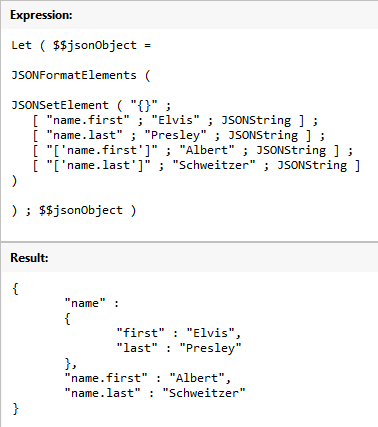
Now we can extract both first names by using JSONGetElement, first with standard notation, and then with bracket notation.

If bracket notation seems a bit complicated, don’t worry… once you’ve used it a few times it will make perfect sense. And if you happen to use it when you don’t need it, no harm done (assuming, of course, that you are bracketing a name and not a path)… for example, here with a $keyName that, hypothetically speaking, might or might not contain a dot, both of these statements produce identical JSON when $keyName does not contain a dot.

This next example is identical to the preceding, except now $keyName contains dots. Here we see the benefit of playing it safe and applying bracket notation to unknown or dynamically-generated key names.

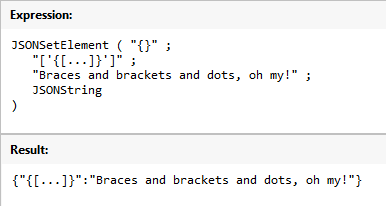
And of course dots aren’t the only problematical characters. I don’t have a complete list, but common sense would suggest that brackets and/or braces are going to be a problem in an object name, since they normally play a “meta” role. Here, for reasons unknown, we have been tasked with creating a JSON object with key names that look like array addresses.
And sure enough, brackets in key names cause confusion if we go the standard notation route…

But with bracket notation we can achieve not only the impossible…

…but the ridiculous as well.
Good CF, Kevin!
One small gotcha: to check the FM version in a cross-local environment, you need to replace the dot with the decimal separator used in the file’s locale:
If ( Substitute ( Get ( ApplicationVersion ) ; “.” ; Left ( 1/2 ; 1 ) ) * 10 < 195 ; "This CF requires application version 19.5 or later" ;
I would also suggest entering values, calculating and displaying results in the same file via a one-to-one relationship, replacing the dot with a comma in the other file:
Let (
input = TestCasesDot::InputValue ;
If ( Left ( JSONGetElement ( input ; "" ) ; 1 ) = "?" ;
Substitute ( input ; [ "." ; Char(1) ] ; [ "," ; "." ] ; [ Char(1) ; "," ] ) ;
input
))
Thank you Alex.
Hi Alex, just to clarify, your suggestions appear to apply to building a unified demo file that would work in any locale. Given that I intentionally built two different files, one for each locale, and configured them to always use the file’s stored settings, does your first suggestion still apply?
In the second file, all you need is a copy of the CF and one calculation field that gets its values through a one-to-one relationship (FK=PK) from the first file, replacing dots with commas. The first file will display the results from the second file via the same one-to-one relationship (PK=FK). This should make the testing process easier.
Hi Alex,
Thank you for clarifying.
Best wishes,
Kevin
Demo files have been upgraded to address the first “gotcha”. Thanks again Alex.