Level: Intermediate, Version: FM 10 or later

Unique Records Revisited, part 2

When you consider how easily most common reporting tasks are accomplished in FileMaker Pro, the lack of a built in, clear cut method to count unique values within a given found set seems a bit surprising. But where there’s a will, there’s a way, and in part 1 we looked at a method that required the found set be sorted. Well I have some good news: today’s demo (Count Unique – Three Variations, 6.4 Mb) has no sorting requirement.

Here we have a flat file (single table) of contact information. For any given found set, the primary key (ID) will of course be unique, but each of the other fields will potentially contain duplicates, and we want to be able to quickly count the unique values without having to first sort the found set.

The basic approach can be summarized in a few words: Continue reading “Unique Records Revisited, part 2”

Level: Intermediate, Version: FM 10 or later

Avoiding Brittleness

Update 28 April 2014: Make sure to read the illuminating comments following the article, with various suggestions to make your code even less brittle.

The other day I was working with an OnRecordCommit script trigger — let’s call it “Trigger Script” — and, not surprisingly, I wanted this script to run whenever a record in a certain table was committed. Except… well… not exactly always… you see, there was this one other script— let’s call it “Other Script” — which had a Commit Record step right smack in the middle, and in that particular circumstance I definitely did not want Trigger Script to execute.

Luckily, we can include a parameter when a script is triggered, so I added the highlighted script parameter to the OnRecordCommit trigger as follows:

…which evaluates as 0 (zero) when the current script is “Other Script”; otherwise it evaluates as 1. Continue reading “Avoiding Brittleness”

Level: Intermediate, Version: FM 10 or later

Portal Sorting, part 2

The other day we looked at static portal sorting, where the developer decides in advance how the portal will sort, and “hard codes” those settings into the portal. Sometimes, though, we want to provide users with an interface where they can dynamically sort a portal by clicking on column headings…

…and we’re going to look at a technique to accomplish this today. Continue reading “Portal Sorting, part 2”

Level: Intermediate, SQL, Version: FM 10 or later

Custom Functions for Internal SQL

Recently I’ve mentioned several custom functions that can make your life easier when working with FileMaker’s internal SQL engine (a.k.a. FQL). This article’s accompanying demo file, SQL Sandbox, includes some sample data, an interface for testing SQL code, a number of code examples, and the following four custom functions:

Q – wraps an expression in single quotes. I created this because I hate visually parsing single quotation marks. As I wrote last month,

...first I want digress for a moment to complain about discuss single quotes, a.k.a. apostrophes. They can be difficult to see when they appear adjacent to double quotes — I liken them to an annoying cloud of gnats — so to avoid confusion, I wrote a custom function which I call simply “Q”:

In a nutshell, this CF supplies the surrounding single quotation marks so we don’t have to type them or think about them, and ironically, the above image illustrates the problem perfectly. A single quote surrounded by double quotes is extremely difficult to parse visually. But once you’ve written the CF, you may never have to deal with this problem ever again (until you edit another developer’s SQL code at any rate).

Additionally, this CF escapes any internal single quotes or apostrophes by prepending another one… e.g., O'Malley becomes O''Malley (yes, this is a good thing if you don’t want SQL code to break… don’t worry: the extra apostrophe won’t show up in your data).

GFN – like GetFieldName(), but only returns the field name itself — essential if you want to protect your code from the hazards of field renaming. Note: since this CF uses the GetFieldName function, it requires FM 10 or later.

Guess which one breaks when someone decides to rename creditCardType to ccType, or idCustomer to idContact? On a related note, in addition to protecting you from ex post facto field renaming, GFN also prevents you from misspelling or entering non-existent field names in the first place.

Also, FQL has over 250 reserved words, including “date”, “action” and “group” — you can see the complete set of reserved words on pages 55–57 of the FileMaker 11 OBDC and JDBC Guide. If you’ve used a reserved word as a field name in your FM database, you normally have to remember to wrap that field name in double quotes… GFN does away with all that by automatically wrapping your field name in quotes for you. There’s no harm done if the field name isn’t a reserved word, and that way you don’t need to worry about it.

(I once wasted an hour debugging a SQL statement referencing a field named “group”, before realizing “group” was a reserved word. An hour of my life, gone forever. But it inspired me to add the quote wrapper to GFN, so something good came out of it.)

GFN’s protective quote wrapper will also deliver you from certain other evils, e.g., in FM 11 (with its newly-rewritten SQL parser), the necessity to escape field names if they begin with an underscore, e.g., “_pk_serial”.

DateToSQL – takes a date in a variety of input formats, and outputs it in this format: DATE '2011-02-28', which is apparently the only format that is acceptable to both the new (FM 11) SQL parser, and the SQL parser used in FM 10 and earlier versions.

The input formats are: US-style dates (MM/DD/YYYY), European-style dates (DD/MM/YYYY), and SQL-style dates (YYYY-MM-DD). For example, say you want to grab a list of foreign keys for all customers who have placed an order in the last 30 days…

Assuming today’s date is 26 March 2011, the final line will be rendered as DATE '2011-02-24' and the SQL gods will smile on you. It’s true, they will.

The preceding code examples have consisted of simple SELECT statements; here’s a more complex UPDATE statement, utilizing all three of the CFs we’ve looked at so far. The aim here is to update the tax rate on any unbilled or future-dated invoice line items, if the user changes the default sales tax rate in Settings (this is a single-user system, so I have the luxury of not having to worry about potential record locks by other users).

And finally, we come to a custom function I don’t actually need very often, but that sure comes in handy when I do…

FoundSetToSQL – the concept of a found set does not exist in SQL, but sometimes we need a SQL command to operate only on the records in our current found set. What to do? Well, it turns out that we can say, “Hey, SQL, only process records if the value in a certain field matches one of the values in this list: a,b,c,d,e,…”, and we can build that list from values in the current FileMaker found set. Take for example this found set of 14 records:
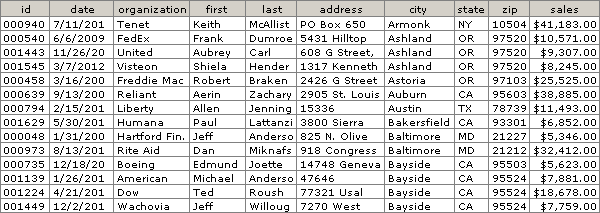
FoundSetToSQL ( customers::id ) will return the following…

'000940','000540','001443','001545','000458','000639',
'000794','001629','000048','000973','000735','001139',
'001224','001449'

…as one unbroken string of text. And this can be used by the SQL “IN” operator as part of a WHERE clause, as per this statement, which generates a list of unique cities in the found set.

Warning: FoundSetToSQL is a) not fast with large found sets, and b) subject to the standard 10,000 iteration recursion limit… you don’t want to point it at a found set with more than 10,000 records. There are various ways to work around these limitations, but that is a topic for another day (the second half of this article addresses ways to build a multiline key of values from the current found set).

In closing, I will risk stating the obvious: these custom functions are not the last word on the subject by any means (especially FoundSetToSQL). Feel free modify and extend them as you see fit, and as always, use at your own risk.

FoundSetToSQL ( customers::id )’000940′,’000540′,’001443′,’001545′,’000458′,’000639′,’000794′,’001629′,’000048′,’000973′,’000735′,’001139′,’001224′,’001449′
Level: Intermediate, Version: FM 10 or later

Filtered Relations, part 4

In parts 1, 2 and 3 of this series, we looked at various methods for dealing with a relational challenge (see the first two paragraphs of part 3 for a succinct description). My aim was to explore some outside-the-box ways to generate filtered totals while respecting the normalized data structure of the three tables.

However if WAN performance is a primary consideration, then denormalizing the data model by redundantly storing invoice dates in the Line Items table is worth considering. (You can follow along in this article’s demo file, filtered-relations-04, if you are so inclined.)

a) create a new relationship from Products to Line Items using the following predicates…

b) define a calculated field in Products to sum across this relationship.

Continue reading “Filtered Relations, part 4”

Level: Intermediate, Version: FM 10 or later

Filtered Relations, part 1

[I want to start out by expressing major thanks to Jason DeLooze, who graciously read an early draft of this article, and with some outside-the-box brainstorming (a specialty of his), transformed my sluggish approach into a blazing speed demon.]

Many of the relationships we define in FileMaker are predictable and mundane. A field in table A is linked to a field in table B via an equijoin (=) operator. We do it every day and we’ve done it countless times. Of course we often define more complex relationships as well: ones with multiple predicates and/or more esoteric operators than the venerable equijoin.

Even in this (FM 11) era of filtered portals, we solve many design and business logic problems relationally. However, once in a while a challenge crops up that seems like it should be solvable using the FileMaker relational model, but that frustrates our initial attempts to do so. For example, let’s look at three tables from a sales database:

On our Products list, we’d like to be able to set a date range in the header, and then see cumulative sales for each product during that period. Continue reading “Filtered Relations, part 1”

Level: Intermediate, Version: FM 10 or later, Virtual List

Exporting Data to iCal, Outlook, Google Calendar, etc.

Demo file: 2010-12-13-export to ical

The other day I needed to export some appointments from FileMaker to iCal. I’d never done this before, but I did a bit of reading on Wikipedia and elsewhere, and it turns out to be fairly straight forward. I don’t claim that what follows is in any way authoritative, just that it works… and not just with iCal, but with Outlook, Google Calendar and any other program that recognizes the iCalendar format.

Let’s start with a basic table of appointments, like this.

We’re going to create an “ics” file, which is a text file with three distinct elements. At the beginning of the file is the header, which looks like this:

BEGIN:VCALENDAR
VERSION:2.0
PRODID:-//FileMaker Pro//NONSGML yourSolutionNameHere//EN

Next we have one or more body entries that look like this:

BEGIN:VEVENT
SUMMARY:Marketing Meeting
UID:00188BD54F5D-63427112000-1000028
DTSTAMP:20101206T180000Z
DTSTART:20101206T180000Z
DTEND:20101206T193000Z
END:VEVENT

And at the very end of the file comes the footer, which looks like this:

END:VCALENDAR

Continue reading “Exporting Data to iCal, Outlook, Google Calendar, etc.”

General, Level: Intermediate, Version: FM 10 or later

Ranking Entries in a Summary Report

Demo file: 2010-11-21-count-unique.zip (requires FM 10 or later)

Yesterday we looked at a simple method to flag unique entries in a found set. This time, we’re going to look at an additional use for this technique, using the same data set and demo file as last time.

As you may recall, we have a simple table of sales data, and previously we produced a summary report sorted by salesperson, but reordered by total sales, so that the top performing salespeople appeared at the top of the report.

Continue reading “Ranking Entries in a Summary Report”

General, Level: Intermediate, Version: FM 10 or later

Identifying Unique Records

[Update 15 May 2011: see this posting for additional information about this technique.]

Demo file: 2010-11-21-count-unique.zip (requires FM 10 or later)

A question that comes up regularly on various FileMaker forums is some variation on “I have a table of sales data for my organization. For a given found set within that table, it’s easy to produce a report grouped by salesperson showing number of sales, total sales amount, etc…

…and at the bottom of the report, I can easily display grand totals for number of sales and total sales amount…


Continue reading “Identifying Unique Records”