ExecuteSQL, Level: Intermediate, SQL, Version: FM 12 or later

Outer Joins in FileMaker 12, part 3

I’ve said before, and no doubt will say again, that one of my favorite things about this blog is how much I learn from your feedback and the demo files you send me.

Recently I received a file from Otmar Kramnis of the Hochschule Luzern demonstrating the fastest SQL-based method I have yet seen to solve the challenge we looked at in part 1 and in part 2, and with a few minor modifications, this is the demo we’re going to focus on today:  Outer Join Demo 7

As you may recall, the aim is to show a week’s worth of daily sales totals for all employees whether they had any sales or not.

4-17-2013 8-39-48 AM

Or, to restate the problem in more generic terms: we need to show all values from table A, whether or not there are any matching values in table B. This is known as an “outer join”, or more precisely a “left outer join”, since we want to see all values in the “left” table (Employees), whether or not they have corresponding matches in the “right” table (Sales).

Continue reading “Outer Joins in FileMaker 12, part 3”

ExecuteSQL, Level: Advanced, SQL, Version: FM 12 or later

Radical Separation, part 1

Disclaimer: This article contains speculative and experimental techniques that are in the proof-of-concept stage. Use at your own risk and test thoroughly.

Earlier this month I had the honor and the privilege to do a presentation on the topic of Radical Separation at the PauseOnError un-conference in Portland, Oregon, which included a demo file resembling this one: virtual-calcs-part-1-v2

3-20-2013 2-54-43 PM

Before the conference I posted a pseudo-F.A.Q. which included the following…

  • Q. What’s your experience with the Separation Model?
    A. I’ve used it heavily over the last seven years, for a variety of vertical market applications, custom projects and, recently, on a vertical market FMGo app.
  • Continue reading “Radical Separation, part 1”
Level: Intermediate, Version: FM 8 or later, Video

Copying and Pasting Layout Schema

Has this ever happened to you? You have a number of identically named fields in two different tables…

2-23-2013 5-48-43 PM

…but when you copy one of those fields from a layout based on the first table…

2-23-2013 5-42-27 PM

… and paste it onto a layout based on the second one…

2-23-2013 5-45-14 PM

…the result is not what you might have wished for.

Continue reading “Copying and Pasting Layout Schema”

Level: Intermediate, Version: FM 8 or later

Fun with Factorials

g01A while back my youngest son, who is an avid Go player, asked me, “Is it true there are more possible Go games than there are atoms in the universe?”

go2“Absolutely,” I replied, “Let’s fire up FileMaker Pro and prove it.” (I wasn’t about to let a rare teachable moment slip by.) “If memory serves, the number of atoms in the universe is estimated be roughly 10^80. Since a Go board is 19 by 19, in theory there are 361 possible first moves (19^2), followed by 360 possible second moves for each of those 361 first moves, followed by 359 possible third moves for each of the 360 possible second moves, and so on. Therefore the total number of moves can be calculated as 361 x 360 x 359… x 1, or, more simply, 361! (i.e., 361 factorial).” Continue reading “Fun with Factorials”

Level: Intermediate, Version: FM 12 or later

Graph Management + Conditional Icons

Recently I received a dual-technique FileMaker 12 demo from Eden Morris. Here’s what he had to say about technique #1:

In the Relationships Graph I show the use of colored labels to indicate where record creation, cascade deletes, and sorted relationships are enabled. Looking at the graph it easily shows that I can create customers from a company table but that they don’t cascade delete, you can create invoices and invoice lines from a project and the invoices and their lines cascade delete, and that the invoice lines are sorted.

1-27-2013 11-50-00 PM

It’s an elegant way to display this info (but for some reason, it makes me crave jelly beans).

Continue reading “Graph Management + Conditional Icons”

Level: Intermediate

Privilege Set Reporting

Editor’s note: Today I’m pleased to present a guest article by Michael Rocharde, author of FileMaker & Me, an interactive multimedia book focusing on FileMaker Interface Design.

FileMaker has always been an incredible tool for generating reports and for many years, I used to have a report screen with banks of buttons to generate all of the individual reports. In the last few years however, I’ve added a global field, to the footer of each module data entry screen, with a pop-up menu, listing all of the different report options for the module in question. To that global field, I’ve added an onObjectModify script trigger which sets the name of the report as the parameter that generates the report they want. Simple, very effective and it has the added advantage of giving the user all the reports that are relevant to where they are at the time.

Recently I had a project where some of the reports that were required were restricted to the different privilege sets and I was looking for a quick (and easy) way to accomplish this. I started thinking about whether I could use a related value list to solve the problem and came up with, what I think is, an elegant and very simple solution.

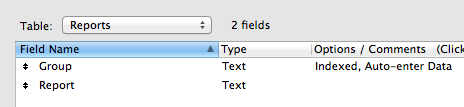
The first thing I did was create a Reports table with just two fields, Group (for the privilege set) and Report (for the name of the report itself).

Reports_table

Continue reading “Privilege Set Reporting”

General, Level: Any

Resolved: My Very Own Twitter Impersonator

UPDATE, 7 JAN 2013: THANK YOU FRIENDS AND COLLEAGUES EVERYWHERE. THIS PROBLEM HAS BEEN RESOLVED THANKS TO YOU. I AM NOW @FILEMAKERHACKS ON TWITTER. I CANNOT BEGIN TO EXPRESS MY GRATITUDE AND APPRECIATION.

Dear Friends, Colleagues and Fellow FileMaker Enthusiasts,

You know the old saying that imitation is the sincerest form of flattery? Well, I’m here to tell you that having experienced it first hand, I’m not feeling even remotely flattered. Pissed off? Yes. Violated? Yes. But not flattered, and not amused. Here’s the short version:

Me:

1-6-2013 3-36-38 PM

The Impostor:

1-6-2013 3-38-08 PM

Here’s a longer version: Last year a colleague wrote to ask why I wasn’t using my logo on my Twitter postings. Me: “I don’t do Twitter.” Him: “Sure you do, I’m one of your followers!”

Continue reading “Resolved: My Very Own Twitter Impersonator”

ExecuteSQL, Level: Advanced, SQL, Version: FM 12 or later

ExecuteSQL: Using IN with Faux Dynamic Variables

Editor’s note: Today we have a guest article written by John Weinshel, whose knowledge of SQL in general, and FileMaker+SQL in particular, runs deep. John’s contributions in various online forums are always worth reading, and it’s a privilege to present his thoughts on this topic here.

The new ExecuteSQL() function in Filemaker 12 does not work dynamically (with the question mark) as expected with the IN function (nor with BETWEEN). For example, we might expect the following statement to return all the ID’s for contacts whose first name is either John, Mary, or Renee:

ExecuteSQL (
"
SELECT c.PKContact
FROM Contacts c
WHERE c.fname IN ( ? )
";
""; ""; " 'John','Mary','Renee' "
)

…but it doesn’t. The following does work, but it’s not dynamic:

ExecuteSQL (
"
SELECT c.PKContact
FROM Contacts c
WHERE c.fname IN ( 'John','Mary','Renee' )
";
""; ""
)

Continue reading “ExecuteSQL: Using IN with Faux Dynamic Variables”

Level: Advanced, Version: FM 10 or later

Thinking About Value Lists, part 3

Welcome to the third installment in this series. We’ve been exploring various issues and behaviors in connection with 2-column value lists (VL’s), and today we’re going to look at, and propose a work around for, an issue with filtered value lists in Find mode.

All of today’s demo files feature a basic expense submission system, with each portal row representing a receipt that the submitter would like to be reimbursed for. Here it is in Browse mode:

And here’s the Relationships Graph:

Continue reading “Thinking About Value Lists, part 3”