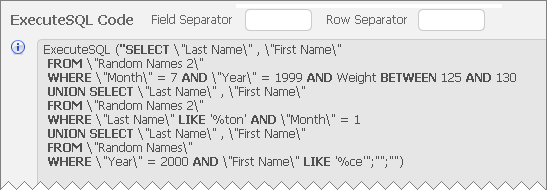
One of the fun things about a new FileMaker release is figuring out how new features work, including subtle behavioral nuances. Today’s demo file, FM12 ExecuteSQL Help Example from CW, is based on Corn Walker’s re-working of one of the demos from part 1, and helps demonstrate how ExecuteSQL fits in with the FileMaker security model.
FM 12 ExecuteSQL, part 1
FileMaker 12 offers many intriguing new features, including new windowing capabilities, significant charting and container field improvements, and a brand new design surface. But to my way of thinking, all of these pale in comparison to the exciting possibilities offered by the new ExecuteSQL function.
What’s so great about ExecuteSQL? In a nutshell, it allows us to natively (without a plug-in) perform queries against FileMaker tables using SQL (structured query language). This means that we can now write code to answer questions that previously required adding new table occurrences and special-purpose fields to serve as relational predicates.
Incidentally, if you’re curious about SQL in general, here are some good starting points:
And of course you’ll want to grab a copy of the FileMaker 12 ODBC/JDBC Guide, which offers tantalizing glimpses of what FileMaker is capable of SQL-wise under the hood. Much of the information in Chapter 7 is directly relevant to the ExecuteSQL function.
User-Friendly Excel Exports, part 5
27 Mar 2017: see User-Friendly Excel Exports, part 6 for an updated approach.
Well, we’ve reached what may well be the final posting in this extended series of articles. We’ve covered a lot of ground, and this article assumes familiarity with what has come before (in parts 1, 1.1, 2, 3 and 4).
Today we’re going to look at a couple “Virtual List” implementations of the User-Friendly Excel Export technique, which will, among other things, allow us to eliminate these calculated fields from the Contacts table…
…as well as the corresponding set of fields in Donations.
Bruce Robertson’s Virtual List technique has made a couple previous appearances on FileMaker Hacks…
…so I won’t rehash its merits in detail here, but if you aren’t familiar with it, I recommend you check out one or both of these earlier articles. Continue reading “User-Friendly Excel Exports, part 5”
User-Friendly Excel Exports, part 4
27 Mar 2017: see User-Friendly Excel Exports, part 6 for an updated approach.
Colleagues and family members are starting to express concern at my obsessive refusal to bring this series to a close. But we’re getting close. Really. In fact, today, we’re going to look at two cool tricks (and one work around) which are utilized in this article’s demo file, excel exports, part 4, but that could prove useful in a variety of other situations. They are:
- Dwindling Value Lists
- Using a variable rather than a hard-coded file reference as an import source
- Adapting the translation table technique to work with Anchor/Buoy (or any other multiple-table-occurrence-group design philosophy)
I’m just going to touch briefly on these today because they are fully deserving of their own topic, but the technique is ideally suited to the task at hand. We want the user to be able to flexibly pick “fields” (actually pseudo-fields, as per earlier articles in this series) to be exported, assigning them to columns A, B, C, etc.
Once a field has been assigned to a particular column, we really don’t need or want to see it in the list of choices any more, do we? Ideally the value list should “dwindle” (shrink) as items are chosen, to make things clearer for the user. (You will note that in the above screen shot, the items in columns A through E, having already been assigned, do not appear in the pop-up menu.)
User-Friendly Excel Exports, part 3
27 Mar 2017: see User-Friendly Excel Exports, part 6 for an updated approach.
So far in this series we’ve been looking at exporting data to Excel from a single table (Contacts). Today we’re going to extend the technique to encompass a second related table, Donations, and without too much trouble we can leverage existing work from earlier entries in this series (part 1, part 1.1 and part 2).
To avoid unnecessary repetition, this article assumes familiarity with the aforementioned predecessors, and you can follow along in today’s accompanying demo file, excel exports, part 3, if you are so inclined.
User-Friendly Excel Exports, part 2
27 Mar 2017: see User-Friendly Excel Exports, part 6 for an updated approach.
[Note: To avoid a huge amount of redundant repetition, this article assumes that you are familiar with part 1 and part 1.1 in this series.]
Today we’re going to take a look at streamlining the approach introduced in part 1 by reducing clutter on the Relationships Graph, going from this…
…to this, with no loss in functionality.
…and you can follow along in today’s demo file, excel exports, part 2, if you are so inclined. Continue reading “User-Friendly Excel Exports, part 2”
User-Friendly Excel Exports, part 1.1
Bruce Robertson emailed me off list with an improved version of my demo from part 1, excel exports, part 1.1, which I am sharing with his permission. The improvements are…
a) live preview fields showing the data to be exported.
b) an “Eval Error Tester” script to make sure the output code in the alias table is well-formed.
Thank you Bruce for making this available.
User-Friendly Excel Exports, part 1
27 Mar 2017: see User-Friendly Excel Exports, part 6 for an updated approach.
Many end users appreciate FileMaker’s ability to export a found set of records in Excel format — it’s fast, straight-forward and empowering. One request that I have received from clients multiple times over the years is: make the exported field names in the top row of the spreadsheet “human-friendly”…
For example, instead of this:
…perhaps they would rather see this:
Another request has been to allow data from multiple source fields to be combined into single export columns, as per columns A and C here:
And a third request has been to provide an interface so that users can pick and choose fields to export, including (where appropriate) related fields, without having to navigate the complexity of the native FileMaker export dialog. Continue reading “User-Friendly Excel Exports, part 1”
Google Route Mapping, part 2
Those of you who attended DevCon 2011 in San Diego may recall meeting Andries Heylen of BH&A, who cheerfully answered questions in the FileMaker Visionary Bar. Well, from the sow’s ear demo I posted in part 1, Andries has woven a silk purse (google-route-mapping-part-2), which I am sharing with his permission, and which uses Google “waypoints” to produce an optimized travel route.
Google Route Mapping, part 1
The other day someone asked a question on the FMP Experts list about plotting a driving route in Google Maps using FileMaker data.
Mark Rubenstein posted a simple solution, and my reactions were, in this order: “No way, it can’t possibly be this easy; I should build a demo (google-route-mapping) to find out; wow, it really works… hey, I wonder if he’d be okay with me posting this on FileMaker Hacks?” Continue reading “Google Route Mapping, part 1”