The recent release of FileMaker 20.2 introduces a feature that developers have long been asking for: the ability to define calculations at the layout level without resorting to workarounds (such as those we saw in Button Bar Segment Fun, part 1 and part 2.)
You can read the official word(s) from Claris here…
…and today I just want to share a few observations. First, in case you haven’t yet gotten your feet wet with layout calculations:
Make sure you’re using FileMaker Pro 20.2 or later
Go into layout mode
Choose “Layout Calculation…” from the Insert menu
The Specify Calculation dialog will appear
Enter the syntax for your calculation, e.g., "Hello " & Get ( UserName )
Click OK
You’ll see something like this in layout mode…
…and this in browse mode (if your user name happens to be Kevin).
Okay… let’s go back into layout mode for some experimentation. If you control-click on the layout calc block you can access the Specify Calculation dialog…
…but, if you prefer, you can also edit the layout calc directly on the layout.
Having first blogged about this back in 2020, I had hoped to be finished with this topic, not because it isn’t interesting (it is) or because getting comfortable working with APIs isn’t fun, educational, and potentially profitable (ditto), but because I didn’t really have much left to say on the subject. Unfortunately, for the third or fourth time now, the API my demo was based on stopped working after the service provider was purchased by another company with the aim of monetizing the formerly-free service. Continue reading “JSON Currency Exchange Rates, v3”→
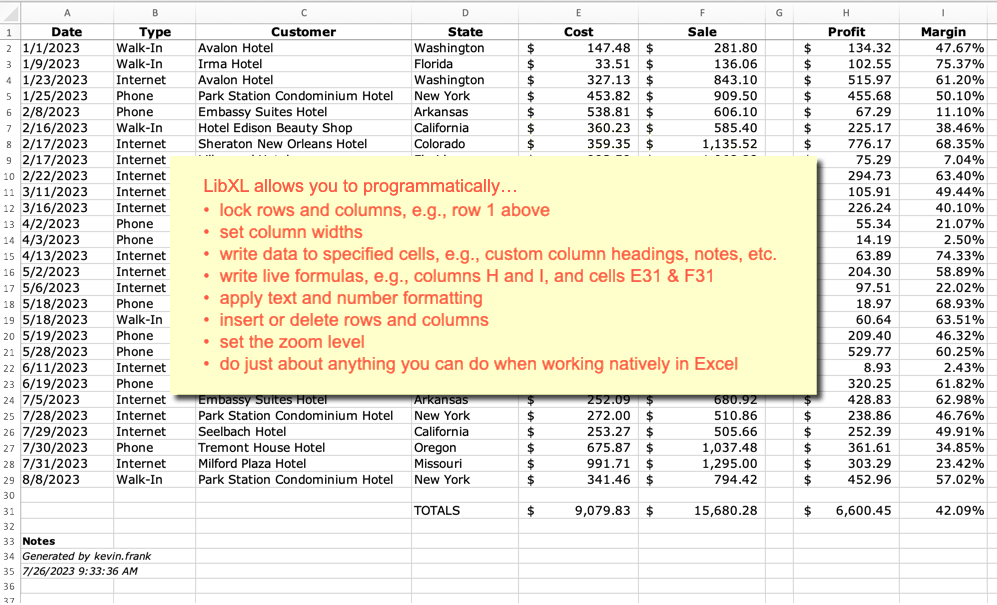
From time to time FileMaker developers are tasked with generating Excel spreadsheet output. There are a variety of ways to accomplish this, in some cases via native FileMaker commands (Export, Save/Send Records), and in other cases using various workaround methods — some of which have appeared on this site in years past.
Today we’re going to look at producing spreadsheet output via LibXL, with help from a plug-in. Why bother? Several benefits immediately come to mind, including… power and flexibility, ease of implementation, and not having to add helper fields, tables, etc., to your database schema. With a plug-in you will typically do all the work at the script level, and generate feature-rich spreadsheets that otherwise would be difficult or impossible to produce from within FileMaker.
This plug-in is required for the demo to function. If unregistered it will add a trial notice banner at the top of the spreadsheet.
Note: if you are a Monkeybread user, MBS also offers an add-on plug-in for LibXL. The function calls are similar in both, and if you’re so inclined today’s demo file can be adapted to work with the MBS version. See documentation here, which can be helpful when using the Goya plug-in as well.
Note: some of these CFs make use of JSONGetElementType so require FM 19.5 or later.
Disclaimer: use at your own risk, these CFs may contain bugs, these CFs may not be performant when processing large amounts of data, always test carefully before deployment, etc., etc., etc.
Editor’s Note: Today I’m pleased to present a guest article by Jon Rosen featuring a creative and performant approach to removing duplicate records.
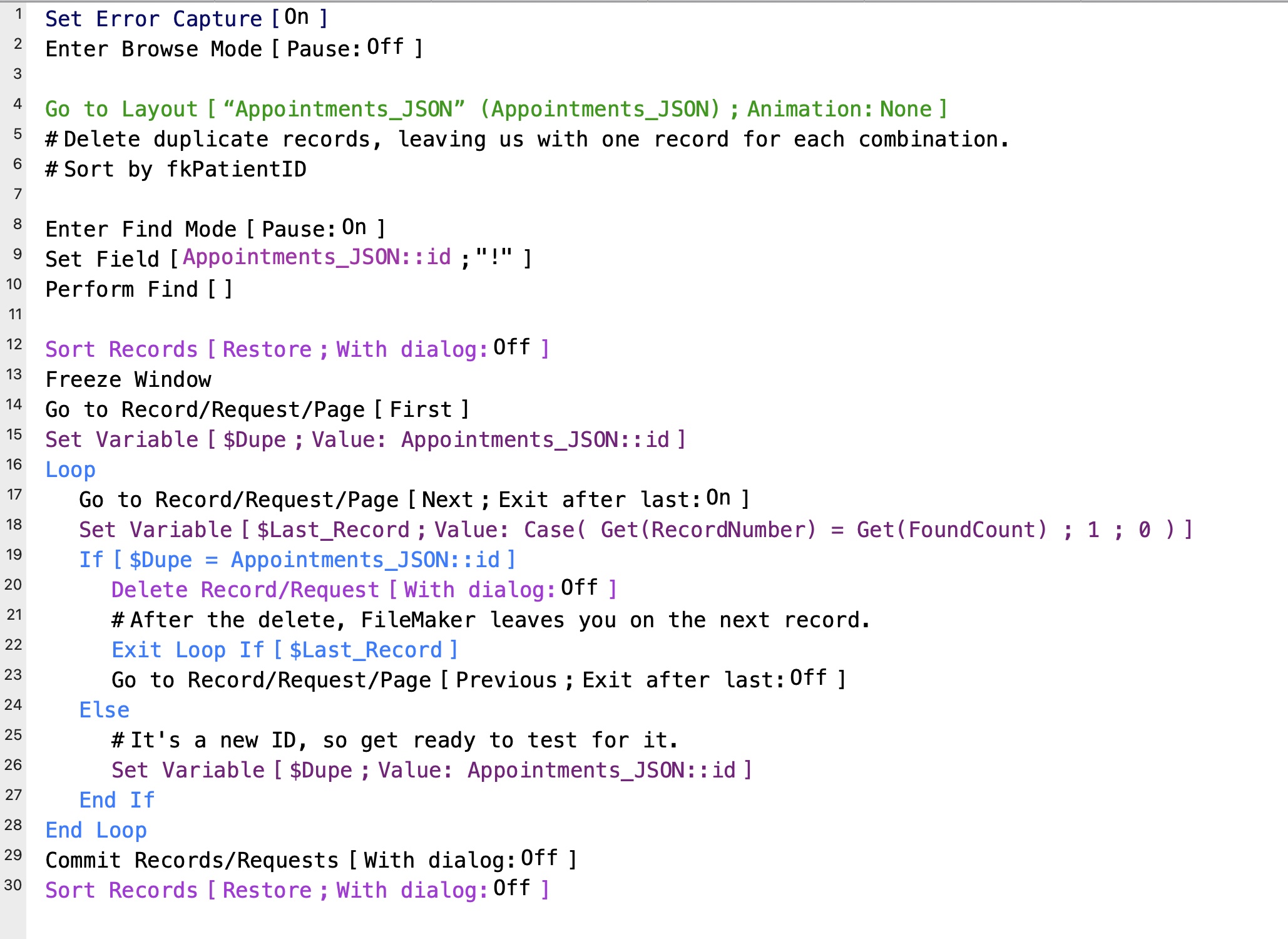
Recently, I had a situation where I had a found set of more than 500,000 records, but over ⅔ of them were duplicates. To remove the dupes, I initially went with the time-honored method I’ve been using for the last twenty years. I’ve been using it so long, that the original version used global fields because script variables hadn’t been created, yet. But now it seemed to run glacially slow on this large file.
After giving it some thought, I came up with a new method of deleting duplicates that turned out to be simpler and many times faster than the older method. So, let’s start with a review of the original method. There’s a good chance you may be using it yourself.
Update 30 September 2023: Free end point no longer available for this service. See JSON Currency Exchange Rates, v3 for a revised, functioning demo.
Introduction
This is a follow up to a behavior I mentioned last month where FileMaker’s JSON functions can transform a number into scientific notation when you might prefer to have that number remain in standard notation.
The overall functionality of the demo was covered last time. This time we’re going to focus on working around the behavior, followed by some related observations… but first let’s review. Continue reading “JSON – Force Standard Notation”→
Today we’re going to take a fresh look at pulling currency exchange rates into FileMaker, and this article is directly based on its predecessor. Why the re-visitation? Two reasons actually:
The “free” endpoints I relied on back in 2020 (and in 2021 when I revised the original demo) have been monetized, and apart from any cost considerations, I want this demo to work out of the box without requiring an API token.
The check box set I used for symbol selection last time was designed to accommodate a fixed and relatively small number of entries. That was a short-sighted decision that could not possibly scale gracefully. This time around I’m using an approach that will automatically accommodate any number of symbols.
About the author: Beverly Voth has been in the Claris FileMaker community many years. In addition to FileMaker Pro and its integrated products, she is a Full Stack Web developer & SQL database administrator. The only recipient of the FileMaker Excellence Award for Outstanding Contribution to the FileMaker Web Publishing Community (DevCon 2003), she’s been advocating Claris FileMaker and web since they could work together.
This article covers more Views, a little errata from past articles (Parts 1, 2, & 3), and where we go from here. This is the final article of the planned four. But if something really inspiring materializes, there may be followup article(s). Some famous “trilogies” (films and books, especially) have gotten additional content, so why not?
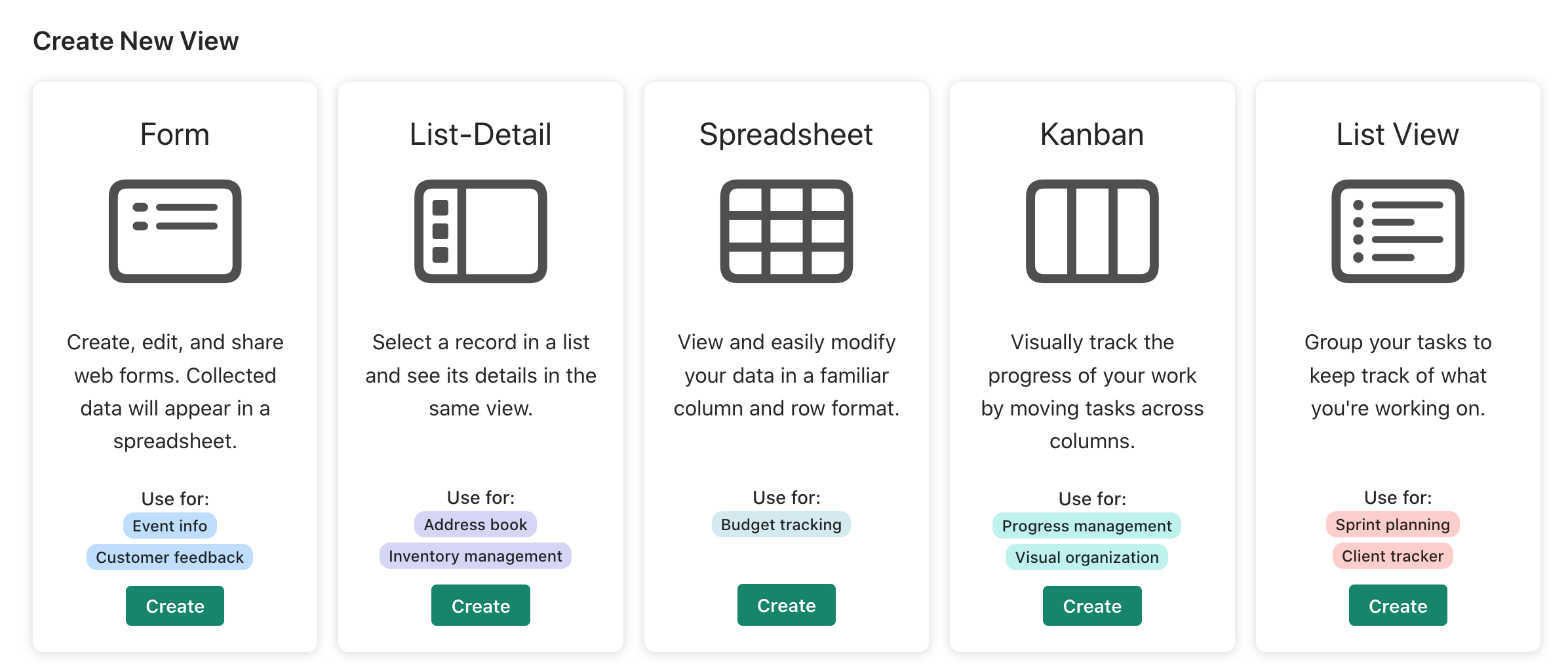
Welcome back! The Spreadsheet View and the Dashboard View are not the only features of Claris Studio. I chose them to discuss first because the Spreadsheet has more information about the tables and fields. That information may be helpful on all Views. But we have other Views: anonymous Form submission, a List-Detail View (suitable for searching, adding, editing), a Kanban View (just another way to present the data & edit it), and some new ones since the last article. Remember that Dashboards are created from the Spreadsheet View only, so they do not appear on this graphic:
Click on the Create New View button to see these options.
We can start with one of these views to create the “table” or we can start with existing data (from a Spreadsheet setup or migrated from Claris Pro). Let’s get started with a review of the Forms. Continue reading “Claris Studio (part 4): Forms the easy way!”→
Recently a client asked me to implement a virtual list reporting framework similar to the one I wrote about a few years ago in Virtual List Simplified. I added the framework to the client’s hosted file, and things went smoothly until I ran a report similar to the one shown below… and observed that the repeating summary field at the bottom wasn’t rendering. The same report worked flawlessly a) offline, and b) when hosted on FMS 19.4 and earlier, but when hosted via FMS 19.5 or 19.6, the summary repeater was malfunctioning.
About the author: Beverly Voth has been in the Claris FileMaker community many years. In addition to FileMaker Pro and its integrated products, she is a Full Stack Web developer & SQL database administrator. The only recipient of the FileMaker Excellence Award for Outstanding Contribution to the FileMaker Web Publishing Community (DevCon 2003), she’s been advocating Claris FileMaker and web since they could work together.
This is part three of a series on the new Claris platform. We introduced the overview, Claris Studio, Tell Me More! on 29 September 2022, and Claris Studio (part 2) – Integration with Claris Pro on 12 October 2022. This article gets into more details on the different types of views in Claris Studio. Since the spreadsheet view will likely be a most common usage for many, this article will be devoted to it. The spreadsheet view in Claris Studio has plenty of goodies & features, and can be used to create Dashboard views (charts and summary text).
A new spreadsheet view – with default fields, table name, & view name
Claris Studio, Spreadsheet View
Of all the views available in Claris Studio, the spreadsheet is a very flexible table for data entry & editing, sorting & grouping. These web-based data grids (tables) are more robust than FileMaker/Claris Pro table view, better than web viewer data tables (easier at least!), but probably not as full-featured as Excel or Numbers spreadsheets. There are no “cell” formulas or references as in some spreadsheets, but there is a way to present a grid of rows & columns for data entry, viewing, and reporting. Web-based data grids may use methods that allow drag-and-drop re-arrangement of rows and/or columns, as you will find in Claris Studio’s spreadsheet.
There are several JavaScript & CSS techniques & frameworks or libraries used for tables on the web. Many of them have been integrated into FileMaker Pro (and now Claris Pro) though Web Viewers.
But they all look like coding down and dirty. That’s great if that’s what you want to do. Would you like something easier? Would you like to send this data to the other Claris Studio view types, including dashboards (charting)? And would you like to share the data collected with Claris Pro? Let’s get started with the finer points of spreadsheets in Claris Studio! Continue reading “Claris Studio (part 3) – Spreadsheet: Details, please!”→