Level: Intermediate, Version: FM 13 or later

Summary List As Relational Predicate, part 2

Disclaimer: This article features an undocumented technique. As with all material on this site, use at your own risk and test thoroughly.

8 Feb 2015: Demo updated to include a “refresh window / flush cached join results” step before GTRRing across a summary list relationship

Last week we looked at a technique to allow a summary field to be used as a relational predicate, directly, i.e., without the need to use a “helper field” as a predicate. If you’re not comfortable employing an undocumented hack in your solutions, I encourage you to read on anyway, because what you’re about to see may still be worth doing, whether you use last week’s method, or the safer (but a bit slower) “helper field” approach as delineated here on FileMaker Hacks last year in Summary List Fields in FM 13, part 1.

We’ve established that a summary list field can be used as a relational predicate (either directly or indirectly); the aim of today’s article and demo file, FM-13-Summary-List-As-Predicate, is to offer a compelling reason to do so. Continue reading “Summary List As Relational Predicate, part 2”

Level: Intermediate, Version: FM 13 or later

Summary List As Relational Predicate, part 1

Disclaimer: This article features an undocumented technique. As with all material on this site, use at your own risk and test thoroughly.

One of my favorite features introduced in FM 13 is the summary list field type, which allows developers to easily access a list of field values for records in a found set.

1-31-2015 8-07-11 AM

The idea of using a summary list (indirectly, via a “helper field”) as a relational predicate is not new, and we explored it here on FileMaker Hacks last year:

Continue reading “Summary List As Relational Predicate, part 1”

Level: Intermediate, Version: FM 13 or later

What is happening when FileMaker Server becomes overloaded (and how to avoid it)

Editor’s Note: Today I am pleased and honored to present the first in what I hope will become a series of articles by guest author Nick Lightbody of Deskspace Systems Ltd.

Summary: we will describe, discuss and illustrate the statistics that enable you to understand the why and how of FileMaker Server performance and suggest means of delivering a predictable and acceptable performance to your users.

Why this is important

FileMaker Server 13 is a wonderful and very reliable product, provided (as with any product) you recognise, understand and work within its limits.

However, Server is a binary product, in the sense that it either performs “good” or it performs “bad” — very slowly, but very reliably — as it grinds through its backlog until its load has reduced sufficiently for it to catch up on its queued calls and return to “good” mode.

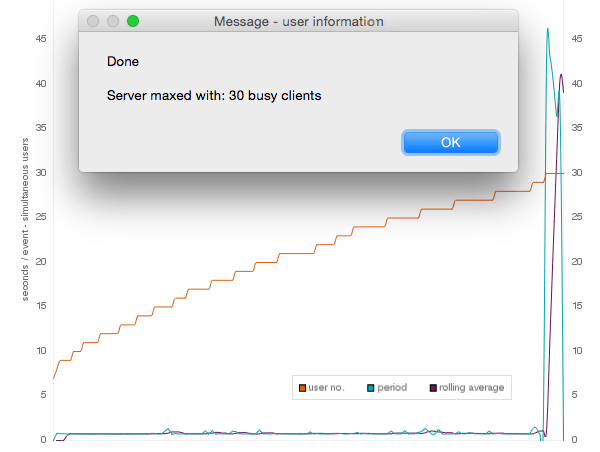
The Deskspace server performance test shown in fig 1 illustrates a common scenario as the number of users increases and suddenly performance declines – dramatically.

fig1 -
fig1 – user numbers increase until Server chokes – suddenly and dramatically – with little warning.

There really is very little middle ground, so when you look at the server statistics and watch the graph crawling along the floor — thinking that you are not really using its full capacity — you may in fact be deluding yourself, as we will illustrate. Continue reading “What is happening when FileMaker Server becomes overloaded (and how to avoid it)”

Level: Intermediate, Summary List, Version: FM 13 or later

FM 13: Anti-deduping, part 2

In part one, we explored various “anti-deduping” techniques. As you may recall, the challenge was to retain duplicates and omit unique entries from within an existing found set, as opposed to starting from all records… otherwise we could have just searched on ! (find all duplicates), but the ! operator does not play nicely with constrain, and cannot help us with this particular challenge.

Update 9 May 2015: it turns out that there is a way to reliably use contrain with the ! operator from within a found set — see Ralph Learmont’s technique + great demo + explanation here — Successfully Find Duplicate Values Within A Set Of Records

Also, last time, we were seeking to omit unique zip (postal) codes, which, in the example file, were always five digits long, i.e., of fixed length. Today our goal is to omit unique (a.k.a. “orphaned”) first names, and it turns out there are some additional challenges when the field in question is of variable length, which we will explore in today’s demo file: Anti-deduping, part 2.

10-11-2014 5-25-21 PM

Question: if we say we want to locate “all the Marias”, what do we really mean? Here are some possibilities… Continue reading “FM 13: Anti-deduping, part 2”

Level: Intermediate, Version: FM 13 or later

The XML Wrap and Unwrap technique

Editor’s Note: today we have a guest article with demo files by Italian developer Giuseppe Pupita, whose helpful and knowledgeable postings in various online forums are always worth reading. Here he presents a technique to move data between disconnected FileMaker systems.

11-16-2014 7-15-18 PM

It is becoming increasingly necessary to move easily and reliably data from one file to another, and I’ve been recently faced with a similar problem. Continue reading “The XML Wrap and Unwrap technique”

Level: Intermediate, Summary List, Version: FM 13 or later

FM 13: Anti-deduping, part 1

Recently there was a question about cleaning up a found set on one of the FileMaker discussion forums. When a question of this nature arises, it’s typically some variation on “How can I remove [or delete] duplicate entries?” But this was the opposite: For a given found set of customers, how can I omit those whose Zip codes only appear once in the found set?

In other words, keep the records whose Zips appear multiple times and banish the others.

Note that the challenge was starting from a subset of records. If the challenge had been for all records in the table, one could simply search on ! (find duplicate values) in the Zip code field. However, this trick won’t work when starting from a found set rather than all records. And constrain won’t help here because it doesn’t play nicely with the ! operator.

Update 9 May 2015: it turns out that there is a way to reliably use contrain with the ! operator from within a found set — see Ralph Learmont’s technique + great demo + explanation here — Successfully Find Duplicate Values Within A Set Of Records

Off the top of my head, I suggested…

Sort by Zip code, then loop through the found set from top to bottom… using GetNthRecord() test the current record’s Zip code against the previous record and also against the next record. If both tests are negative, omit, otherwise go to next record (and of course exit after last).

As it turned out, it was a one-time cleanup task, and my suggestion was good enough. But I had a nagging feeling there were better-performing ways to go about this, and today’s demo file,  Anti-deduping, part 1, presents four different methods. I encourage you to download it, experiment, and add your own methods or variations… perhaps you’ll come up with a faster approach, in which case, needless to say, I hope you’ll post a comment at the end of this article.

9-21-2014 2-36-38 PM

Continue reading “FM 13: Anti-deduping, part 1”

Level: Intermediate, Version: FM 13 or later

FM 13: Popovers in Portals

26 Aug 2014: fixed minor bug in “tab control in a portal” demo and updated article text.

The popover object in FileMaker 13 presents developers with a wealth of new design opportunities (a number of which were discussed in this article: FileMaker 13 Popovers). But if you’ve tried to use a popover inside a portal, you may have noticed that embedded portals, tab controls and slide controls within those popovers simply do not work as expected… or at all, for that matter.

Well, today we’re going to look at a simple work around, which was inspired by Ray Cologon’s brilliant Screen Popovers demo, and also utilizes David Thorp’s clever technique to enforce popover modality (i.e., prevent the user from dismissing the popover until certain conditions have been met)…

8-25-2014 4-53-35 AM

…with help from these three demo files: Continue reading “FM 13: Popovers in Portals”

Level: Intermediate, Version: FM 13 or later

Shaking the Dependency Tree

Editor’s Note: few names in the FileMaker community command as much respect and  admiration as that of today’s guest author, Darren Terry. This article is a distilled summary of Darren’s popular “Shaking the Dependency Tree” presentation, as seen at the PauseOnError unconference, the FileMaker Developers’ Conference, and FMPUG user group meetings.

8-7-2014 9-27-05 PM

Demo file: Shaking The Dependency Tree.zip 

INTRODUCTION

FileMaker Pro has a very powerful calculation engine built into it. The calculation engine is exposed to us in a number of ways: calculation fields, script steps, conditional formatting, filtered portals, web viewers, chart objects, etc. But it can be a challenge to determine precisely when various kinds of calculations will refresh, and what causes them to refresh. Continue reading “Shaking the Dependency Tree”

Chart, Level: Advanced, Version: FM 13 or later, Virtual List

FM 13: Virtual List Charts, part 2

Picking up where we left off in part 1, today we’re going to take a look at examples 2 through 6 in the Virtual List Charts demo file (the demo has been updated since part 1, so I recommend downloading a fresh copy).

5-16-2014 4-08-08 PM

We covered example 1 and most of the general concepts last time, so today we’re mainly going to touch on specific points of interest, but to briefly recap… Continue reading “FM 13: Virtual List Charts, part 2”

Chart, Level: Advanced, Version: FM 13 or later, Virtual List

FM 13: Virtual List Charts, part 1

4-20-2014 11-18-24 AMToday we’re going to look at applying the virtual list technique to FileMaker charting with the goal of producing a reusable chart “object”, or rather, a series of chart objects. We’ll need more than one because while certain attributes (e.g., chart title) can be set programmatically, others, including type (e.g., column or line), must be hard-coded into the chart object.

We’ve already explored Bruce Robertson’s virtual list on this site a number of times, but briefly, you create a utility table in your solution to facilitate non-standard viewing, reporting, etc., and pre-populate it with “more records than you’ll ever need”. The records in this table will derive their data “virtually”, by parsing it from an array — typically one or more $$variables.

Well it turns out the technique can be applied to charting as well, and today we have a demo file, Virtual List Charts, that contains six examples: three for Web Visits…

4-20-2014 2-03-32 PM

Continue reading “FM 13: Virtual List Charts, part 1”