
Well, we’ve reached part 4 in this series that has been going on in fits and starts since September, and we have just one demo file today: Thinking About Value Lists, part 4

Well, we’ve reached part 4 in this series that has been going on in fits and starts since September, and we have just one demo file today: Thinking About Value Lists, part 4
Welcome to the third installment in this series. We’ve been exploring various issues and behaviors in connection with 2-column value lists (VL’s), and today we’re going to look at, and propose a work around for, an issue with filtered value lists in Find mode.
All of today’s demo files feature a basic expense submission system, with each portal row representing a receipt that the submitter would like to be reimbursed for. Here it is in Browse mode:

And here’s the Relationships Graph:

In part 1 we explored a particular type of value list: the field-based two-column variety, based on all values, and set to show values from the second column only…

…and today’s article assumes familiarity with that material. This time around we’re going to look at some challenges and issues that can arise when using filtered (a.k.a. “conditional”) field-based value lists, and propose some solutions to those challenges.
I don’t claim that any of the following is particularly original or brilliant, but I do a fair amount of team programming, and these issues come up over and over again.
Beverly Voth has produced a PDF version of The Missing SQL Reference with some additional material not available in her original posting from October 19th.

And the SQL4_fmdev2.fmp12 demo file has been updated with new queries.
Thank you Beverly for this major contribution to the FileMaker community.
There seem to be many questions about the usage of SQL (Structured Query Language) with the ExecuteSQL function in FileMaker 12. This tutorial attempts to explain some of the SQL terms, if you are new to writing SQL statements. Since there are already many examples of how to write the ExecuteSQL queries, links to these will be listed at the end of this article. If you don’t need to learn the terms, jump right to the Helpful Example Databases section, below. There you will find links to solutions that help you create and test your queries.
This is not a complete SQL guide, as other databases may use other syntax. This is not a complete FileMaker and SQL guide, as FileMaker may be an ODBC source and the SQL queries made against it may vary from the terms used by ExecuteSQL(). This is not a complete FileMaker and ESS guide using SQL calls (if using Import or Execute SQL script steps or ExecuteSQL() function or ESS). It may not have all the nuances needed for other data sources. This is the ExecuteSQL() function reference for which you’ve been waiting. The FileMaker 12 ODBC and JDBC Guide is helpful, but it has uses outside (and beyond) the ExecuteSQL() function. Any discrepancies between the reference and the function will be noted here, if possible.
Last week in part 1 we looked at four “outer join” reporting approaches. Two of them involved ExecuteSQL, and I ended that section with the plea: Of course it’s possible that you, dear reader, know some FileMaker SQL voodoo to speed things up, and would be willing to share? Well Dr. Osamu Noda of Japan was kind enough to not only respond, but has provided a pair of demos (Outer Join Demo 5 and Outer Join Demo 6) which are significantly faster and which I am sharing with his permission.

Both of the demos are based on my original files from last week, and as you may recall, the aim was to show a week’s worth of sales for all employees whether they had any sales or not.
Recently I had an on-screen reporting challenge, and decided to try several different approaches to see which would be fastest. The challenge: Starting with two tables, one containing 20 Employees, and one containing 2,000 Sales records for the current year…

…display daily sales totals per employee in a seven-day grid, like so:
Have you ever wanted to export a single field and maintain all the characters in that field? This article explores the possibility with XML Export and the use of a simple XSLT. But first we’ll explain the good, the bad and the ugly of some different standard ways to export TEXT out of FileMaker.
Using this sample text in one field (and one record) we will make different exports and review the results:
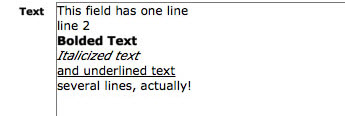
Continue reading “An In-Depth Look at “Export Field Contents””
The question on one or more of the FileMaker forums was asked and answered. Q: How do you get the Count() of the related records in a filtered portal? A: (paraphrased) duplicate the filtered portal and make it one row in height. Place the related summary field, “Count of…”, in the single row filtered portal. Voila! your count is now filter-specific. (The instructions for creating the filter for a portal and summary field are below.)
This recent topic led me to consider what other aggregate fields could be used with the filtered portal. And what about that Go To Related Record script step? Does it only show the related FILTERED records or all related records? The demo (bvoth_aggregates_in_portals.fmp12) and article have been created to answer these questions.
I started using filtered portals in cross-tab reports shortly after they were introduced. These are generally ways to show something very specific in each portal with sorts and filters and usually one row only. I had not explored the use of aggregates in these cross-tab reports until now.
Kudos to those before me that may have discovered these answers and tricks, too.
Continue reading “Aggregates (Summary Fields) in Filtered Portals”
In July and August we explored several esoteric value list techniques. This time around, and over the next few postings, we’re going to step back from the cutting edge, identify some common value list challenges, and propose some solutions to those challenges. A few thoughts before we begin:
Now on to our first demo (Thinking About Value Lists, part 1 demo 1), which contains a table of employees with office sizes. Here it is in layout mode…

