ExecuteSQL, Level: Intermediate, SQL, Version: FM 12 or later

FM 12 ExecuteSQL: Robust Coding, part 2

In part 1, I listed six scenarios that could potentially cause ExecuteSQL code to break:

…and managed to get through the first five before running out of steam. This time, we’re going to examine #6 on the list, and then look at a few miscellaneous odds ’n’ ends, and today’s demo file is ExecuteSQL Sandbox, v2, if you’d like to follow along.

Changing a Field Type

Why would changing a field’s type cause a problem? Well, first off, as I mentioned last month, if you are using that particular field as a predicate in a JOIN, the query will break, and your reward will be the the dreaded “?”.

I don’t have a fix for this, just some advice: Don’t change a field’s type if you’ve used it as a JOIN predicate in a working SQL statement. (The only reason I’ve needed to change a field type recently was to fix a broken JOIN where the field types were mismatched.)

Continue reading “FM 12 ExecuteSQL: Robust Coding, part 2”

ExecuteSQL, Level: Intermediate, SQL, Version: FM 12 or later

FM 12 ExecuteSQL: Robust Coding, part 1

[Note: Some of the material in this article, and in today’s demo file ExecuteSQL Sandbox, previously appeared in my March 2011 article, Custom Functions for Internal SQL.]

Demo file: ExecuteSQL-sandbox.zip

The other day a colleague remarked, “You know, it’s going to be interesting to see if you SQL guys are still so excited about ExecuteSQL when something gets renamed and your code breaks.” He had a good point: code is “brittle” if it works initially, but then subsequently breaks as a result of a seemingly innocuous action.

Here are some things that can cause ExecuteSQL code to break:

  1. Renaming a table occurrence (TO)
  2. Renaming a field
  3. Using a “reserved word” as a field or TO name
  4. Having a problematic character in a field or TO name
  5. Executing the code in a foreign country (!)
  6. Changing a field’s type (e.g., from text to number or vice versa)

…and today we’re going to look at some defensive measures we can employ to prevent problems when these things occur.

Using the “orders” table in the demo file

Continue reading “FM 12 ExecuteSQL: Robust Coding, part 1”

ExecuteSQL, Level: Intermediate, SQL, Version: FM 12 or later

FM 12 ExecuteSQL: Dynamic Parameters, pt 2

This is a quick follow-up to part 1, with a couple more observations about dynamic parameters.

Embedded Apostrophes

Here’s one I can’t believe I forgot to mention the other day:  A major ExecuteSQL headache that dynamic parameters can alleviate is the dreaded “embedded apostrophe” problem. In case you aren’t familiar with it, if your text string contains an embedded apostrophe, in standard SQL you must escape it by prepending another apostrophe, for example compare these two “standard” (non-dynamic) queries:

As you might expect, you don’t have to worry about this if you instead use a dynamic parameter… just quote the search term the way you would any FileMaker text string (i.e., in double quotes) and go about your business.

Continue reading “FM 12 ExecuteSQL: Dynamic Parameters, pt 2”

ExecuteSQL, Level: Intermediate, SQL, Version: FM 12 or later

FM 12 ExecuteSQL: Dynamic Parameters, pt 1

I have a confession: when I first read about dynamic parameters in the Help entry for ExecuteSQL, my initial reaction was, “Why do they have to make it so darn complicated?”

I have another confession: I am now singing a very different tune. I’ll get to the reason for this in a minute, but first let’s compare two ExecuteSQL statements, which were discussed last month in FM 12 ExecuteSQL, part 1.

Continue reading “FM 12 ExecuteSQL: Dynamic Parameters, pt 1”

ExecuteSQL, Level: Intermediate, SQL, Version: FM 12 or later

FM 12 ExecuteSQL: A Cool Tool

It’s been a fun week experimenting with the ExecuteSQL function, and also seeing what others are doing with it. In some cases the experience has been eye opening, and I strongly recommend that anyone interested in ExecuteSQL grab the SQL Builder file from Eden Morris, available on FMForums (registration required) at http://fmforums.com/forum/files/file/25-sql-builder/

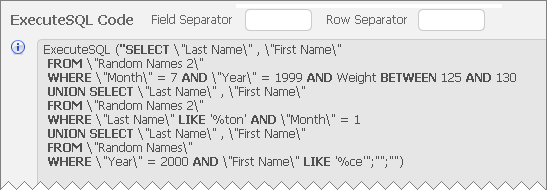
This attractive and powerful tool provides a point and click interface to build complex SQL queries, which are then rendered in FileMaker 12 ExecuteSQL syntax, e.g.,

The current version is 0.4, implying that updates may be forthcoming, so you might want to not only download the demo, but bookmark the above link as well. Very nicely done, Mr. Morris!

ExecuteSQL, Level: Intermediate, SQL, Version: FM 12 or later

FM 12 ExecuteSQL, part 2

One of the fun things about a new FileMaker release is figuring out how new features work, including subtle behavioral nuances. Today’s demo file, FM12 ExecuteSQL Help Example from CW, is based on Corn Walker’s re-working of one of the demos from part 1, and helps demonstrate how ExecuteSQL fits in with the FileMaker security model.

Continue reading “FM 12 ExecuteSQL, part 2”

ExecuteSQL, Level: Intermediate, SQL, Version: FM 12 or later

FM 12 ExecuteSQL, part 1

FileMaker 12 offers many intriguing new features, including new windowing capabilities, significant charting and container field improvements, and a brand new design surface. But to my way of thinking, all of these pale in comparison to the exciting possibilities offered by the new ExecuteSQL function.

What’s so great about ExecuteSQL? In a nutshell, it allows us to natively (without a plug-in) perform queries against FileMaker tables using SQL (structured query language). This means that we can now write code to answer questions that previously required adding new table occurrences and special-purpose fields to serve as relational predicates.

Incidentally, if you’re curious about SQL in general, here are some good starting points:

And of course you’ll want to grab a copy of the FileMaker 12 ODBC/JDBC Guide, which offers tantalizing glimpses of what FileMaker is capable of SQL-wise under the hood. Much of the information in Chapter 7 is directly relevant to the ExecuteSQL function.

Continue reading “FM 12 ExecuteSQL, part 1”

Level: Advanced, Version: FM 9 or later, Virtual List

User-Friendly Excel Exports, part 5

27 Mar 2017: see User-Friendly Excel Exports, part 6 for an updated approach.

Well, we’ve reached what may well be the final posting in this extended series of articles. We’ve covered a lot of ground, and this article assumes familiarity with what has come before (in parts 1, 1.1, 2, 3 and 4).

Today we’re going to look at a couple “Virtual List” implementations of the User-Friendly Excel Export technique, which will, among other things, allow us to eliminate these calculated fields from the Contacts table…

…as well as the corresponding set of fields in Donations.

Bruce Robertson’s Virtual List technique has made a couple previous appearances on FileMaker Hacks…

…so I won’t rehash its merits in detail here, but if you aren’t familiar with it, I recommend you check out one or both of these earlier articles. Continue reading “User-Friendly Excel Exports, part 5”

Level: Intermediate, Version: FM 9 or later

User-Friendly Excel Exports, part 4

27 Mar 2017: see User-Friendly Excel Exports, part 6 for an updated approach.

Colleagues and family members are starting to express concern at my obsessive refusal to bring this series to a close. But we’re getting close. Really. In fact, today, we’re going to look at two cool tricks (and one work around) which are utilized in this article’s demo file, excel exports, part 4, but that could prove useful in a variety of other situations. They are:

  1. Dwindling Value Lists
  2. Using a variable rather than a hard-coded file reference as an import source
  3. Adapting the translation table technique to work with Anchor/Buoy (or any other multiple-table-occurrence-group design philosophy)

Dwindling Value Lists

I’m just going to touch briefly on these today because they are fully deserving of their own topic, but the technique is ideally suited to the task at hand. We want the user to be able to flexibly pick “fields” (actually pseudo-fields, as per earlier articles in this series) to be exported, assigning them to columns A, B, C, etc.

Once a field has been assigned to a particular column, we really don’t need or want to see it in the list of choices any more, do we? Ideally the value list should “dwindle” (shrink) as items are chosen, to make things clearer for the user. (You will note that in the above screen shot, the items in columns A through E, having already been assigned, do not appear in the pop-up menu.)

Continue reading “User-Friendly Excel Exports, part 4”

Level: Intermediate, Version: FM 9 or later

User-Friendly Excel Exports, part 3

27 Mar 2017: see User-Friendly Excel Exports, part 6 for an updated approach.

So far in this series we’ve been looking at exporting data to Excel from a single table (Contacts). Today we’re going to extend the technique to encompass a second related table, Donations, and without too much trouble we can leverage existing work from earlier entries in this series (part 1, part 1.1 and part 2).

To avoid unnecessary repetition, this article assumes familiarity with the aforementioned predecessors, and you can follow along in today’s accompanying demo file, excel exports, part 3, if you are so inclined.

Continue reading “User-Friendly Excel Exports, part 3”