ExecuteSQL, Level: Intermediate, Version: FM 12 or later

Outer Joins in FileMaker 12, part 2

Last week in part 1 we looked at four “outer join” reporting approaches. Two of them involved ExecuteSQL, and I ended that section with the plea: Of course it’s possible that you, dear reader, know some FileMaker SQL voodoo to speed things up, and would be willing to share? Well Dr. Osamu Noda of Japan was kind enough to not only respond, but has provided a pair of demos (Outer Join Demo 5 and Outer Join Demo 6) which are significantly faster and which I am sharing with his permission.

Both of the demos are based on my original files from last week, and as you may recall, the aim was to show a week’s worth of sales for all employees whether they had any sales or not.

Continue reading “Outer Joins in FileMaker 12, part 2”

ExecuteSQL, Level: Intermediate, SQL, Version: FM 12 or later

Outer Joins in FileMaker 12, part 1

Recently I had an on-screen reporting challenge, and decided to try several different approaches to see which would be fastest. The challenge: Starting with two tables, one containing 20 Employees, and one containing 2,000 Sales records for the current year…

…display daily sales totals per employee in a seven-day grid, like so:

Continue reading “Outer Joins in FileMaker 12, part 1”

Beverly Voth, Level: Any, Version: FM 16 or later

An In-Depth Look at “Export Field Contents”

Have you ever wanted to export a single field and maintain all the characters in that field? This article explores the possibility with XML Export and the use of a simple XSLT. But first we’ll explain the good, the bad and the ugly of some different standard ways to export TEXT out of FileMaker.

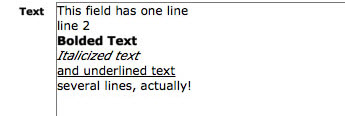
Using this sample text in one field (and one record) we will make different exports and review the results:

Continue reading “An In-Depth Look at “Export Field Contents””

Beverly Voth, ExecuteSQL, Level: Intermediate, Version: FM 12 or later

Aggregates (Summary Fields) in Filtered Portals

The question on one or more of the FileMaker forums was asked and answered. Q: How do you get the Count() of the related records in a filtered portal? A: (paraphrased) duplicate the filtered portal and make it one row in height. Place the related summary field, “Count of…”, in the single row filtered portal. Voila! your count is now filter-specific. (The instructions for creating the filter for a portal and summary field are below.)

This recent topic led me to consider what other aggregate fields could be used with the filtered portal. And what about that Go To Related Record script step? Does it only show the related FILTERED records or all related records? The demo (bvoth_aggregates_in_portals.fmp12) and article have been created to answer these questions.

I started using filtered portals in cross-tab reports shortly after they were introduced. These are generally ways to show something very specific in each portal with sorts and filters and usually one row only. I had not explored the use of aggregates in these cross-tab reports until now.

Kudos to those before me that may have discovered these answers and tricks, too.

Continue reading “Aggregates (Summary Fields) in Filtered Portals”

Level: Beginner, Version: FM 8 or later

Thinking About Value Lists, part 1

In July and August we explored several esoteric value list techniques. This time around, and over the next few postings, we’re going to step back from the cutting edge, identify some common value list challenges, and propose some solutions to those challenges. A few thoughts before we begin:

  1. Some of the material in this series will be beginner-level; some will be either intermediate or advanced, depending on your point of view
  2. Value lists are subtle and multifaceted; to get them to do what we want, we sometimes have to move beyond the obvious
  3. As often happens in FileMaker, there are many ways to skin the cat
  4. I plan to explore only a few of these ways
  5. But will do so in microscopic detail

Now on to our first demo (Thinking About Value Lists, part 1 demo 1), which contains a table of employees with office sizes. Here it is in layout mode…

Continue reading “Thinking About Value Lists, part 1”

Level: Intermediate

FileMaker Blogs

Recently a question came up on one of the lists asking about intermediate-to-advanced FileMaker blogs. Here are some I like to read (no doubt I’ve missed some good ones; I apologize for any inadvertent omissions).

Cimbura – http://cimbura.com/tech/blog

DB Services – http://www.dbservices.com/articles

FileMaker ’n’ the Web: Lessons Learned – http://blog.jsfmp.com

FileMaker Weetbicks – http://www.teamdf.com/weetbicks

FMDiff – http://fmdiff.com/fm

FM Forums Community Blog List – http://fmforums.com/forum/blogs

GeistInteractive – http://www.geistinteractive.com/blog

HomeBase Software – http://hbase.net

MightyData – http://www.mightydata.com/blog

New York FileMaker Pro Developers’ Group – http://nyfmp.org/blog

RobFM – http://www.sumware.net/robfm3

SavvyData – http://www.savvydata.com/blog

SeedCode – http://seedcodenext.wordpress.com

Six Fried Rice – http://sixfriedrice.com/wp/blog

Soliant Consulting – http://www.soliantconsulting.com/blog

Continue reading “FileMaker Blogs”

Beverly Voth, General, Level: Intermediate, Macintosh, Version: FM 8 or later, Windows

Fixed Width for EDI and Other Reporting

Editor’s note: Today it’s my pleasure to present a guest article written by Beverly Voth. Like many other developers, I have enjoyed and benefitted from her ongoing contributions to the FileMaker community.

I do a lot of text manipulation for EDI (Electronic data interchange – http://en.wikipedia.org/wiki/Electronic_data_interchange) and plain text exports with fixed-width field data. Some varieties of EDI use XML, but this article is about plain text. EDI may or may not use the fixed-width format. Fixed-width reports may or may not use delimiters and various “padding” characters.

I created two FileMaker custom functions to help me calculate fixed-width and EDI text for export, and if you wish, you can follow along in today’s demo file, Fixed Width EDI.

Continue reading “Fixed Width for EDI and Other Reporting”

ExecuteSQL, Level: Advanced, SQL, Version: FM 12 or later

More Fun with Value Lists, part 2

Update 20 Aug 2012: Dr. Noda has updated the demo files to include Rob Russell’s clever fill graphic trick (as per the responses following the article). Thank you Rob and Dr. Noda.

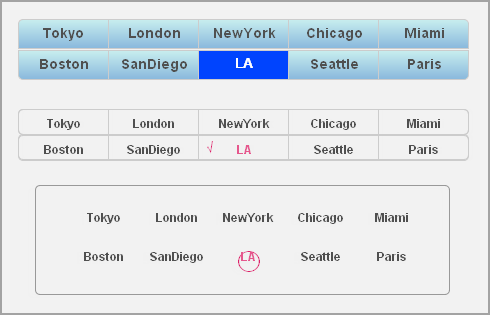
As promised last time, today we’re going to look at a technique from Dr. Osamu Noda, which uses FM 12’s ExecuteSQL to create what appears to be a value list when in fact there are no value lists defined at all.

This technique, like some of the others we’ve seen recently, is decidedly esoteric, but it shows some clever outside-the-box thinking, and I appreciate Dr. Noda taking the time to share the demo (ValueListWithoutDefinition-RR-Edition) and write up his notes. One of the things I particularly like about this technique is that it allows the order of the value list items to be customized, even though the values come from a table.

Continue reading “More Fun with Value Lists, part 2”

ExecuteSQL, Level: Advanced, Version: FM 12 or later

More Fun with Value Lists, part 1

One of the things I love about FileMaker is how many different ways there are to skin the proverbial cat. Following our recent look at “Magic Value Lists,” I received thought-provoking FileMaker 12 demos from John Ahn and Dr. Osamu Noda.

I’m going to save Dr. Noda’s files for next time, but today we have two variations on a demo which resulted from a discussion with Nick Chapin on FileMaker TechNet. Actually, the first variation is from John (lib_valueLists_john_ahn_mod), and the second is an alternate approach that I came up with. If you’re a TechNet member (registration is free), you can read the original discussion here. At any rate, the objectives were:

  1. Store the entries for all value lists in a single table (thereby allowing authorized users to construct and maintain value lists using name-value pairs, without having access to FileMaker’s “Manage Value Lists”)
  2. Use UUIDs
  3. Use popup menus
  4. Have the value lists work properly in Find mode
  5. Value lists should be “portable” (i.e., accessible from any table context)

Let’s start with John’s version.

This is the value list table:

Continue reading “More Fun with Value Lists, part 1”

ExecuteSQL, Level: Intermediate, SQL, Version: FM 12 or later

Magic Value Lists

Folks, we have a superb demo today (MagicValueList), which comes courtesy of Andries Heylen of BH&A

But first a bit of background. Prior to July 18, 2012, if anyone had told me you could base a value list on an unstored field, my response would have been something along the lines of…

  • What app are you using? (Because it sure as heck ain’t FileMaker.)
  • Why are you wasting my time with this nonsense?
  • Is today April Fool’s Day?
  • What are you smoking?

But then John Ahn showed this amazing Conditional Value List demo during the DevCon “Unconference” session devoted to ExecuteSQL (see previous posting), and to my way of thinking, the most intriguing part of session was only incidentally concerned with SQL, because John seemingly had achieved the impossible — a value list based on an unstored field.

Continue reading “Magic Value Lists”