Level: Intermediate, Version: FM 10 or later

Unique Records Revisited, part 2

When you consider how easily most common reporting tasks are accomplished in FileMaker Pro, the lack of a built in, clear cut method to count unique values within a given found set seems a bit surprising. But where there’s a will, there’s a way, and in part 1 we looked at a method that required the found set be sorted. Well I have some good news: today’s demo (Count Unique – Three Variations, 6.4 Mb) has no sorting requirement.

Here we have a flat file (single table) of contact information. For any given found set, the primary key (ID) will of course be unique, but each of the other fields will potentially contain duplicates, and we want to be able to quickly count the unique values without having to first sort the found set.

The basic approach can be summarized in a few words: Continue reading “Unique Records Revisited, part 2” →

Level: Beginner, Version: FM 8 or later

Unique Records Revisited, part 1

A while back I posted a technique to identify and count unique records. I recently discovered that while the technique is 100% reliable in terms of identifying unique records, under certain circumstances it will fail to count them correctly, due to what I believe is a bug in the way summary fields work. You can easily reproduce the bug by following the instructions in this demo file: broken summary field

Fortunately there are various ways to skin this particular cat, and today we’re going to look at one of them (demo file: broken summary field workaround).

The method for indentifying unique records hasn’t changed. Continue reading “Unique Records Revisited, part 1” →

Level: Intermediate, Version: FM 11 or later

Popup Pickers

Back in 2009, David Graham released a demo called Spotlight Filter that caused a minor revolution in the FM development world: a) it neatly solved a problem that many developers routinely face, and b) it was an early and convincing implementation of FileMaker script triggers.

The problem it solved was, “How can I provide my users with a lightning-quick, keyboard-driven popup-window to pick from a set of values, for example, to add a customer or a product to an invoice?” Continue reading “Popup Pickers” →

Level: Intermediate, Version: FM 8 or later

Space Is The Place: a conversation with Jason DeLooze

Recently I asked Jason DeLooze about something that was puzzling me. As usual I found his comments illuminating, and with his permission, am sharing them here.

KF: Why does the following evaluate as true (i.e., return a 1)?

GetAsNumber("") < 0

JDL: There actually is method in this madness. FileMaker numbers, dates, times, and timestamps have a duality nature. Remember that FMP stores these data types as text strings and interprets their value in the proper “space” when needed; that is, in their “text” form when the comparison operator is evaluated in “text space”; as a number value when the comparison operator is evaluated in “number space”, etc.

Continue reading “Space Is The Place: a conversation with Jason DeLooze” →

General

Combinations and Pascal’s Triangle, part 2

Yesterday we looked at counting all possible combinations of four modifier keys: Alt, Control, Shift and Window (abbreviated A,C,S,W). Today, we’re going to look at a related problem: how many different ways can we combine two of those four keys?

Of course, when your total “set size” is only four, it’s not that hard to identify them (AC, AS, AW, CS, CW, & SW) and then count them (6). But why go to all that trouble when a modified version of Pascal’s Triangle can not only do the work for you, but answer the question for any set size, and any number of choices within that set.

Let’s start with the original and slice off the sections in red:

03-corrected

This gives us a simplified triangle, which we can use to answer the question I posed above: Continue reading “Combinations and Pascal’s Triangle, part 2” →

Level: Any, Version: FM 8 or later

Combinations and Pascal’s Triangle, part 1

Recently I needed to calculate all the possible combinations for these modifier keys:

Alt, Control, Shift, Window (abbreviated as A,C,S,W)

…ranging from none of them to all four, and every combination in between. I didn’t want to miss any of them, so calculating the total number of possible combinations seemed like a good idea. (As you may have noticed, this was on a Windows computer, and no, I didn’t forget Caps Lock — it wasn’t relevant in this case.)

As it happens, there is a very simple formula, 2^x, where x represents the total number of objects, for counting all possible combinations (including none).

So, the answer was 2^4, or 16, as follows: A, AC, AS, AW, ACS, ACW, ASW, ACSW, C, CS, CW, CSW, S, SW, W and none. Continue reading “Combinations and Pascal’s Triangle, part 1” →

Level: Beginner, Version: FM 8 or later

Dialogical Opinions

The other day I wrote: “I never want a dialog to draw attention to itself: a simple title, clear wording, no jokes, no strange button names.” Today I’d like to share a few other opinions on the topic of FileMaker custom dialogs, and as usual, I consider these to be general guidelines, not holy writ.

1. Life is too short to waste time thinking up fancy titles for your dialogs. I use the word “Message” 99.99% of the time.

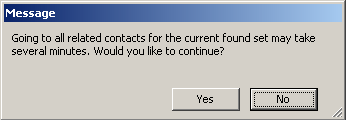
2. As a general rule, the “non-active” choice should be button #1. If your dialog asks, “This may take several minutes. Would you like to continue?” then button #1 should be No, and #2 should be Yes.

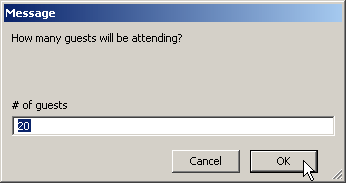
However, if it’s an input dialog, then the active choice will need to be button #1, because currently FileMaker only accepts input via that button. And bear in mind that on the PC (but not on the Mac) hitting the Esc key always chooses button #1. (I know, that doesn’t seem quite right, does it?)

3. Set Get(LastMessageChoice) into a $variable, that way a) you can comment it, b) you can save some wear and tear on the calc engine, and c) very occasionally you will have multi-dialog scenarios and want to know which button was clicked on a dialog prior to the most recent one (in that case, of course, you’d want to use different named $variables for each dialog).
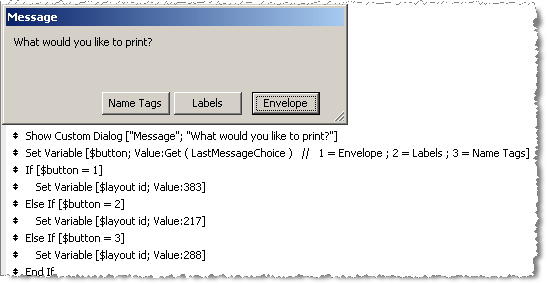
In case it’s not clear, the comment following Get(LastMessageChoice) tells the developer what action is associated with each button. Normally you can’t see that information when working with a script, unless you open up the custom dialog settings.

In the above example, I used an “If/Else If” construction to test the $button variable because I was planning to add more steps to each branch. If I didn’t need to add any further steps, then I could do away with the “If/Else If” steps and replace them with a single Set Variable step:

Set Variable [ $layout id ; Choose ( $button - 1 ; 383 ; 217 ; 288 ) ]

(If you’re not familiar with the Choose function, you can read about it here.)

Level: Beginner, Version: FM 8 or later

Streamlining Scripts, part 1

I’m always mildly astonished when I see a script like the following — and this is the entire script by the way. It’s not that there’s anything horribly wrong with with it, but the architecture annoys me.

The thing I don’t like about the above script is that it is indented more than is actually necessary, negatively impacting readability. Continue reading “Streamlining Scripts, part 1” →

Level: Intermediate, Version: FM 10 or later

Avoiding Brittleness

Update 28 April 2014: Make sure to read the illuminating comments following the article, with various suggestions to make your code even less brittle.

The other day I was working with an OnRecordCommit script trigger — let’s call it “Trigger Script” — and, not surprisingly, I wanted this script to run whenever a record in a certain table was committed. Except… well… not exactly always… you see, there was this one other script— let’s call it “Other Script” — which had a Commit Record step right smack in the middle, and in that particular circumstance I definitely did not want Trigger Script to execute.

Luckily, we can include a parameter when a script is triggered, so I added the highlighted script parameter to the OnRecordCommit trigger as follows:

…which evaluates as 0 (zero) when the current script is “Other Script”; otherwise it evaluates as 1. Continue reading “Avoiding Brittleness” →