Level: Intermediate, Version: FM 9 or later

User-Friendly Excel Exports, part 4

27 Mar 2017: see User-Friendly Excel Exports, part 6 for an updated approach.

Colleagues and family members are starting to express concern at my obsessive refusal to bring this series to a close. But we’re getting close. Really. In fact, today, we’re going to look at two cool tricks (and one work around) which are utilized in this article’s demo file, excel exports, part 4, but that could prove useful in a variety of other situations. They are:

  1. Dwindling Value Lists
  2. Using a variable rather than a hard-coded file reference as an import source
  3. Adapting the translation table technique to work with Anchor/Buoy (or any other multiple-table-occurrence-group design philosophy)

Dwindling Value Lists

I’m just going to touch briefly on these today because they are fully deserving of their own topic, but the technique is ideally suited to the task at hand. We want the user to be able to flexibly pick “fields” (actually pseudo-fields, as per earlier articles in this series) to be exported, assigning them to columns A, B, C, etc.

Once a field has been assigned to a particular column, we really don’t need or want to see it in the list of choices any more, do we? Ideally the value list should “dwindle” (shrink) as items are chosen, to make things clearer for the user. (You will note that in the above screen shot, the items in columns A through E, having already been assigned, do not appear in the pop-up menu.)

Continue reading “User-Friendly Excel Exports, part 4”

Level: Intermediate, Version: FM 9 or later

User-Friendly Excel Exports, part 3

27 Mar 2017: see User-Friendly Excel Exports, part 6 for an updated approach.

So far in this series we’ve been looking at exporting data to Excel from a single table (Contacts). Today we’re going to extend the technique to encompass a second related table, Donations, and without too much trouble we can leverage existing work from earlier entries in this series (part 1, part 1.1 and part 2).

To avoid unnecessary repetition, this article assumes familiarity with the aforementioned predecessors, and you can follow along in today’s accompanying demo file, excel exports, part 3, if you are so inclined.

Continue reading “User-Friendly Excel Exports, part 3”

Level: Intermediate, Version: FM 9 or later

User-Friendly Excel Exports, part 2

27 Mar 2017: see User-Friendly Excel Exports, part 6 for an updated approach.

[Note: To avoid a huge amount of redundant repetition, this article assumes that you are familiar with part 1 and part 1.1 in this series.]

Today we’re going to take a look at streamlining the approach introduced in part 1 by reducing clutter on the Relationships Graph, going from this…

…to this, with no loss in functionality.

…and you can follow along in today’s demo file, excel exports, part 2, if you are so inclined. Continue reading “User-Friendly Excel Exports, part 2”

Level: Intermediate, Version: FM 9 or later

User-Friendly Excel Exports, part 1.1

Bruce Robertson emailed me off list with an improved version of my demo from part 1, excel exports, part 1.1, which I am sharing with his permission. The improvements are…

a) live preview fields showing the data to be exported.

b) an “Eval Error Tester” script to make sure the output code in the alias table is well-formed.

Thank you Bruce for making this available.

Level: Intermediate, Version: FM 9 or later

User-Friendly Excel Exports, part 1

27 Mar 2017: see User-Friendly Excel Exports, part 6 for an updated approach.

Many end users appreciate FileMaker’s ability to export a found set of records in Excel format — it’s fast, straight-forward and empowering. One request that I have received from clients multiple times over the years is: make the exported field names in the top row of the spreadsheet “human-friendly”…

For example, instead of this:

…perhaps they would rather see this:

Another request has been to allow data from multiple source fields to be combined into single export columns, as per columns A and C here:

And a third request has been to provide an interface so that users can pick and choose fields to export, including (where appropriate) related fields, without having to navigate the complexity of the native FileMaker export dialog. Continue reading “User-Friendly Excel Exports, part 1”

Level: Intermediate

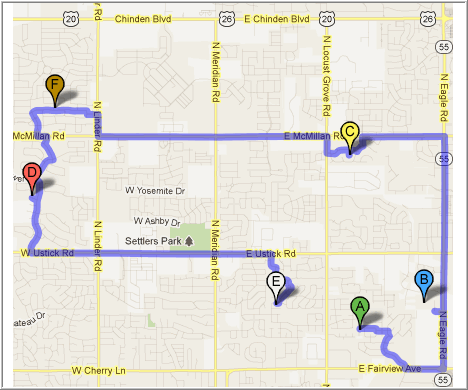
Google Route Mapping, part 2

Those of you who attended DevCon 2011 in San Diego may recall meeting Andries Heylen of BH&A, who cheerfully answered questions in the FileMaker Visionary Bar. Well, from the sow’s ear demo I posted in part 1, Andries has woven a silk purse (google-route-mapping-part-2), which I am sharing with his permission, and which uses Google “waypoints” to produce an optimized travel route.

Continue reading “Google Route Mapping, part 2”

Level: Beginner, Version: FM 8 or later

Google Route Mapping, part 1

The other day someone asked a question on the FMP Experts list about plotting a driving route in Google Maps using FileMaker data.

Mark Rubenstein posted a simple solution, and my reactions were, in this order: “No way, it can’t possibly be this easy; I should build a demo (google-route-mapping) to find out; wow, it really works… hey, I wonder if he’d be okay with me posting this on FileMaker Hacks?” Continue reading “Google Route Mapping, part 1”

Level: Intermediate

GetAsDate Head-Scratcher

Recently I was doing some FileMaker training with my older son; we were looking at the “DayOfWeek” function in the data viewer, and I showed him that…

DayOfWeek ( Date ( 1 ; 22 ; 2012 ) )

…returns a 1, since this particular date falls on a Sunday, and FileMaker considers Sunday to be the first day of the week. Then I said, “Of course I could instead express it like this…”

DayOfWeek ( GetAsDate ( "1/22/2012" ) )

…and was nonplussed when a ? was the result. Continue reading “GetAsDate Head-Scratcher”

Level: Intermediate, Version: FM 8 or later

Locating Matching Records, part 2

Note: FileMaker 12, released a few months after this article was written, introduced a “Find Matching Records” step, effectively eliminating the need for the techniques explored below (except for the section on case-sensitive searching).

Have you ever right-clicked into a field (or Ctrl-clicked if on a Mac) and chosen Find Matching Records? It works remarkably well, but oddly enough, there is no scripted equivalent for this command.

Of course if we do a Find Matching Records and then invoke Modify Last Find

…we can see what FileMaker is doing behind the scenes. Continue reading “Locating Matching Records, part 2”

Level: Beginner, Version: FM 8 or later

Locating Matching Records, part 1

Note: FileMaker 12, released a few months after this article was written, introduced a “Find Matching Records” step, effectively eliminating the need for the techniques explored below.

Sometimes a seemingly-simple FileMaker challenge turns out to be more nuanced and educational than first impressions might indicate. This happened recently when I was asked to help make a scripted search behave properly. Most of the time, the existing routine worked correctly, but on certain records it would fail.

The challenge: Click a button to find all records with the same Note text as the current record.

No problem — how hard could that be? Any competent FileMaker developer can do this in his or her sleep, right? Well sometimes properly defining the problem turns out to be half the battle. Later, after the smoke had cleared, I built a demo to explore various approaches one might take…

…and we’ll get to that in a minute, but right now let’s look at the original script and the problem, or rather, series of problems, as they initially unfolded. Continue reading “Locating Matching Records, part 1”