Level: Intermediate, Version: FM 9 or later

Conditional Invisibility, part 2

One of my favorite aspects of FileMaker Pro is reporting, and I appreciate it when a client poses a reporting challenge, because the phrase “we can’t do that” is not in my vocabulary (except when used as an example of a phrase not in my vocabulary). But recently I was given a reporting request that momentarily tempted me to utter those forbidden words.

Background: the client gives away prizes. Each prize falls into a “category”, and each category has one or more “types”.

The request: For a given date range, display and summarize prizes by category, and by type within that category, with each category starting on a fresh page… so far so good, right? The hierarchy is Prize Category → Prize Type, and FileMaker developers can crank out reports like that in their sleep.

But then came the twist: show different columns of information depending on category and type. And yes, the client wanted this all in a single report.

Continue reading “Conditional Invisibility, part 2”

Level: Beginner, Version: FM 9 or later

Conditional Invisibility, part 1

I mentioned this technique in passing a few months ago (Portal Sorting, part 2), but today I would like to examine it in greater detail. Have you ever had a text object or a field that you wanted to selectively change based on some logical condition? For example, say you have a check box, and want the label next to the check box to change depending on whether the box is checked or not, like so:

In the old (pre-FileMaker 9) days, you could have used auto-enter or calculated field trickery, but now, thanks to the modern miracle of Conditional Formatting, you can make this happen at the layout level, rather than having to pollute your table schema.

Continue reading “Conditional Invisibility, part 1”

Level: Intermediate, Version: FM 8 or later

Magic Key, part 2

I ended yesterday’s article promising a couple improvements on the techniques showcased therein. To avoid unnecessary repetition I am going to assume you have read it.

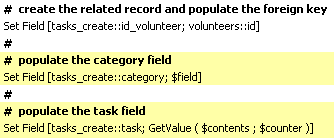
The first improvement is to eliminate the highlighted steps in the “parse current field” script. Is it really possible to create a related record and populate multiple fields in that record using a single Set Field step?

Absolutely, and you can follow along in today’s demo file, magic-key-multipredicate-check-box-reporting, if you are so inclined. Continue reading “Magic Key, part 2”

Level: Intermediate, Version: FM 8 or later

Magic Key, part 1

Today we’re going to look at a technique called Magic Key, which allows you to flexibly create and populate related records. I believe that the name originates with European developer Ugo Di Luca, and we’ll get to the details in a moment, but first let’s look at a scenario where it might come in handy. Have you ever built or inherited a system with data stored in text fields formatted as check box sets?

There are pros and cons to this approach, and one of the cons is that data stored in this manner can be a pain to report on. But I have good news: Magic Key can help alleviate that pain Continue reading “Magic Key, part 1”

Chart, Level: Intermediate, Version: FM 11 or later

Array Charting, part 3

[This article assumes that the reader is familiar with part 1 and part 2 of this series.]

The other day, I ended part 2 of this series by looking at the y-axes of a variable-array-based chart, and commenting, “Note that all 52 variables for each of the 12 data series are individually enumerated. I’m thinking that there is a smarter way to go about this, but that is code for another day.”

Well, now I’m thinking that “another day” has arrived.

Continue reading “Array Charting, part 3”

Chart, Level: Beginner, Version: FM 11 or later

A Charting Tip from the Old Advance Man

Here’s a tip I picked up from Steven Blackwell the other night on Friday Night FileMaker Chat. FileMaker 11 doesn’t provide an obvious way to prevent a user from interacting with a chart in browse mode (e.g., copying, clicking on, dragging, or mousing over to view tooltips).

Continue reading “A Charting Tip from the Old Advance Man”

Chart, Level: Advanced, Version: FM 11 or later

Array Charting, part 2

Last week we looked at building a FileMaker 11 native chart based on data that has been parsed into a field-based array.

2011-07-11-b

I happen to like field-based arrays, for reasons I’ll get to in a minute, but is a field-based array really necessary to generate the above chart? Continue reading “Array Charting, part 2”